How to remove FRP protection using FRP Bypass
You have a cellphone and you cannot unlock it. This usually happens when you find a device that no one claims or when your grandparents forget the password they set in the first place. Of course, the main problem here is that you can hardly do anything with the device blocked. As we will not be able to maneuver as much as we would like with the cellphone locked, in this process, it will be essential to have the support of a desktop or laptop computer. Any of these will help us to download the required application and transfer it to the device we want to unlock.
What you need to disable FRP protection from your cellphone
In summary, to overcome this situation, you will need four key elements:
- A computer
- A flash drive
- The FRP Bypass application
- An OTG adapter
If you do not know what the latter is, it is a cable that lets you connect a USB to your mobile device. We know it is not ideal to have to get an external physical tool, but given the situation, we assure you it will be worth it.
How to bypass the FPR lock from your Android
With all the requirements now clear, it is time to get down to business. First, download the app, then install it, and finally use the factory reset option so that FRP Bypass can do its job.
Download FRP Bypass to your PC
The first step is to download the FRP Bypass application. A safe way to do it is through the servers of Malavida, and you can do it by clicking on the following link.

Once you go to the link above, you will be taken to the app page, and from there, you will have to click on the green button.
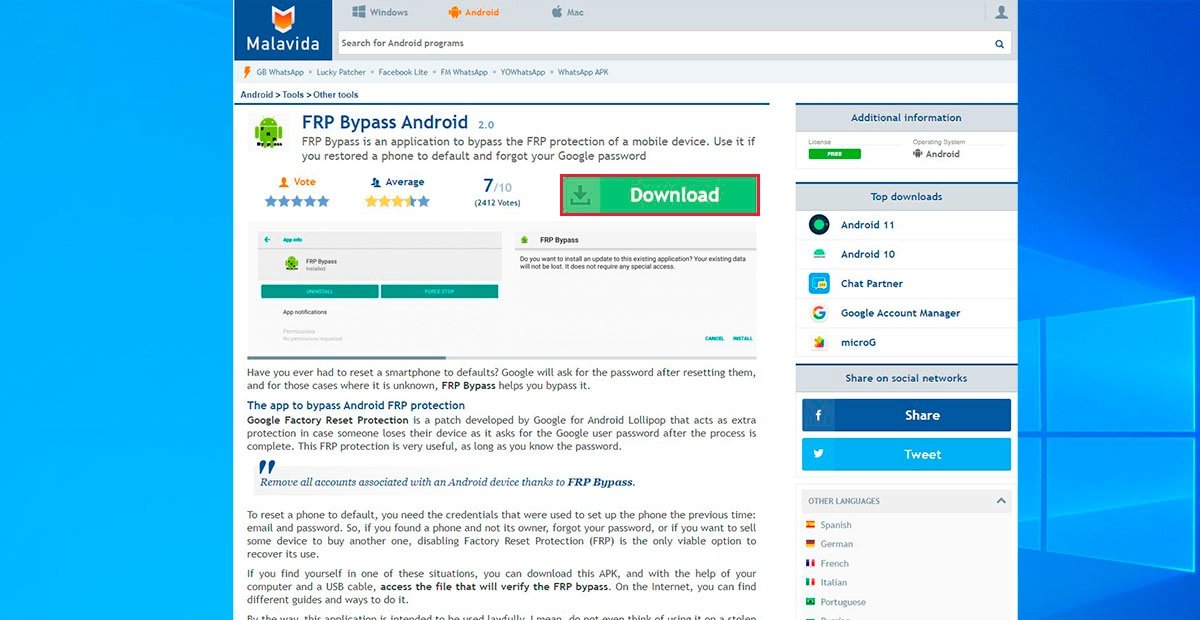
Download FRP Bypass
You will be redirected to a confirmation page, where again you must click on the green Download button.
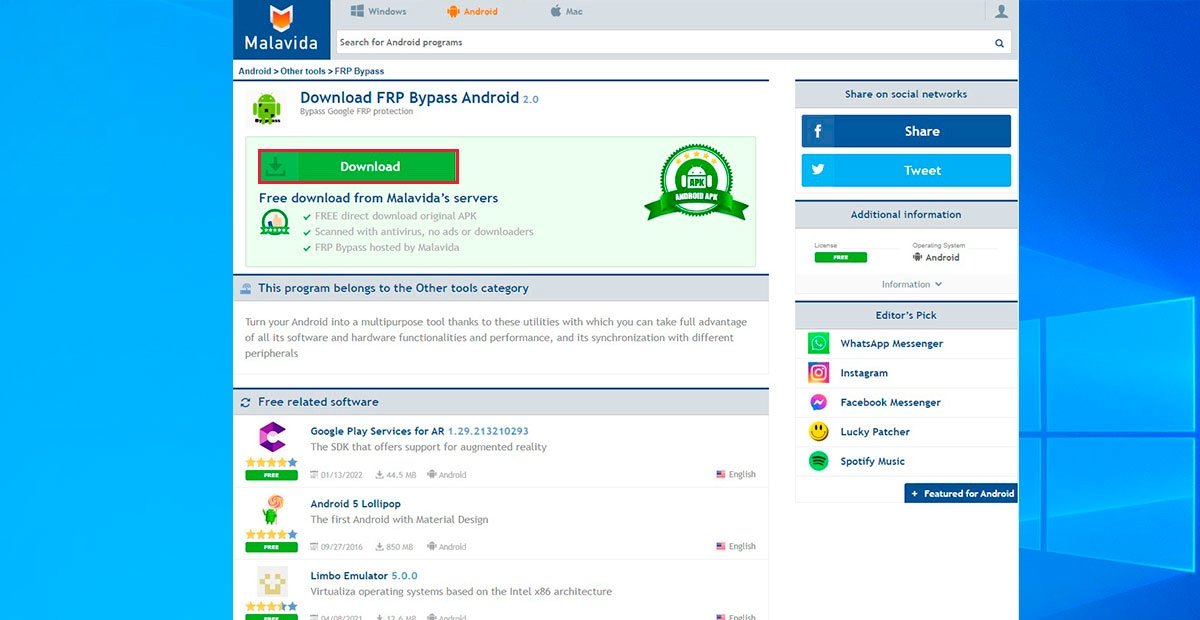
Confirm the download
You will now see a new window appear where you are allowed to choose a location to save the downloaded file. Select a folder easy to locate and press Save. In this case, we have chosen Downloads.
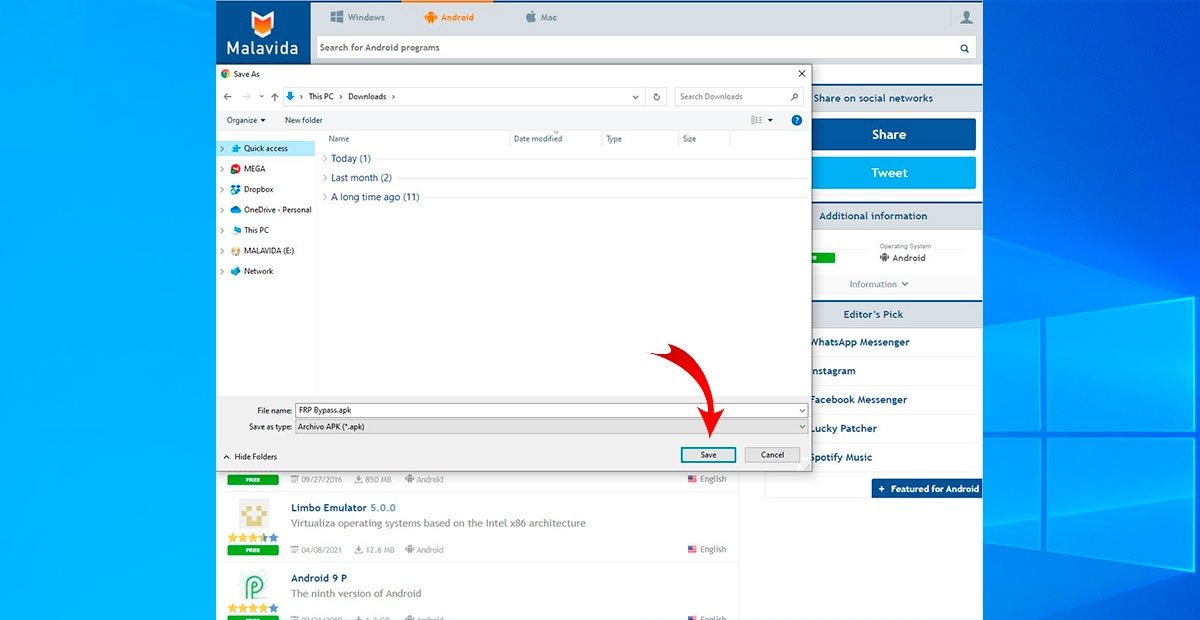
Save the file to a folder
Install FRP Bypass on your Android
Go to the folder where you saved the FRP Bypass installation file, right-click on it and select Copy.
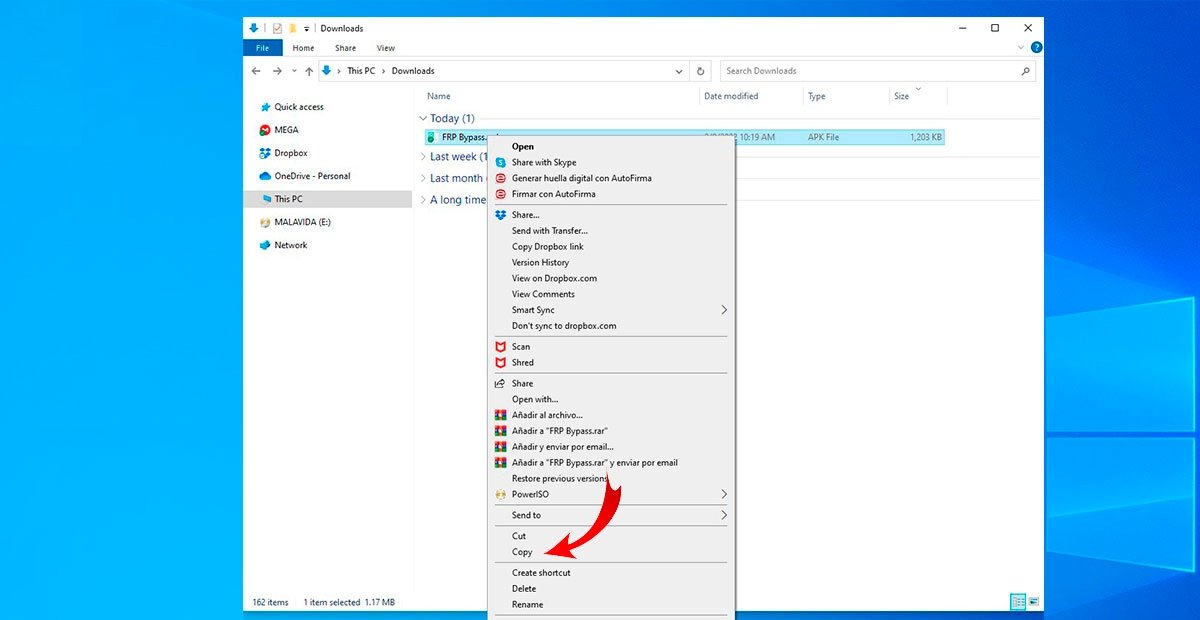
Copy FRP Bypass from your computer
Connect your flash drive and go to the flash drive folder in the file explorer, as shown in the image.
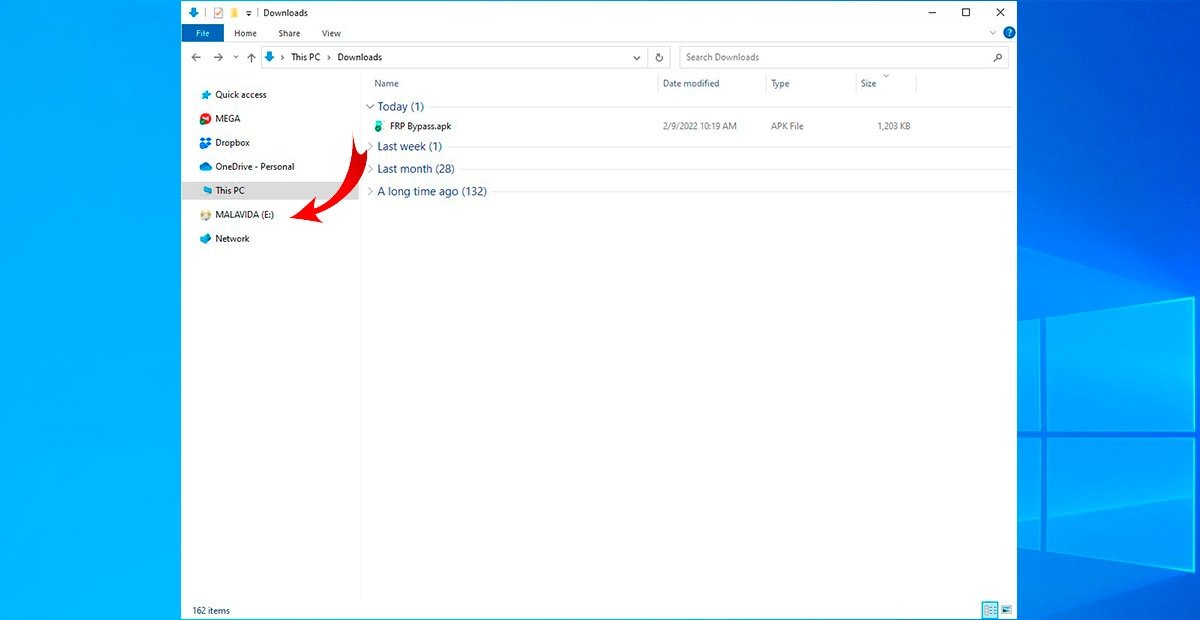
Go to the USB stick’s folder
Right-click inside this folder and select the «Paste» option. With this, you will have FRP Bypass on your flash drive and you will be able to transfer it to your Android.
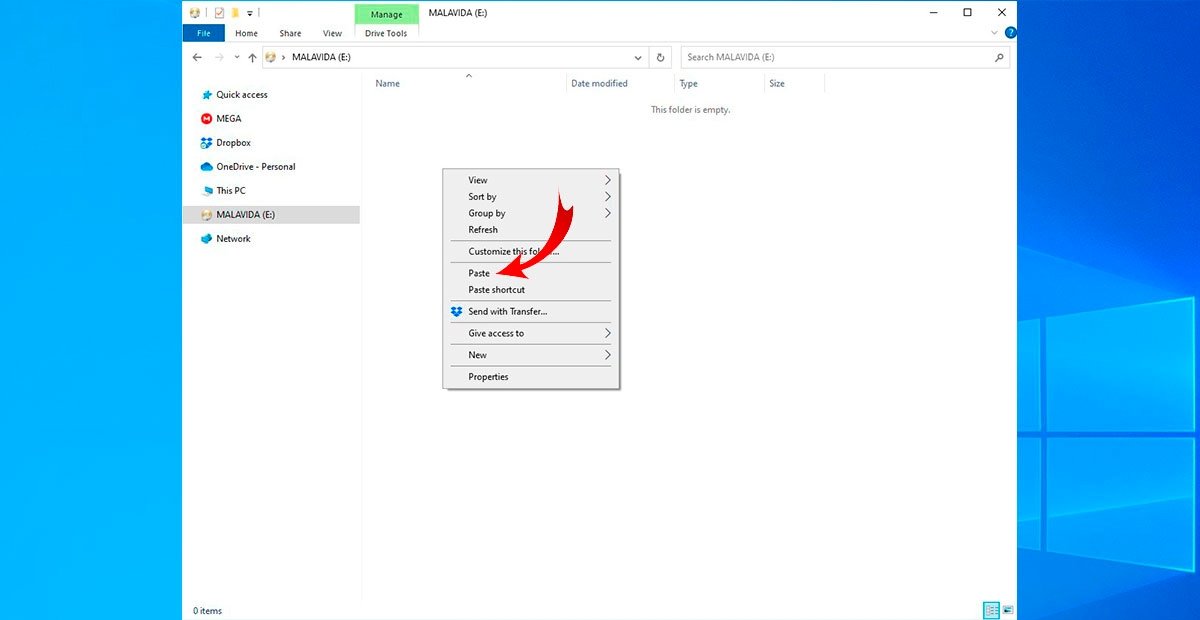
Paste FRP Bypass to the USB stick
Now, follow the next steps:
- Connect your OTG adapter to your mobile device and then insert the flash drive into the input port.
- After doing so, you will see the file explorer of your Android open. When this happens, search for and install the FRP Bypass APK.
- You may be prompted to activate the installation from external sources, which you simply accept and move on.
To finish the process, you simply need to force a factory reset of the device.
Force factory reset
This process is quite simple and involves some combination of the external buttons that modern devices have. The only complication is that the pattern changes depending on the manufacturer, so we will try to help you to avoid this being a problem in this process.
- In many cases, it is enough to press and hold the volume down button and the power button.
- If you have a Samsung, the key that will accompany the power button will be the volume up key.
- LG devices require both volume buttons plus the power button.
We hope this guide has been helpful for you and that you get to recover the functionality of that locked device.
[OFFICIAL] FRP Bypass APK Download Latest for All Phones
FRP bypass apk is also known as FRP bypass tool. It is used for bypassing Google factory reset protection. If you have forgotten your Google account password after a factory reset, it comes useful. You can use the FRP bypass methods shared in this guide to solve all your issues.
In this article, we are going to share all stuff about the FRP bypass apk. As you know many users are facing this problem. So they want to know how to bypass google factory reset protection on their android device.
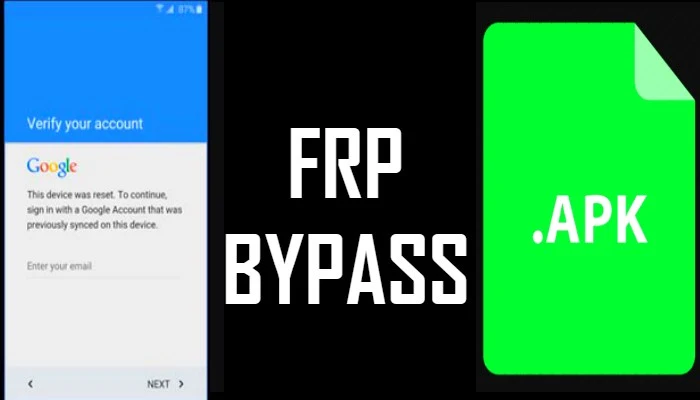
Google factory reset protection is a new patch developed by Google. It protects the user’s device in case they lost it. This tool is very useful in times when you have factory reset your android device. And then you forget your Google account password. So keep reading this guide to know more about this tool and how you can use it.
What is Google FRP Bypass APK?
As mentioned earlier, Factory reset protection is a security patch by Google. It helps in protecting the device in case it is stolen or lost.
No one will be able to use the device because you will need Google account access. FRP bypass feature was first introduced for devices like LG, Samsung, and many others. No doubt it is an awesome security feature but it creates a lot of problems if you forget your account password.
| File name | FRP Bypass.APK |
| File size | 1.2 MB |
| File type | application/vnd.android.package-archive |
| File extension | apk |
| Downloads | 10.9 Million |
| Version | Latest |
Click on the frp bypass download buttons below to directly download latest apk files.
Download FRP Bypass Android Apps
Another method, you can use to bypass Google account is by using frp bypass android apps. There are many android apps available to bypass frp lock on smartphones. Below we have listed the most popular bypass frp apps with their guide.
Apps Direct Open Without Install
All these frp unlock files/apps we mentioned below support all devices. It includes Oppo, Realme, Samsung, Micromax, LG, Sony, and other smartphones as well. You can use these apps to bypass Google account on your frp-locked device within five minutes.
FRP Bypass with OTG
- First of all, you will need to download frp bypass apk file from our official website. Click here to download the file directly on your device.
- Once you have downloaded the file, copy the apk on your USB drive.
- Now start your android device on which you are facing FRP issue.
- Next, a setup wizard will open where you need to follow the basic instructions.
- Once the bypass factory reset protection screen appears. You will need to enter google account login credentials.
- But because of the reason you lost your phone or don’t remember it, you will need to try something other.
- Now using an OTG cable, you will need to connect a USB pen drive to your android device.
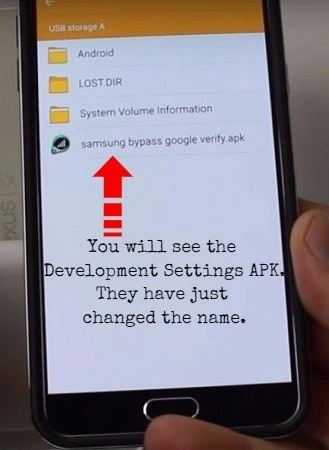
- Then you will see file explorer opening on your android phone. Next, open the folder on your android device where you have saved the FRP Bypass apk file.
- During the installation process, your phone will block installation and you might see an unknown source error. Simply go to your device settings and turn on the unknown sources option.
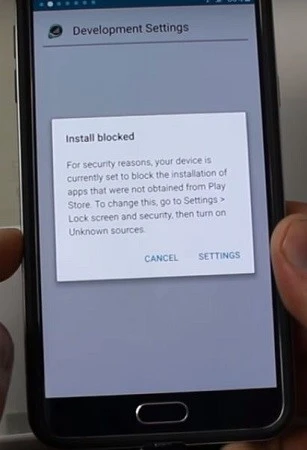
- Now tap on the installation button again to start the installation process.
- After the installation is completed, tap on open and it will open the settings menu.
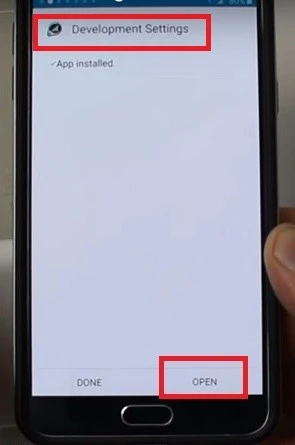
- In settings scroll down, select backup and reset option. Then tap on factory data reset and tap on confirm button.
That’s it!! You have successfully bypassed google factory reset protection on your android device. Now you will need to restart your device and you won’t face FRP bypass issue anymore. After restarting your device, it’s your choice to add a google account or skip it.
FRP Bypass without OTG
The first method we shared above requires OTG cable along with frp bypass apk file. But with this method, you don’t need to use OTG. Because we will be using the FRP bypass android apps/one tap shortcuts. So make sure you have a working internet connection.
Below we have shared the step by step guide on how you can remove frp lock. Based on your phone android OS, follow the tutorial and unlock your frp locked smartphone.
Скачать FRP Bypass APK v2.0 Latest 2023 [Официальный]
Есть несколько случаев, когда вам нужно сбросить данные своего смартфона, очистив его от мусора, или вы хотите продать свое устройство кому-то. Но вы не знаете, что вам нужно разблокировать устройство, используя свою учетную запись Google, и, к сожалению, вы не помните пароль; в то же время.
Эта ситуация может выйти из-под контроля и создать проблемы для многих пользователей, которые не знают, как исправить эту ошибку. Но что, если я скажу вам, что есть какое-нибудь приложение, которое поможет обойти настройки защиты от сброса к заводским настройкам? Кроме того, он позволяет вам получить доступ к вашему телефону, как раньше. Мы говорим об APK обхода FRP.
Давайте получим больше информации об этом приложении в следующей части и без проблем преодолеем эти проблемы. Но прежде чем вы начнете, вам нужно знать о FRP, поэтому давайте сначала разберемся с этим термином.
Что такое приложение FRP?
FPR или другими словами Google Защита заводских настроек support — это функция безопасности, которая предоставляется пользователям смартфонов Android.
Благодаря этой функции безопасности никто не сможет получить доступ к вашему телефону после сброса настроек устройства до тех пор, пока вы не введете правильные учетные данные учетной записи Gmail.
Нельзя отрицать, что эта функция очень полезна для пользователя, поскольку она обеспечивает более высокий уровень безопасности. Но в то же время эта функция иногда может создавать проблемы даже для пользователей, в основном, когда пользователи не помнят правильный пароль своей учетной записи Google.
Однако вам не нужно ни о чем беспокоиться, так как это приложение поможет в трудные времена.
Что такое APK обхода FRP?
Это специальный инструмент, который позволяет пользователям получить доступ к своим смартфонам, даже не запуская протоколы защиты от заводских настроек, которые применяются производителями смартфонов.
Хотя в интернете вы найдете несколько других вариантов, которые решат эту проблему без особых проблем. Но для правильной работы этих инструментов вам потребуется настройка компьютера.
Но, с другой стороны, обход FRP помогает пользователям разблокировать свои смартфоны без какой-либо поддержки ПК. Обычно процесс требует применения нескольких команд и требует расширенных инструментов и поддержки для преодоления этой ситуации.
Однако это не относится к этому apk. Хотя нельзя отрицать, что процесс немного дольше, в конце концов вы получите результат.
Скачать Процедура обхода FRP Tool
В приведенном выше разделе вы найдете файл apk, поэтому выбирайте его в соответствии с версией вашего смартфона. FRP Bypass APK может решить большинство проблем, связанных с защитой от сброса настроек, и восстановить доступ к вашему телефону. Итак, выберите предпочтительный вариант и начните процесс, описанный в следующей части.
Как это использовать?
Процесс использования этого приложения немного сложен и сложен, поэтому вы должны оставаться сосредоточенными во время раздела инструкций. Поэтому обязательно внимательно прочитайте каждый шаг, чтобы избежать каких-либо проблем.
После сброса настроек телефона вас встретит новый экран.
Шаг 1: Получите APK-файл
- Прежде всего, вам нужно получить соединение Wi-Fi, чтобы вы могли начать процесс.
- Нажмите на Добавлена сеть, затем нажмите и удерживайте и выберите «Языковые настройки» с клавиатуры.
- Затем вам нужно выбрать «Добавить клавиатуру», а затем выбрать Английский.
- Теперь нажмите на три точки и получите доступ Помощь и обратная связь.
- Тип и поиск YouTube, и нажмите на поиск.
- Откройте приложение Youtube, перейдите на Настройки → Прокрутите вниз и выберите О программе.
- Теперь откройте Условия использования и выберите Браузер Chrome.
- В строке поиска вставьте URL этого поста, чтобы получить APK FRP ByPass.
- Нажмите на параметры загрузки легко.
Примечание: Вы можете заметить предупреждающий знак, нажмите «Разрешить» из этого источника.
Шаг 2. Настройте учетную запись Gmail.
- После того, как вы загрузили приложение, нажмите на 3 точки и перейдите в раздел загрузки.
- Нажмите на приложение FRP и установите это приложение на свой телефон.
- Откройте приложение и снова нажмите на три точки, чтобы просмотреть учетную запись для входа.
- Введите свои учетные данные Gmail и подтвердите их.
- Наконец, перезагрузите телефон.
При этом вы можете инициализировать процесс установки с новой учетной записью Gmail и легко преодолеть эту проблему. Теперь давайте узнаем больше об особенностях этого увлекательного приложения.
Особенности
Это достойное приложение, которое поможет вам снять блокировку FRP со своего смартфона. Есть множество причин, по которым люди любят это приложение, мы рассмотрели некоторые из основных черт. С учетом сказанного, давайте начнем!
100% бесплатно и безопасно
Несомненно, официальное приложение недоступно в Playstore, и даже найти настоящий apk-файл может быть сложной задачей для всех, так как вам придется пройти через несколько веб-сайтов, некоторые из которых также могут быть поддельными. Но вам не нужно беспокоиться о вещах, поскольку приложение, которое мы предоставляем, тщательно протестировано.
Таким образом, вы можете свободно использовать это приложение и обойти знак учетной записи Google после сброса настроек устройства. Кроме того, ваш аккаунт не будет забанен серверами. Итак, загрузите этот apk для безопасного сайта, такого как мы.
Лучший инструмент обхода FRP
FRP Bypass APK, безусловно, самый надежный вариант. Это лучшее приложение для решения экрана FRP, которое легко помогает пользователям в процессе входа в систему. В отличие от других вариантов, представленных на рынке, которые в основном не работают и не дают никаких результатов, это приложение предлагает множество впечатляющих функций.
Use Samsung FRP Bypass APK to Bypass FRP Lock?

Google introduced a new feature with its Android Lollipop to help protect personal data on Android devices. The feature is known as the Factory Reset Protection, generally abbreviated as FRP. If someone happens to steal your Android device, the feature makes it impossible for the individual to erase your Android device without your Google credentials.
If you happen to purchase a Samsung device from a secondhand dealer with the FRP still enabled, erasing the device and using it may appear impossible. However, this is not the case. With tools like the Samsung bypass APK, bypassing the FRP should be possible.
What’s Samsung FRP Bypass
As mentioned earlier on, the FRP won’t let you to factory reset a Samsung device if you do not have the password of the Google account on the device. Apart from purchasing a secondhand Samsung device, people do forget their Google account credentials.
If you need to perform a factory reset on an Android device but cannot recall the password of the Google account used on the device, you may need to use a third-party tool to get rid of the FRP. The process of using a third-party tool to get rid of the FRP without a password is what we are calling Samsung FRP bypass.
What’s Samsung Bypass APK
The Samsung FRP bypass APK is one of the tools you can use to factory reset a Samsung device without having to enter the Google account password. This will make it possible for you to set up a Google account whose password you can recall on the device.
How to Use Samsung FRP Bypass APK — OTG Cable Required
Follow the steps below to get rid of the FRP using the Samsung bypass APK. But as it’s not easy to complete the steps, you should be noted some requirements or disadvantages of this way before you try:
The tool requires you to have an OTG USB cable, a computer, and a USB drive.
The process is too complicated.
This way may not work for your specific Samsung device.
There is no guarantee that the method will work on newer Android versions.
Step 1: Download the Samsung FRP bypass APK using your computer.
Step 2: After the download, plug your USB drive to the PC and copy the Samsung FRP bypass APK to the drive.
Step 3: Turn your Samsung device on and then follow the onscreen instructions which appear after the factory reset.
Step 4: After the basic setup steps, you should see a popup requesting you to enter the Google account email and password used on the Samsung device.
Step 5: Using an OTG USB cable, connect the USB drive to the Samsung device. A file explorer on your Samsung should open up immediately.
Step 6: Find the Samsung FRP bypass APK you previously copied to the USB drive. Tap on the file.
Step 7: If you see a warning on your screen, visit the settings on your device and disable the unknown sources option.
Step 8: Tap on the APK file again and wait for the installation process to end.
Step 9: Open the app and then follow the onscreen instructions on Samsung FRP bypass APK to erase everything.
How to Bypass Samsung FRP Lock Much Easier without OTG
For people who want to have an easier time when removing the FRP from their Samsung device, iMyFone LockWiper (Android) is a much better option. Unlike Samsung bypass APK, the tool guarantees you success on all Samsung devices irrespective of the Android version.
Unlike Samsung FRP bypass APK, LockWiper doesn’t require you to prepare the OTG cable and USB drive. You just need a USB cable to connect your device to LockWiper and let LockWiper do the rest.
Great Features Offered by LockWiper (Android):
- Completely remove any traces of Google FRP lock from Samsung device without password
- Take complete control of your device and enjoy any features you like after removing
- Your Samsung device won’t be linked to the previous Google account, so it won’t be tracked
- Provide specific removal solutions for each device that’s why high success rate can be guaranteed
- Free trial is available for you to detect if your device is supported or not
Steps to Completely Bypass Samsung FRP Lock
To bypass the Samsung FRP using LockWiper (Android), you will just need to follow the steps we have outlined below:
Step 1: Install iMyFone LockWiper (Android) on your computer. After launching the tool, select Remove Google Lock (FRP).
Step 2: Click Start and then connect your Samsung to the PC using a USB cable. Select your device name and follow the steps which appear on the Samsung device screen to put the device in recovery mode.
Step 3: Select the device PDA or enter it manually and then select your Country and Carrier. Tap Download to proceed.
Step 4: After the download, click Start to Extract. Next, follow the steps which appear on your screen to put your device into the Downloading Mode and then tap Start.
Step 5: After the installation, enable USB debugging and OEM unlock by following the steps on your screen. Confirm the OEM unlock on the popup.
Step 6: Follow the steps on your screen to reset the Samsung and then put it in Download mode again. The LockWiper will download the device firmware.
Step 7: After the download, tap Start to Extract. After the extract, LockWiper (Android) will remove the FRP.
Conclusion
If you are stuck with an Android device whose Google account password you cannot recall and it has the FRP protection on it, you don’t have to panic. What you will need to do instead is find a third-party program that can help you get rid of the FRP without the Google account password. When compared to Samsung FRP bypass APK, iMyFone LockWiper (Android) stands out. LockWiper (Android) features a free trial version that you can use to confirm whether it will work for you.