Exploring the Role of Graphics Processing Unit (GPU) in Android Devices

The Graphics Processing Unit (GPU) is a key component of modern smartphones, including Android devices. It is responsible for rendering graphics and handling complex visual tasks, such as playing video games, rendering animations, and displaying high-resolution images.
The GPU works in conjunction with the Central Processing Unit (CPU) to provide smooth and efficient performance for demanding applications. The GPU offloads the graphical processing from the CPU, freeing up resources and reducing the load on the system.
One of the key benefits of using a GPU in an Android device is improved battery life. By using the GPU to handle intensive graphical tasks, the CPU can remain idle and conserve battery power. This is especially important for demanding applications like video games, which can consume a lot of battery life if not optimized.
Another advantage of using a GPU in Android devices is improved graphics performance. With a dedicated GPU, devices can render high-quality graphics, animations, and special effects with greater ease and speed. This results in a better user experience, especially for users who frequently play video games or use demanding apps.
Additionally, the GPU can also be used for offloading other tasks, such as image and video processing, from the CPU, which can further improve the overall performance of the device.
listing key benefits of using a GPU in an Android device include:
- Improved battery life: By offloading graphical processing tasks from the CPU, the GPU can conserve battery power and extend the device’s battery life.
- Better graphics performance: A dedicated GPU can render high-quality graphics, animations, and special effects with greater speed and efficiency, providing a better user experience.
- Offloading CPU tasks: The GPU can also be used to offload tasks like image and video processing from the CPU, further improving device performance.
In conclusion, the GPU plays a critical role in modern Android devices, providing improved battery life, better graphics performance, and offloading CPU tasks. With the growing demand for high-performance devices, the GPU will continue to play an important role in the development of Android devices.
Что такое GPU-ускорение на платформе Android

Одной из многочисленных возможностей, присутствующих на современных Android-устройствах, выступает GPU-ускорение, доступное в специальном системном разделе. По ходу статьи мы расскажем о том, что это за функция и в каких случаях может повлиять на работу смартфона.
Что такое GPU-ускорение на Android
Сама аббревиатура GPU на смартфонах расшифровывается точно так же, как и на других устройствах, включая компьютеры, и означает «Графический процессор». Поэтому при активации ускорения вся нагрузка телефона переходит с ЦПУ на видеокарту, едва ли задействованную в повседневных задачах.
Примечание: Во время работы описываемого режима может значительно повыситься нагрев телефона, но, как правило, без вреда для компонентов.
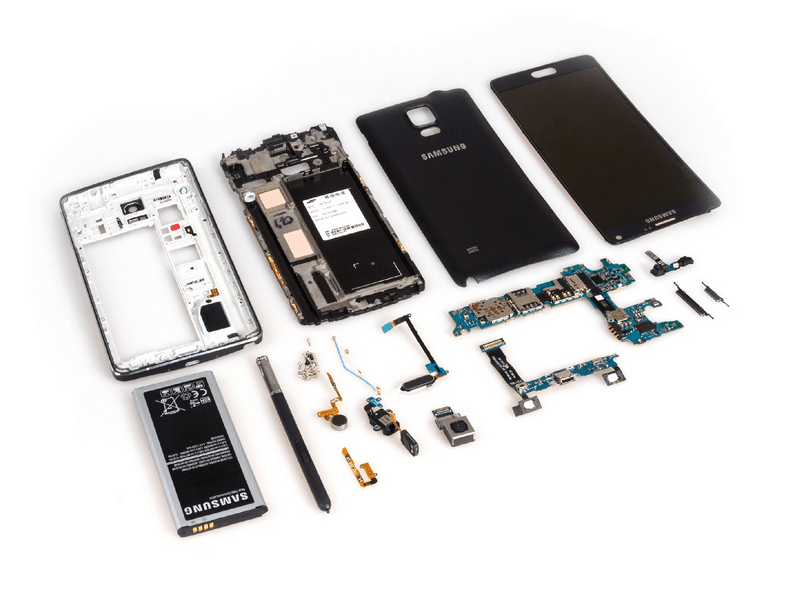
Главное назначение GPU-ускорения заключается в принудительном переносе рендеринга с процессора устройства на GPU с целью повышения производительности. Как правило, особенно если брать в расчет современные мощные смартфоны или планшеты и весьма требовательные игры, подобная возможность положительно повлияет на скорость обработки информации. Кроме того, на некоторых телефонах можно получить доступ к дополнительным настройкам рендера.
Иногда ситуация может быть полностью противоположной, в связи с чем включение принудительного рендеринга двухмерного рисования может стать причиной невозможности запуска того или иного приложения. Так или иначе, функцию можно включать и отключать без ограничений, что делает большинство проблем легко разрешимыми. К тому же, как можно понять по вышесказанному, большинство приложений все же отлично работают при включенном GPU-ускорении, позволяя использовать ресурсы устройства на максимум.
Включение и отключение
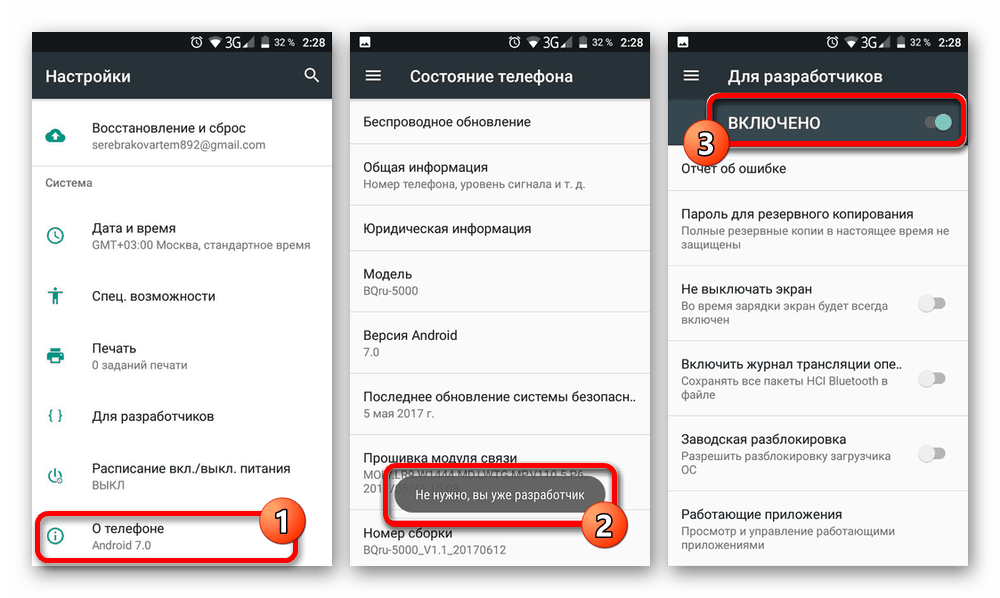
GPU-ускорение можно контролировать в определенном разделе с настройками. Однако для доступа к данной странице потребуется выполнить ряд действий. Более подробно процедура была нами разобрана в отдельной статье на сайте по следующей ссылке.
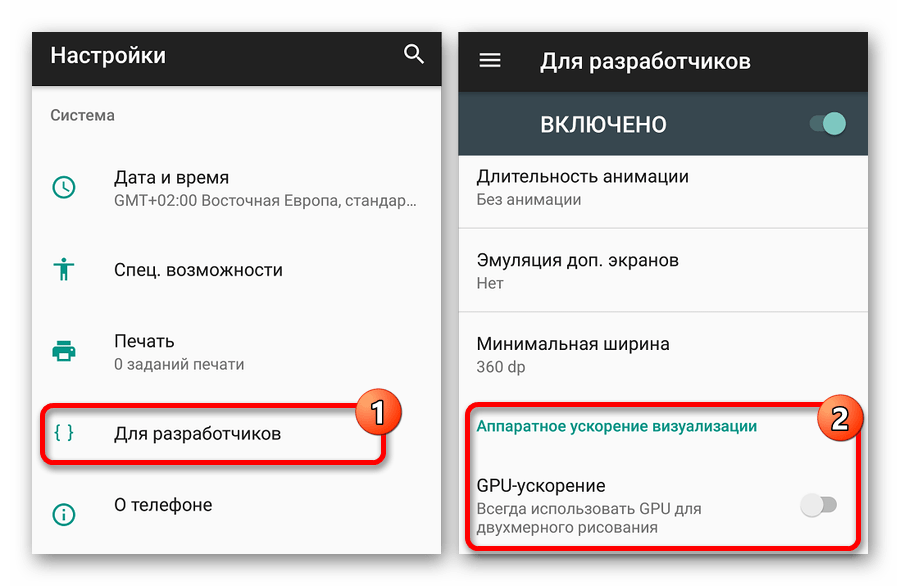
После перехода к странице «Для разработчиков» в системном приложении «Настройки» воспользуйтесь свайпом вверх и найдите пункт «GPU-ускорение» в блоке «Аппаратное ускорение визуализации». В некоторых случаях функция может иметь другое название, например, «Рендеринг принудительно», но практически всегда остается неизменным описание. Ориентируйтесь именно по нему, обратив внимание на представленный ниже скриншот.
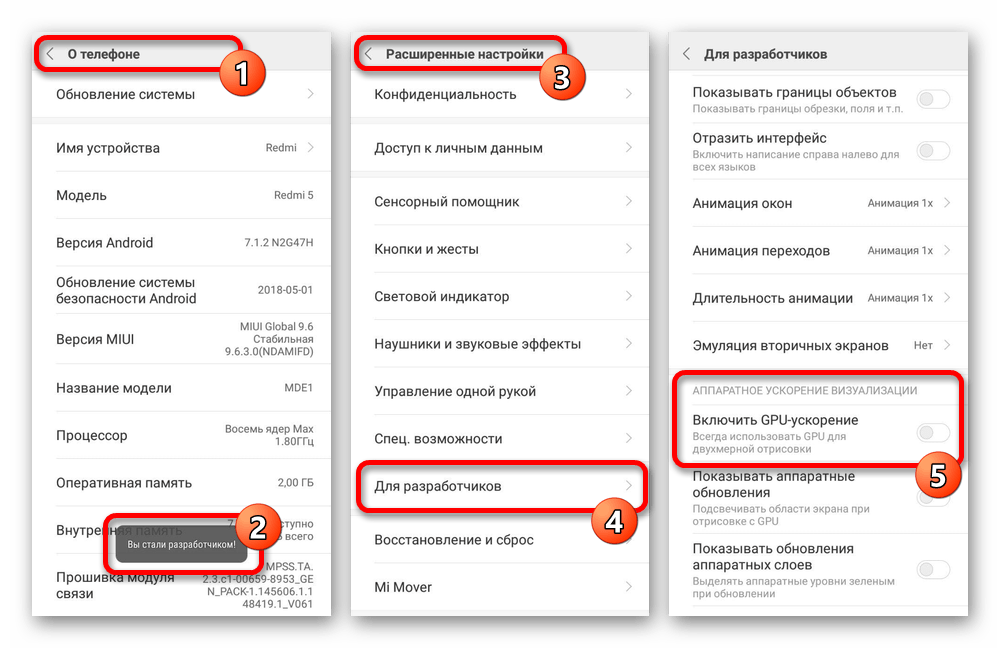
Эта процедура не станет проблемой, так как все действия легко обратимы. Таким образом, чтобы отключить принудительный рендеринг, деактивируйте пункт, указанный выше. Кроме того, данная тема напрямую связана с ускорением Android-устройства, детально рассмотренным нами также в отдельной инструкции.
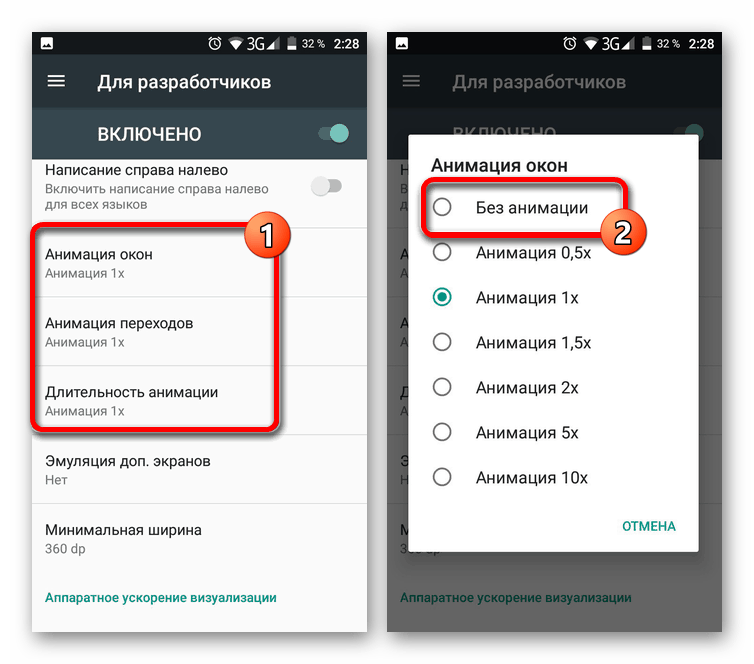
Как видно из представленной в статье информации, GPU-ускорение на Android-устройствах можно включать и отключать в зависимости от конкретной ситуации, будь то запуск требовательных игр или приложений. С этим не должно возникнуть проблем из-за отсутствия ограничений на работу функции, не считая ситуаций, когда телефон по умолчанию не предоставляет нужных настроек.
What Is GPU And How Does It Work On Your Smartphone?

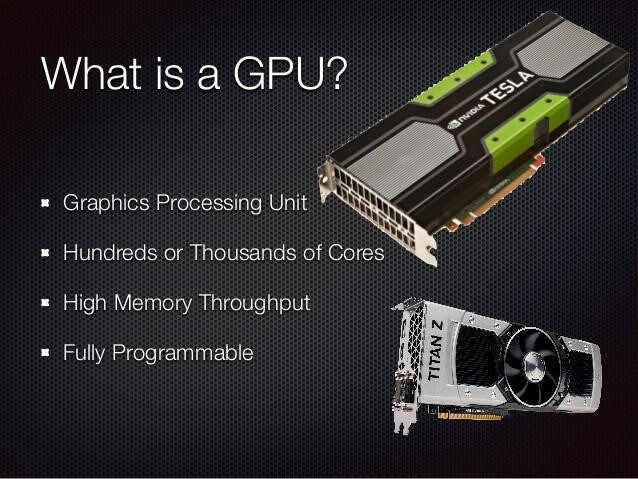
What is a GPU? What is the role of a GPU in your smartphone? These are important questions that you should ask before purchasing your mobile phone, but people generally avoid such questions. Many people are not even aware of GPU, let alone how it influences the performance of your phone. That is why in this blog, we will learn about what GPU in a smartphone does?
Source: slideshare.net
GPU- What is it?
GPU means Graphics Processing Unit, and its main purpose is to perform graphics processing operations or do floating point calculations. In simple terms, it is a specialized circuit whose main job is to generate images for the device to display.
Every smartphone has a GPU in some form to generate pictures. It’s an essential part of phone’s structure.
Without GPU in smartphones, the possibility of having high-performance games or having high-quality UI would be impossible. The architecture of a GPU is almost similar to a CPU. But it focuses more on the calculation of graphical data. Thus, you can’t ask GPU in your smartphone to perform tasks that are not graphical in nature. It would make it ineffective and slow.
Popular GPUs are- Qualcomm’s Adreno series, the PowerVR series (iPhones), and so on.

Source: androidguys.com
Importance of GPU
- Reduces CPU load
The most important function of a GPU is to lessen the load of CPU (Central Processing Unit) especially when running high graphic games. For example- Take a game involving guns and lots of graphics. Now, here GPU will take care of creating graphics, texture, etc. within the game. The CPU not having to worry about all this looks after AI or calculation for the game.
- It makes games look and run better
Smartphone’s GPU aids the games to run efficiently on the device. While also making sure that you get the highest resolutions and framerates. High frame rates will make the game run smoother and faster, and also it will freeze less.
- Developer can make complex games
The modern GPU have the ability to handle 3D games rendering and effects easily. It means more realistic and 3D games.
 How To Force Microsoft Edge To Use The. Microsoft Windows 10 after the latest update, allows you to select what GPU should Microsoft Edge use in order to.
Types of GPU
Graphic Cards Dedicated graphics cards provide a high level of power. The purpose behind their creation is to display images. Dedicated graphics cards on Android is not available, you can find them in laptops and PCs.
These GPUs have separate RAM attached to the CPU, and only GPU can access it.
Integrated Graphic card: Android users require these types of GPU as system-on-a-chip. In this, GPU uses the system’s memory, and it is integrated into the processor only.
Hybrid GPU: It is the mixture of above two GPUs. They a small dedicated RAM, but also make use of system memory.
How does a GPU work?
GPU in your smartphone works by manipulating the memory of the device rapidly. It pushes the device to create images fast and efficiently in a frame buffer. The images are stored in a portion of RAM that displays the image.
GPUs have multiple processing cores that run simultaneously at low speeds. They have two functions- processing of vertices and pixels.
- Vertices
The process of vertices revolves around the coordinate systems. The GPU handles the geometric calculation for reproducing dimensional space on your phone’s display screen. It results in things like depth, spatial data and the possibility of 3-dimensional space rotation.
- Pixels
It’s a complex process and requires a lot of processing power. It renders various layers of the images and applies effects. They are required to develop complex textures for creating realistic graphics.
- Lastly
Once GPU handles both these processes, it transfers the result to the digital readout. (Phone’s screen)
How to identify the best GPU?
- A good GPU will have a large memory bus- 64 bit or more.
- It will possess a high memory clock speed.
- The size of the chip fabrication process. Smaller the chip, more efficient it will be.
Conclusion:
Usually, things related to GPU in your smartphone don’t come to your mind while buying the phone. It all may sound a bit complex, but they are important for your phones and you should know about them.
People Who Read This Post Also Like
Top 10 Video Quality Enhancers to Improve the Video Quality
6 Ways To Organize Photos On Mac (Beginner’s Guide)
5 Best Video Players for Chromebook (2023)
3 COMMENTS
Muhammad atif
LABHESH PAWAR
Brian Phelan
Leave a Reply Cancel reply
Recent Posts
5 Best Free Software to Record Screen as GIF in Windows PC
How To Fix Copy Paste Not Working On Android
Say Goodbye to Spam Emails: Gmail’s Battle Against Spam Levels Up
What Is A CAB File And How To Recover Deleted CAB Files on Windows?
How to Find Duplicate Files with Different Names but Same Content
Subscribe & be the first to know!
Signup for your newsletter and never miss out on any tech update.
All product names, trademarks and registered trademarks are property of their respective owners. All company, product and service names used in this website are for identification purposes only. Use of these names, trademarks and brands does not imply endorsement. WeTheGeek does not imply any relationship with any of the companies, products and service names in any form.
WeTheGeek is an independent website and has not been authorized, sponsored, or otherwise approved by Apple Inc.
WeTheGeek is not affiliated with Microsoft Corporation, nor claim any such implied or direct affiliation.
Disclaimer Last updated: January 01,2023 The information contained on wethegeek.com website (the “Service”) is for general information purposes only. Wethegeek.com assumes no responsibility for errors or omissions in the contents on the Service. In no event shall wethegeek.com be liable for any special, direct, indirect, consequential, or incidental damages or any damages whatsoever, whether in an action of contract, negligence or other tort, arising out of or in connection with the use of the Service or the contents of the Service. Wethegeek.com reserves the right to make additions, deletions, or modification to the contents on the Service at any time without prior notice. Wethegeek.com does not warrant that the website is free of viruses or other harmful components.External links disclaimer Wethegeek.com website may contain links to external websites that are not provided or maintained by or may not be in any way affiliated with wethegeek.com. Please note that the wethegeek.com does not guarantee the accuracy, relevance, timeliness, or completeness of any information on these external websites.
Please note that wethegeek.com may receive commissions when you click our links and make purchases. However, this does not impact our reviews and comparisons. We try our best to keep things fair, objective and balanced, in order to help you make the best choice for you.
Copyright © Wethegeek.com , 2023 All rights reserved.

 Subscribe Now & Never Miss The Latest Tech Updates!
Enter your e-mail address and click the Subscribe button to receive great content and coupon codes for amazing discounts.
Что такое графический процессор в телефоне Android?
В смартфоне графический процессор (графический процессор) является центральной частью аппаратного обеспечения системы. Он отличается от ЦП тем, что обрабатывает элементы визуализации дисплея телефона, тогда как ЦП — это мозг устройства, обрабатывающий все тяжелые вычисления и логику за экраном.
Что делает GPU в телефоне?
Графические процессоры (GPU) являются неотъемлемой частью большинства современных смартфонов. Они улучшают производительность при рендеринге видео, игр и другой графики.
Какой графический процессор лучше всего подходит для мобильных устройств?
Рейтинг мобильных графических процессоров
| Рейтинг | Имя графического процессора | SOC |
|---|---|---|
| # 1 | Графический процессор A14 Bionic | Apple A14 Bionic |
| # 2 | Adreno 660 | Snapdragon 888 |
| # 3 | Графический процессор A13 Bionic | Apple A13 Bionic |
| # 4 | Mali-G78 MP24 | Kirin 9000 |
Как я могу узнать свой мобильный графический процессор?
На вашем устройстве перейдите в «Настройки» и нажмите «Параметры разработчика». В разделе «Мониторинг» выберите «Профиль рендеринга графического процессора». В диалоговом окне «Профилирование графического процессора» выберите «На экране в виде полос», чтобы наложить графики на экран вашего устройства.
Важен ли GPU?
Графический процессор является чрезвычайно важным компонентом игровой системы и во многих случаях даже более важным, чем центральный процессор, когда дело касается определенных типов игр. Простое описание: графический процессор — это однокристальный процессор, который используется в основном для управления и повышения производительности видео и графики.
Есть ли в телефоне графический процессор?
В каждом смартфоне есть графический процессор в той или иной форме для создания изображений. Это важная часть структуры телефона. Без графического процессора в смартфонах возможность создания высокопроизводительных игр или высококачественного пользовательского интерфейса была бы невозможна. Архитектура графического процессора почти аналогична процессору.
Что такое GPU?
Графический процессор (ГП) — это специализированная электронная схема, предназначенная для быстрого управления и изменения памяти для ускорения создания изображений в буфере кадров, предназначенных для вывода на устройство отображения.
Подходит ли Mali G52 для игр?
Повышенная энергоэффективность снижает энергопотребление и тепловую мощность устройства, поэтому Mali-G52 может поддерживать большее игровое время даже для таких технологий разряда батареи, как дополненная реальность.
Какой графический процессор лучше всего подходит для игр?
Лучшие видеокарты для игр 2021 года
- GeForce RTX 3080. Лучшая видеокарта в целом, для 4K и более. …
- Radeon RX 6800 XT. Лучший графический процессор AMD, забудьте о DLSS. …
- GeForce RTX 3090. Самая быстрая видеокарта, отлично подходит для творцов. …
- GeForce RTX 3060 Ti. …
- GeForce RTX 3070.…
- Radeon RX 6700 XT. …
- Radeon RX 6800.…
- GeForce RTX 3060 12 ГБ.
Какая видеокарта лучшая?
| Ранг | Устройство | Цена MSRP |
|---|---|---|
| 1 | NVIDIA GeForce RTX 3090 DirectX 12.00 | 1499 долларов |
| 2 | AMD Radeon 6900 XT DirectX 12.00 | 999 |
| 3 | AMD Radeon RX 6800 XT DirectX 12.00 | 649 |
| 4 | NVIDIA GeForce RTX 3080 DirectX 12.00 | 699 долл. США |
Какой у меня графический процессор?
Узнайте, какой у вас графический процессор в Windows
Откройте меню «Пуск» на своем ПК, введите «Диспетчер устройств» и нажмите Enter. Вы должны увидеть опцию вверху для видеоадаптеров. Щелкните стрелку раскрывающегося списка, и прямо здесь должно быть указано имя вашего графического процессора.
Как проверить свой процессор Android?
Перейти в настройки. Найдите «О телефоне», откройте его. Там вы найдете все подробности о телефоне — версии Android, оперативной памяти, процессоре и т. Д.
Что такое Force GPU рендеринг?
Принудительный рендеринг с помощью графического процессора
При этом будет использоваться графический процессор (GPU) вашего телефона, а не программный рендеринг для некоторых 2D-элементов, которые еще не используют эту возможность. Это означает более быстрый рендеринг пользовательского интерфейса, более плавную анимацию и большую передышку для вашего процессора.
Может ли ОЗУ влиять на FPS?
И ответ на это: в некоторых сценариях и в зависимости от того, сколько у вас оперативной памяти, да, добавление дополнительной оперативной памяти может увеличить ваш FPS. … С другой стороны, если у вас небольшой объем памяти (скажем, 2–4 ГБ), добавление большего количества ОЗУ увеличит ваш FPS в играх, которые используют больше ОЗУ, чем было раньше.
Простыми словами, что такое GPU?
Означает «Графический процессор». Графический процессор — это процессор, предназначенный для обработки графических операций. Сюда входят как 2D-, так и 3D-вычисления, хотя графические процессоры в первую очередь преуспевают в рендеринге 3D-графики.
Как выбрать графический процессор?
При рассмотрении дискретных графических процессоров необходимо учитывать как объем памяти графической карты, так и ее пропускную способность. Объем видеопамяти с произвольным доступом (VRAM) в вашем графическом процессоре важен для высокопроизводительных игр, в которых используются большие объемы данных для построения сложных изображений на экране.