How to fix the can’t activate more than 3 apps in AltStore
For some reason, the iOS 13,5 counts offloaded AppStore apps towards the 3 sideloaded apps limit when using the free certificate. If you see this message when you try to install AltStore or any other app there is an easy fix to the can’t activate more than 3 apps error message. Previous iOS versions are not affected.
AltStore is one of the still-working tools used to install IPA files on iOS 13. Cydia Impactor isn’t working with free certificates to sideload apps and games on your iPhone, iPod, and iPad, but AltStore 1.3 fixes this issue. Use this method to fix the «can’t activate more than 3 apps» when installing AltStore on iOS 13.5.
Offload Unused Apps on iOS 13.5
Offload unused apps is a native iPhone settings option, that automatically deletes apps you don’t use after a period of inactivity, or when your device detects it’s running low on space. On iOS 13.5 this counts for the 3 sideloaded apps limit.
Step 1. Open the Settings app on your device.
Step 2. Navigate to iTunes & App Stores.
Step 3. Disable «Offload Unused Apps».
Step 4. Open the Home Screen.
Step 5. Remove or install all offloaded apps in the system.
From now on you should have an option to install the apps on your device. Please be aware, that when using the free certificate you have still limit up to 3 apps per device. To install the next IPA you need to deactivate or remove the apps.
How to deactivate apps in AltStore
Since iOS 13.5 you can install up to 3 sideloaded apps simultaneously. To work around this, AltStore lets you «deactivate» any of your apps. Inactive apps don’t count towards the 3 app limit, but can’t be opened until activated again.
Step 1. Open AltStore from the Home Screen on your device.
Вышла версия AltStore v1.6.1 без лимита на 3 приложения для устройств MacDirtyCow
Вышла новая версия инструмента AltStore, в которой нет ограничения на скачивание максимум трёх приложений одновременно на устройствах с уязвимостью MacDirtyCow (с iOS и iPadOS 14.0-16.1.2). Обновление уже доступно всем желающим.
В аккаунте AltStore в Twitter появилось сообщение о выходе версии 1.6.1 со всеми изменениями, которые были в бета-версии. Среди них:
- Скачивание более трёх приложений одновременно на устройствах с эксплойтом MacDirtyCow.
- Новая кнопка очистки кэша, которая удаляет ненужные данные и освобождает память.
- Исправлена ошибка, возникавшая при просмотре источников на устройствах с iOS
Конечно, для использования эксплойта MacDirtyCow для скачивания более трёх приложений одновременно ваше устройство должно быть уязвимо багу MacDirtyCow. Это значит, что функция работает только на устройствах с iOS и iPadOS 14.0-16.1.3. На устройствах с iOS и iPadOS 16.2 и новее это не работает.
Чтобы пользоваться функцией, нужно скачать приложение WDBRemoveThreeAppLimit, которое позволит вам скачивать более трёх приложений одновременно:

А вот как выглядит новая кнопка очистки кэша:

Установить обновление очень просто. Просто откройте приложение AltStore на своём iPhone или iPad и нажмите кнопку «Update», чтобы скачать последнюю доступную версию:

Обновлять AltStore до последней доступной версии рекомендуется всем пользователям, чтобы они могли наслаждаться всеми новыми функциями и избегать различных ошибок.
Скачивание приложений с помощью AltStore позволяет обходить App Store и устанавливать любые .ipa файлы, но только с 7-дневным периодом подписи с помощью Apple ID, а также с помощью бесплатного аккаунта разработчика.
Saved searches
Use saved searches to filter your results more quickly
You signed in with another tab or window. Reload to refresh your session. You signed out in another tab or window. Reload to refresh your session. You switched accounts on another tab or window. Reload to refresh your session.
Have a question about this project? Sign up for a free GitHub account to open an issue and contact its maintainers and the community.
By clicking “Sign up for GitHub”, you agree to our terms of service and privacy statement. We’ll occasionally send you account related emails.
Already on GitHub? Sign in to your account
The operation couldn’t be completed. Cannot activate more than 3 apps and app extensions. #214
The operation couldn’t be completed. Cannot activate more than 3 apps and app extensions. #214
Comments
I cant install altstore on my iPhone XS with iOS13.5
First I get this message:
AltStore already installed on another device.
Apps installed with AltStore on your other devices will stop working. Are you sure you want to continue?
Then I see this error:
The operation couldn’t be completed. Cannot activate more than 3 apps and app extensions.
If you are running iOS13.5.

Offload Unused Apps is disabled. I have currently no other apps activated on my device. A few months ago i installed altstore, but its deleted long ago.
I tried three different Apple IDs always with the same error.
Altstore как скачать больше 3 приложений
Этот текст мало кто будет читать и мы можем написать здесь все, что угодно, например.
Вы живете в неведении. Роботы уже вторглись в нашу жизнь и быстро захватывают мир, но мы встали на светлый путь и боремся за выживание человечества. А если серьезно, то.
В целях обеспечения безопасности сайта от кибератак нам необходимо убедиться, что вы человек. Если данная страница выводится вам часто, есть вероятность, что ваш компьютер заражен или вы используете для доступа IP адрес зараженных компьютеров.
Если это ваш частный компьютер и вы пытаетесь зайти на сайт, например, из дома — мы рекомендуем вам проверить ваш компьютер на наличие вирусов.
Если вы пытаетесь зайти на сайт, например, с работы или открытых сетей — вам необходимо обратиться с системному администратору и сообщить, что о возможном заражении компьютеров в вашей сети.
Вышла версия AltStore v1.6.1 без лимита на 3 приложения для устройств MacDirtyCow
Вышла новая версия инструмента AltStore, в которой нет ограничения на скачивание максимум трёх приложений одновременно на устройствах с уязвимостью MacDirtyCow (с iOS и iPadOS 14.0-16.1.2). Обновление уже доступно всем желающим.

В аккаунте AltStore в Twitter появилось сообщение о выходе версии 1.6.1 со всеми изменениями, которые были в бета-версии. Среди них:
- Скачивание более трёх приложений одновременно на устройствах с эксплойтом MacDirtyCow.
- Новая кнопка очистки кэша, которая удаляет ненужные данные и освобождает память.
- Исправлена ошибка, возникавшая при просмотре источников на устройствах с iOS
Конечно, для использования эксплойта MacDirtyCow для скачивания более трёх приложений одновременно ваше устройство должно быть уязвимо багу MacDirtyCow. Это значит, что функция работает только на устройствах с iOS и iPadOS 14.0-16.1.3. На устройствах с iOS и iPadOS 16.2 и новее это не работает.
Чтобы пользоваться функцией, нужно скачать приложение WDBRemoveThreeAppLimit, которое позволит вам скачивать более трёх приложений одновременно:
А вот как выглядит новая кнопка очистки кэша:
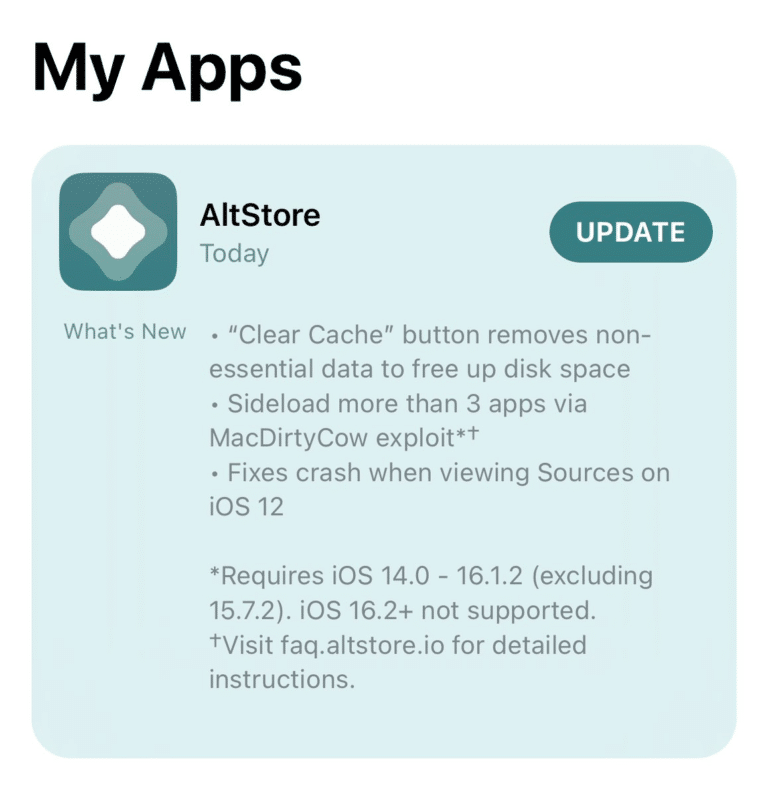
Установить обновление очень просто. Просто откройте приложение AltStore на своём iPhone или iPad и нажмите кнопку «Update», чтобы скачать последнюю доступную версию:
Обновлять AltStore до последней доступной версии рекомендуется всем пользователям, чтобы они могли наслаждаться всеми новыми функциями и избегать различных ошибок.
Скачивание приложений с помощью AltStore позволяет обходить App Store и устанавливать любые .ipa файлы, но только с 7-дневным периодом подписи с помощью Apple ID, а также с помощью бесплатного аккаунта разработчика.
How to fix the can’t activate more than 3 apps in AltStore
For some reason, the iOS 13,5 counts offloaded AppStore apps towards the 3 sideloaded apps limit when using the free certificate. If you see this message when you try to install AltStore or any other app there is an easy fix to the can’t activate more than 3 apps error message. Previous iOS versions are not affected.
AltStore is one of the still-working tools used to install IPA files on iOS 13. Cydia Impactor isn’t working with free certificates to sideload apps and games on your iPhone, iPod, and iPad, but AltStore 1.3 fixes this issue. Use this method to fix the «can’t activate more than 3 apps» when installing AltStore on iOS 13.5.
Offload Unused Apps on iOS 13.5
Offload unused apps is a native iPhone settings option, that automatically deletes apps you don’t use after a period of inactivity, or when your device detects it’s running low on space. On iOS 13.5 this counts for the 3 sideloaded apps limit.
Step 1. Open the Settings app on your device.
Step 2. Navigate to iTunes & App Stores.
Step 3. Disable «Offload Unused Apps».
Step 4. Open the Home Screen.
Step 5. Remove or install all offloaded apps in the system.
From now on you should have an option to install the apps on your device. Please be aware, that when using the free certificate you have still limit up to 3 apps per device. To install the next IPA you need to deactivate or remove the apps.
How to deactivate apps in AltStore
Since iOS 13.5 you can install up to 3 sideloaded apps simultaneously. To work around this, AltStore lets you «deactivate» any of your apps. Inactive apps don’t count towards the 3 app limit, but can’t be opened until activated again.
Step 1. Open AltStore from the Home Screen on your device.
AltStore: Cannot activate more than 3 apps and app extensions.
Getting this error on your AltStore: “Cannot activate more than 3 apps and app extensions. Make sure ‘Offload Unused Apps’ is disabled in Settings > iTunes & App Stores, then install or delete all offloaded apps.”? Come on in for explanation and what you can do about it.
- This article shared the steps how to get around the 3-app limitation you are getting on AltStore when sideloading apps.
- For other interesting articles, head to: AltStore, Sideload Apps, emulator on iOS, iOS Tip & Trick, Games, FREE games & stuffs, how-to and more at JILAXZONE.
- If you find this article / content inside is already obsolete, do let me know by commenting on the comment section below so that I can update the article to reflect the latest process/news. Thanks.
The reason why you are getting “Cannot activate more than 3 apps and app extensions”
It’s not your iPhone nor iPad nor iPod Touch fault nor it’s AltStore fault. It’s a limitation imposed by Apple on the free developer account, so if you are not paying the $99/year for paid developer account membership, that’s the limit you are getting.
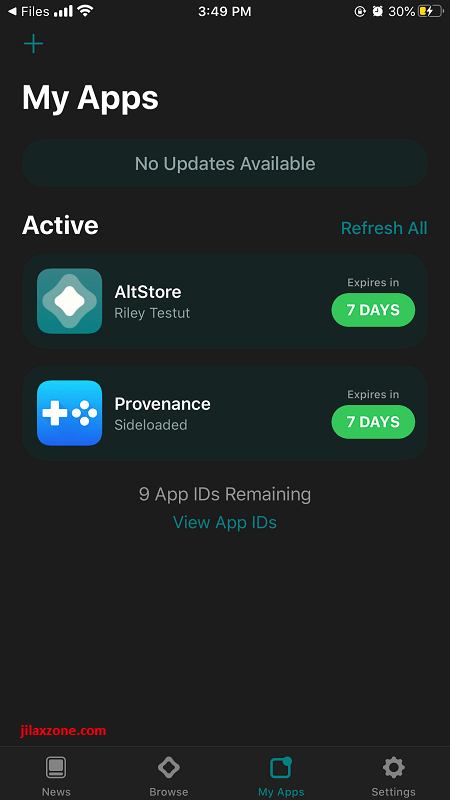
Using AltStore with free developer account, you have 3-app limit
At the time this article is written, Apple has announced iOS 15 and iPadOS 15, so in case now you are on iOS 15 or iPadOS 15 and looking how to install AltStore on iOS 15 & iPadOS 15, check out this link: Here’s how to install and run AltStore on iOS 15 & iPadOS 15 at JILAXZONE.
3-app limit bypass and workaround
Here’s the workaround and the bypass method you can do to get around the 3-app limit on AltStore.
The workaround
If you are looking for a workaround, what you can do is to deactivate the app.
a) Open AltStore app.
b) Inside AltStore, go to My Apps tab, then on the app you want to deactivate and / or remove, long press the app until the sub menu appear, then tap “Deactivate”. The app will then gets deactivated.
Now you can sideload a new app without getting the “Cannot activate more than 3 apps and app extensions” error.
The bypass
If you are looking to bypass the 3-app limit, what you can do is to join the paid Apple developer program (link: https://developer.apple.com/). It’s $99 / year. Once you joined the paid developer program:
a) Plug your iPhone (or iPad) into computer with AltServer running.
b) On your iPhone, open AltStore app.
c) Inside Altstore, go to Settings tab, tap on “SIGN OUT”. When prompted, tap “Sign Out”. You’ll be signed off.
d) Key in your Apple ID and password and sign back in.
Once you have signed back in, you can sideload as many apps as you like and there’s no more 3-app limit.
Do you have anything you want me to cover on my next article? Write them down on the comment section down below.
Alternatively, find more interesting topics on JILAXZONE:
JILAXZONE – Jon’s Interesting Life & Amazing eXperience ZONE.
Hi, thanks for reading my curated article. Since you are here and if you find this article is good and helping you in anyway, help me to spread the words by sharing this article to your family, friends, acquaintances so the benefits do not just stop at you, they will also get the same goodness and benefit from it.
Or if you wish, you can also buy me a coffee:
Live to Share. Share to Live. This blog is my life-long term project, for me to share my experiences and knowledge to the world which hopefully can be fruitful to those who read them and in the end hoping to become my life-long (passive) income.
My apologies. If you see ads appearing on this site and getting annoyed or disturb by them. As much as I want to share everything for free, unfortunately the domain and hosting used to host all these articles are not free. That’s the reason I need the ads running to offset the cost. While I won’t force you to see the ads, but it will be great and helpful if you are willing to turn off the ad-blocker while seeing this site.