Оформление текста сообщений WhatsApp жирным шрифтом
Не многие пользователи мессенджера WhatsApp умеют применять предусмотренную в нём функцию форматирования текста отправляемых сообщений, а это — отличный метод создания максимально информативных и/или эмоциональных посланий. Сегодня в статье расскажем, как выделять отдельные слова, фразы или предложения в тексте жирным шрифтом.
Для того чтобы решить озвученную в заголовке статьи задачу в различных версиях мессенджера, за счёт отличий в интерфейсе WhatsApp для Android, iOS и Windows, потребуется выполнить несколько различающиеся действия. Следует учесть, что из двух предложенных ниже методов форматирования текста универсальным и однозначно применимым пользователями всех трёх ОС является лишь первый!
Способ 1: Специальный символ
Основной способ выделения отправляемого через WhatsApp текста жирным шрифтом – это установка в его начале и конце символа * .
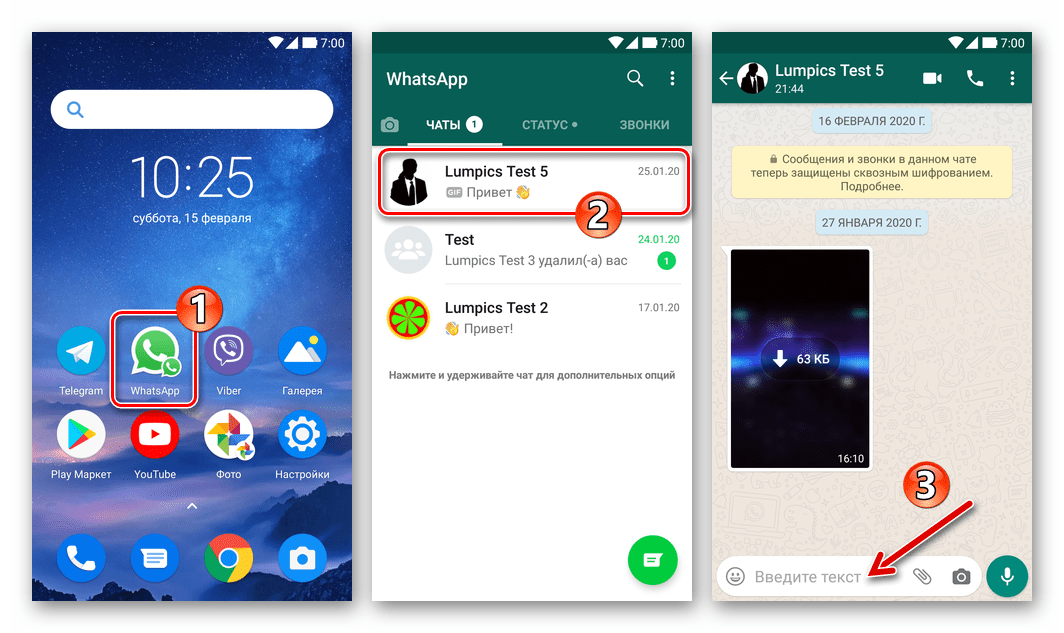
- Запустите мессенджер и откройте чат с собеседником, которому планируете отправлять текст с форматированием. Установите курсор в поле набора сообщения.
- Введите символ * . Далее, не ставя пробела, напишите выделяемое жирным шрифтом слово, фразу или предложение. Завершив ввод, вновь без пробела поставьте * .
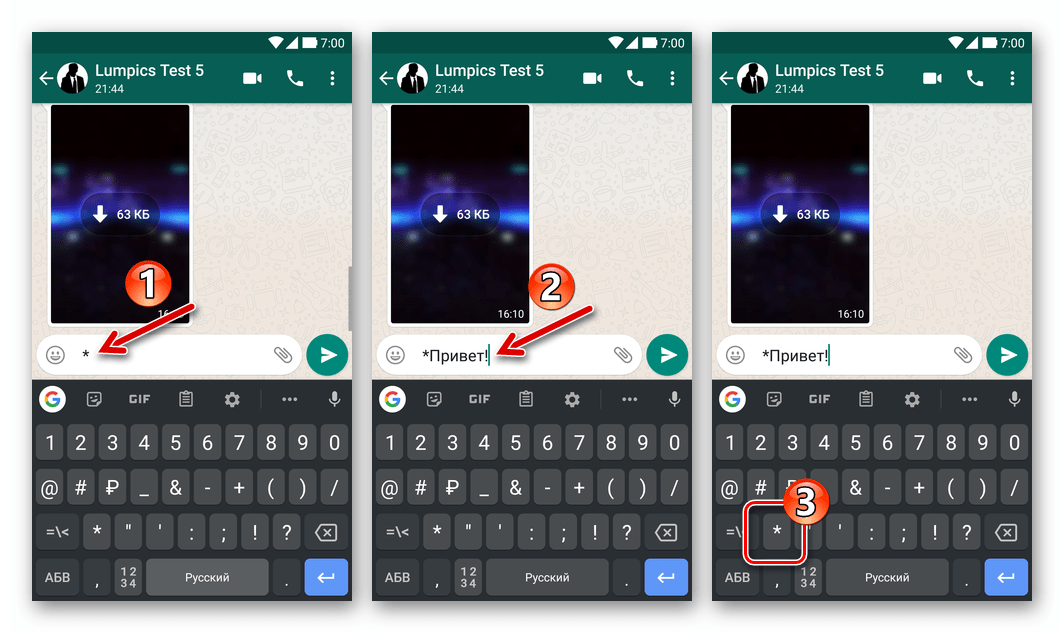
В среде Виндовс предварительный просмотр эффекта от установки символов форматирования в формируемом для отправки через ВатсАп сообщении не предусмотрен.
- Андроид:
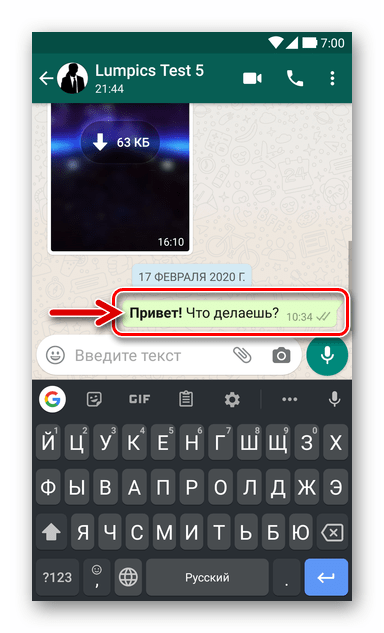
- айОС:
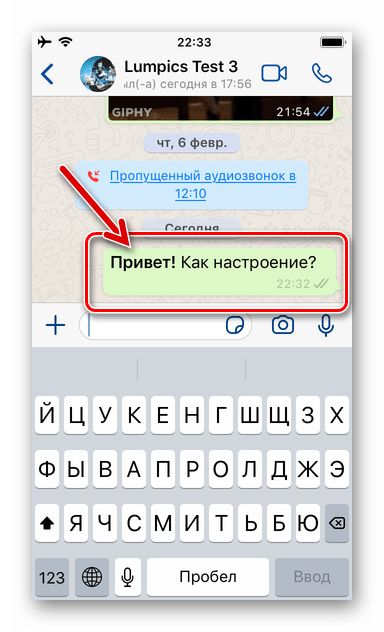
Помимо применения предложенного в инструкции выше порядка действий, можно просто набрать сообщение полностью, поставить звездочки в начале и конце выделяемых жирным шрифтом фрагментов текста и затем выполнить отправку.
Способ 2: Контекстное меню
В среде любой версии iOS, а также на большом количестве Android-устройств доступен еще один, часто более удобный, нежели вышеописанный, метод применения к тексту сообщения в WhatsApp форматирования – вызов соответствующей функции из специального меню.
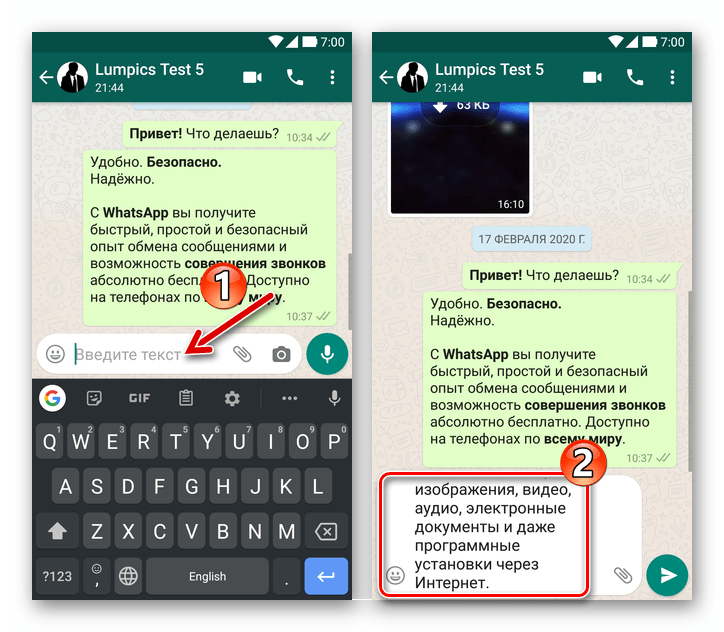
- Наберите предполагаемое к передаче в диалог или групповой чат ВатсАп текстовое сообщение, но не отправляйте его.
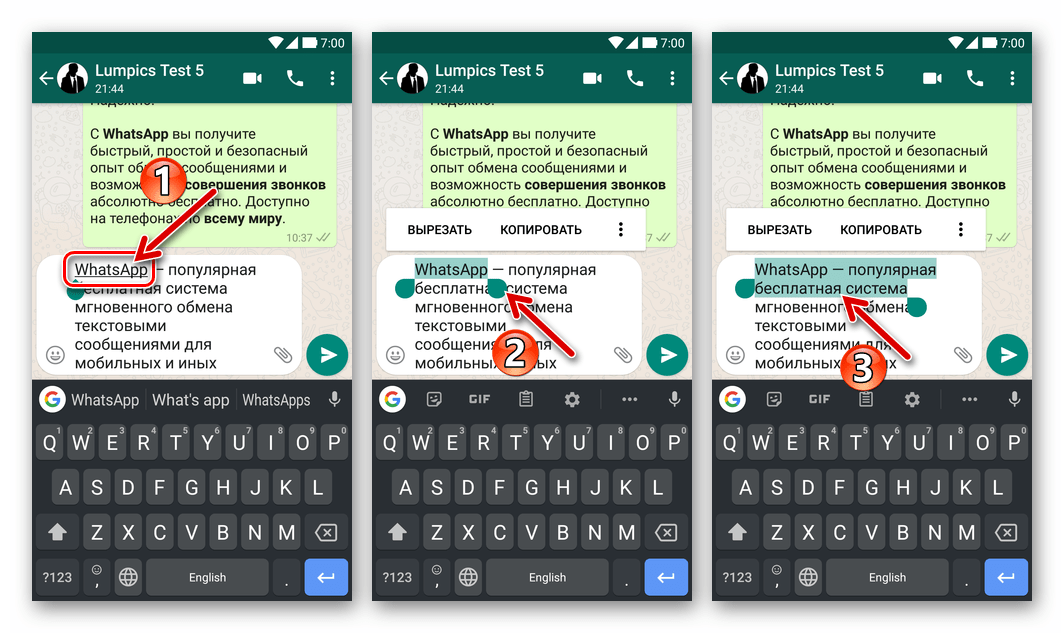
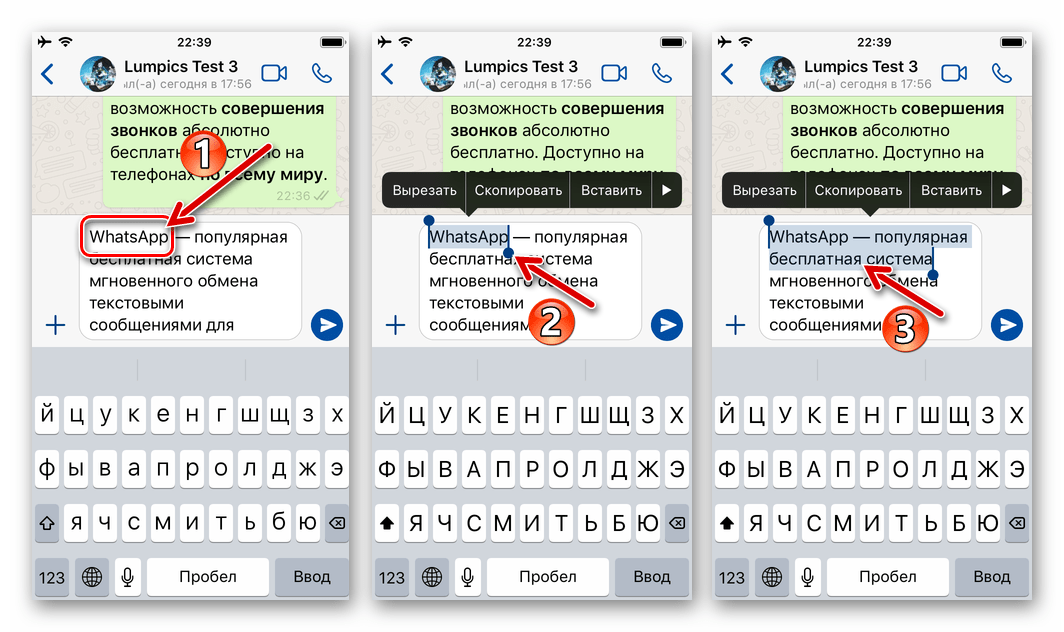
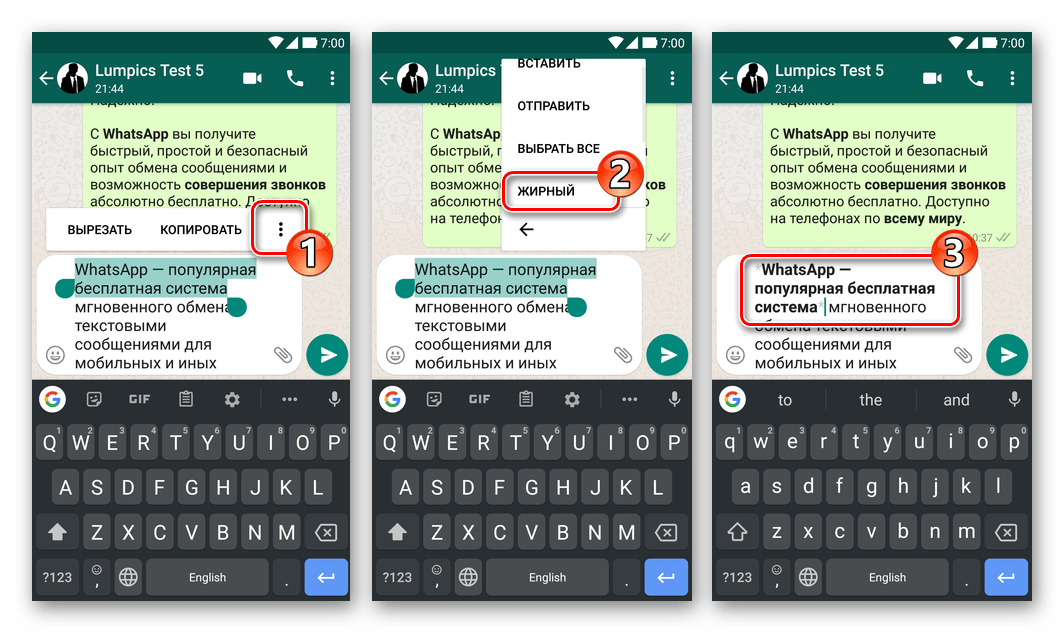
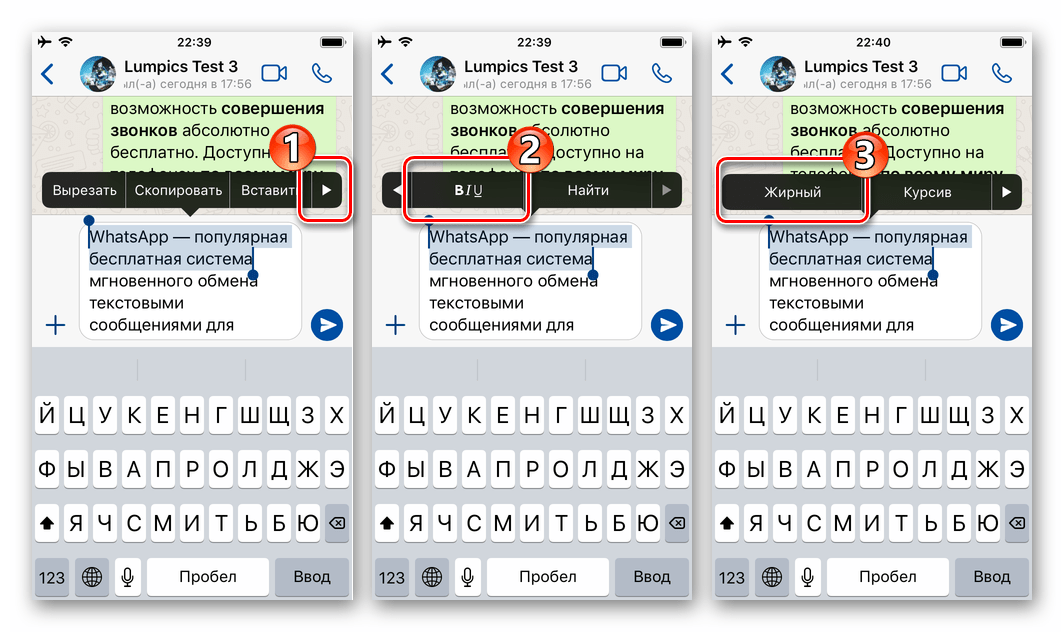
- В тексте послания выделите слово (длительное нажатие в Андроид, двойной тап по совокупности символов в айОС) или фразу, к которой нужно применить форматирование в виде жирного шрифта.
- Android:
- iOS:
- Android – в меню коснитесь трех вертикально расположенных точек, затем пролистайте отобразившийся список опций и выберите в нём «ЖИРНЫЙ».
- iOS — в перечне применимых к фрагменту текста действий коснитесь направленной вправо стрелки «Ещё», далее нажмите на ставший доступным в меню пункт «B I U», а затем выберите «Жирный».
Применяя один из доступных в той или иной версии мессенджера WhatsApp приёмов либо комбинируя использование описанных в статье методов форматирования, становится возможным выделять жирным шрифтом отдельные слова или их сочетания, предложения и текст сообщений целиком, а затем выполнить их отправку в любой чат.
Simple How Can I Make Bold Font In Whatsapp With New Ideas

Open the whatsapp by clicking on the icon in your phone. This will open a chat window for that particular recipient.
Simple How Can I Make Bold Font In Whatsapp With New Ideas, To make your text bold, write your message in this format. Tap more to choose strikethrough or monospace.

How to Write Bold, Italic, Strikethrough in WhatsApp on iPhone iGeeksBlog From igeeksblog.com
Once you do so and send the text, your desired word. To create strikethrough text, you need to add one tilde (
) before the word (s) you want to appear as strikethrough and one tilde (
) after the word (s) you want to appear as strikethrough. If you haven’t discovered these tricks yet, try them, they will make your words stand out. Download and install the bluewords app on your phone.
How to Write Bold, Italic, Strikethrough in WhatsApp on iPhone iGeeksBlog Italic and bold fonts on whatsapp.
After that put the underscore symbol i.e _ in front and end of the text that you want to make italic. To write in bold in whatsapp, you need to begin the text with an ‘*’ (asterisk). On the main screen, tap underlined words. Then you need to type in the text that you want to format bold.

Source: techvaio.com
Change font color in whatsapp chat. To write in bold in whatsapp, you need to begin the text with an ‘*’ (asterisk). Whatsapp asked marielle schaden score 4.3 votes change font size chatopen whatsapp.tap more options.tap settings chats font size.you can select from small, medium, large. F) change font to bold plus strikethrough format. How To Customize Fonts In WhatsApp Messages Techvaio.

Source: whatfontis.com
This will open a chat window for that particular recipient. Go to your whatsapp chat. Tap more to choose strikethrough or monospace. D) change font to the monospaced format. WhatsApp Hidden Tips, Tricks and Features You Never Knew.

Source: droidviews.com
Type your text on the following screen and tap the copy icon. Change font color in whatsapp chat. If you give one line space, you will have to insert the star at the end and beginning again. Alternatively, you can use shortcuts on android and iphone. 7 Cool WhatsApp Tips and Tricks You Must Checkout DroidViews.

Source: kitabelajar.github.io
How to write bold in whatsapp. B) change font to the italic format. Tap on the start writing button. Tap more to choose strikethrough or monospace. Whatsapp Bold Italic Underline Mudah.

Source: voyager8.blogspot.com
@serenesat my comment has nothing to do with the question. Now, select a contact you wish to chat with. To monospace your message, place three backticks on both sides of the text: After that put the underscore symbol i.e _ in front and end of the text that you want to make italic. WhatsApp tips how to make the message text bold, italics.

Source: techindroid.com
Now, select a contact you wish to chat with. On the main screen, tap underlined words. E) change font to bold plus italic format. And you will have to repeat it whenever you want to put bold as it will not be saved. How to use Bold, italic and Strikethrough in WhatsApp on Android & iOS.

Source: help4ucode.wordpress.com
Bold, italic, strikethrough, or monospace. Whatsapp lets you format your messages with bold just by typing special characters before and after the text in your message. Open the whatsapp messenger app on your smartphone. Here we take a look at how you use this app to underline text in whatsapp. Type Bold, Italic and Strikethrough Text in WhatsApp help4u.
Source: igeeksblog.com
Type your message in the whatsblue text app. Tap on ‘font size’ and you will see three options, small, medium and large. A) change font to the bold format. This will open a chat window for that particular recipient. How to Write Bold, Italic, Strikethrough in WhatsApp on iPhone iGeeksBlog.

Source: mute.fm
Once you have typed out the text, you can enclose it with ‘*’ (asterisk) if the steps are followed correctly, once you send the message, it would reflect bold formatting at the recipient’s end. Go to your whatsapp chat. Once you do so and send the text, your desired word. The text “ good ” between two _ will automatically turn into an italic font style. Whatsapp font tips and tricks mutefm.

Source: utilitylog.com
I am replying to your comment to an answer. To make the text italic, insert an underscore ( _) before and after the desired text. Italic and bold fonts on whatsapp. On the main screen, tap underlined words. How to add text formatting in Google+ & WhatsApp Utilitylog.

Source: businessinsider.com.au
This will open a chat window for that particular recipient. * this text will be bold *. To make text bold and italic at the same time. Type your message in the whatsblue text app. Here’s how to use bold and italics on WhatsApp Business Insider.

Source: apothecarylounge.com
In the chatbox type the text you want to send. Type an asterisk ( * ) on either side of a word or phrase to make it bold. B) change font to the italic format. Choose from the options popup. How To Type Bold In Whatsapp Apothecary Lounge.

Source: techguruplus.com
Change font color in whatsapp chat. To type in bold, insert an asterisk (star *) at the beginning and the end of a word, sentence, or paragraph. Bold, italic, strikethrough, or monospace. Once you do so and send the text, your desired word. How to write Bold, Italic and Strikethrough in Whatsapp.

Source: paktales.com
D) change font to the monospaced format. Bold = text italic = text ; Launch whatsapp on your device. Open the whatsapp by clicking on the icon in your phone. WhatsApp Font Style Trick How to Change WhatsApp Font Style.
Source: intellectdigest.in
To make your text bold, write your message in this format. Tap on ‘font size’ and you will see three options, small, medium and large. 2 texting on whatsapp can be made more fun by changing the format or font of. How to write bold in whatsapp. How To Bold, Italics And Strikethrough Text In Whatsapp.

Source: igeeksblog.com
Open the whatsapp app and start/open a chat to send a bold text. Add these symbols to change your text: The text “ good ” between two _ will automatically turn into an italic font style. While the whatsapp default settings come with medium font size, you can change it according to your preference. How to Write Bold, Italic, Strikethrough in WhatsApp on iPhone iGeeksBlog.

Source: standard.co.uk
Tap more to choose strikethrough or monospace. To create strikethrough text, you need to add one tilde (
) before the word (s) you want to appear as strikethrough and one tilde (
) after the word (s) you want to appear as strikethrough. Tap on the start writing button. I am replying to your comment to an answer. WhatsApp update adds bold, italic, and strikethrough text and here’s.
![How to Bold in Whatsapp? [Simple Procedures] Tech Follows](https://i0.wp.com/www.techfollows.com/wp-content/uploads/2019/03/How-to-Bold-in-Whatsapp-4.png?resize=587%2C1024&ssl=1)
Source: techfollows.com
While the whatsapp default settings come with medium font size, you can change it according to your preference. Long touch on the message so that the complete message is selected. Now scroll down to the ‘chats’ option and tap on it. Open the whatsapp app and start/open a chat to send a bold text. How to Bold in Whatsapp? [Simple Procedures] Tech Follows.

Source: whatfontis.com
One is by applying shortcuts, and the second is via the whatsapp formatting option. Open the chat where you want to send a message. This aesthetic font is one of the favorite fonts by whatsapp users. Now type your message and add the ( *) asterisk symbols before and after the message or a part of the message to make the fonts bold. WhatsApp Hidden Tips, Tricks and Features You Never Knew.

Source: mobiletrans.wondershare.com
Change font color in whatsapp chat. To make text bold and italic at the same time. Tap on the ‘send’ button to send the written message. Your text font is now converted from normal to bold. Here are All the WhatsApp Text Tricks and Tips That You Should Know.

Source: voyager8.blogspot.com
Go to your whatsapp chat. Tap the text you’re entering in the text field. @serenesat my comment has nothing to do with the question. Follow the steps to format your text in whatsapp. WhatsApp tips how to make the message text bold, italics.
How make the font bigger. While the whatsapp default settings come with medium font size, you can change it according to your preference. Open blewwords app whatsblue text ( fancy text generator pro) from the app drawer and open the “ fancy text ” option. Now scroll down to the ‘chats’ option and tap on it. How to format text (make text bold, italic etc) during chats in.

Source: geekinstructor.com
On the main screen, tap underlined words. On ios and ipados, choose biu and then bold, italic, strikethrough, or monospace. Now scroll down to the ‘chats’ option and tap on it. In the chatbox type the text you want to send. How to Change Font Style and Color on WhatsApp.

Source: igeeksblog.com
The text “ good ” between two _ will automatically turn into an italic font style. On ios and ipados, choose biu and then bold, italic, strikethrough, or monospace. You can change the format in whatsapp by putting * before and after the word you want to transform. Open the chat where you want to send a message. How to Write Bold, Italic, Strikethrough in WhatsApp on iPhone iGeeksBlog.
For Example, If You Type Igeeksblog As Igeeksblog In Whatsapp, It Will Automatically Become Bold.
Go to your whatsapp chat. Apart from making text bold and italic, whatsapp now also allows users to generate strikethrough text. C) change font to the strikethrough format. Type your message in the whatsblue text app.
For The Example We Typed Hello.
Add these symbols to change your text: Long touch on the message so that the complete message is selected. To write in bold in whatsapp, you need to begin the text with an ‘*’ (asterisk). Tap on the ‘send’ button to.
Scroll Through Your Contact List And Tap On The Contact That You Want To Send A Message To.
There are two ways of using monospace text. Here, we shall share some cool whatsapp font tips and tricks to add a more dramatic effect to your messages. Open the whatsapp by clicking on the icon in your phone. In the chatbox type the text you want to send.
I Am Replying To Your Comment To An Answer.
If you give one line space, you will have to insert the star at the end and beginning again. To type in bold, insert an asterisk (star *) at the beginning and the end of a word, sentence, or paragraph. Open the app and go through the welcome wizard. Choose from the options popup.
Как использовать жирный, курсивный и зачёркнутый шрифт в WhatsApp
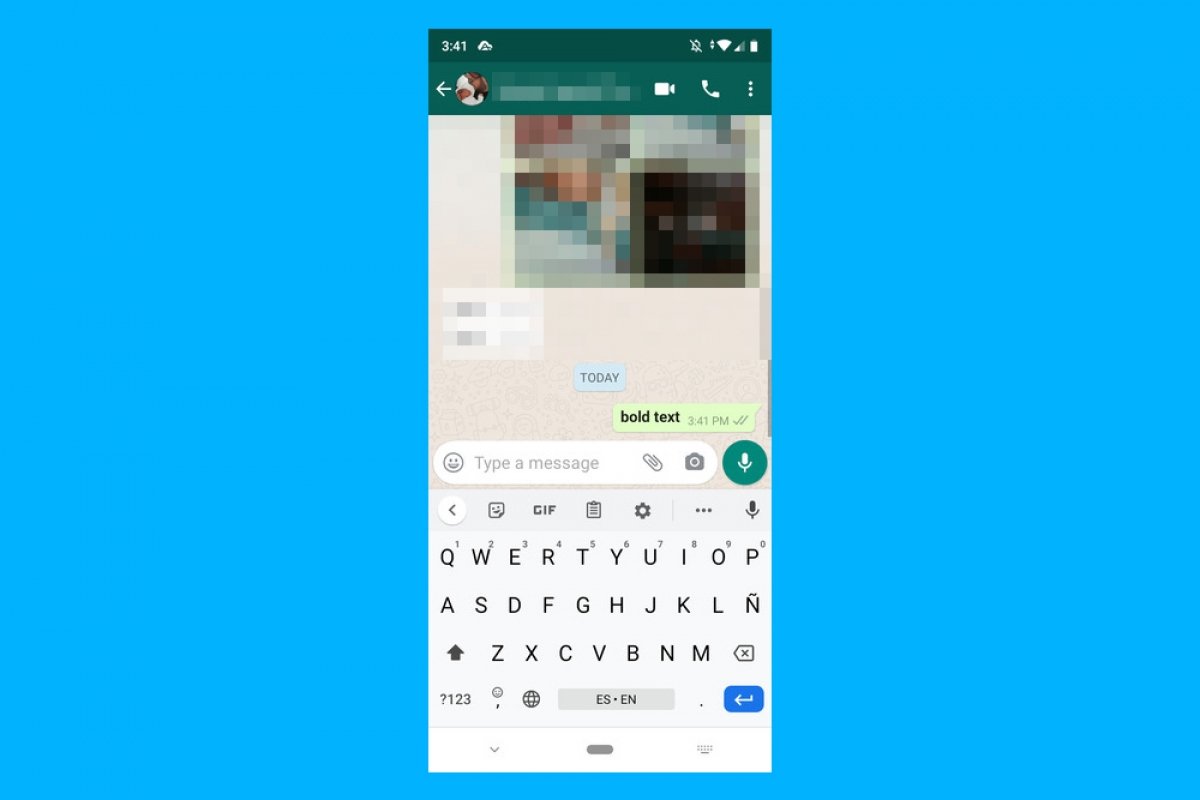
Чтобы выделить текст в WhatsApp жирным, курсивным и зачеркнутым шрифтом, нам нужно вводить конкретные символы перед текстом, который мы хотим изменить. Например, чтобы выделить текст жирным шрифтом, нужно поставить звездочку в начале и в конце слова или предложения. Вот как это будет выглядеть при печатании:
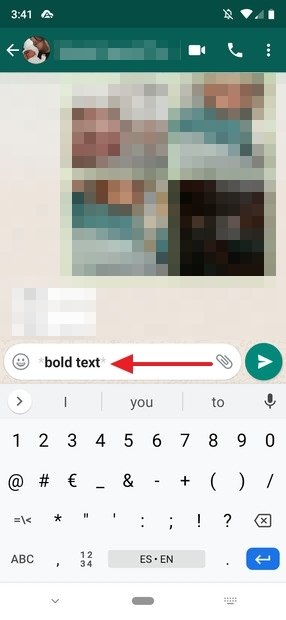
Писать жирным шрифтом
И следующим образом при отправке:
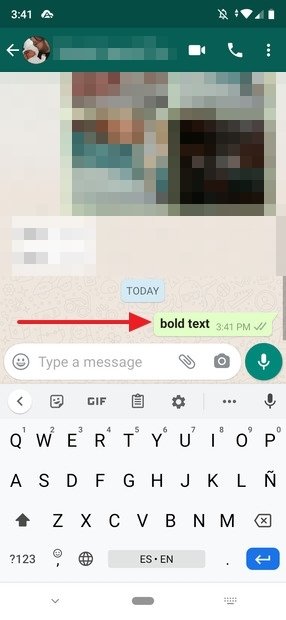
Текст выделен жирным шрифтом
Чтобы выделить его курсивом, мы меняем звездочки на нижние дефисы, как показано ниже:
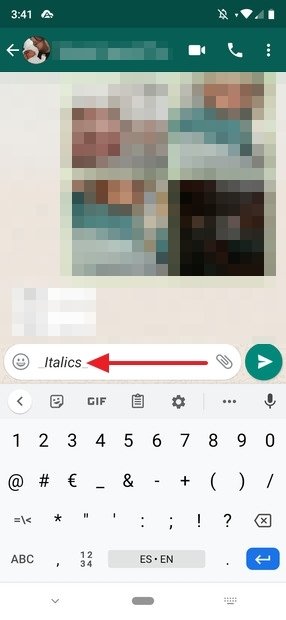
Писать курсивом
И так выглядит после отправки сообщения:
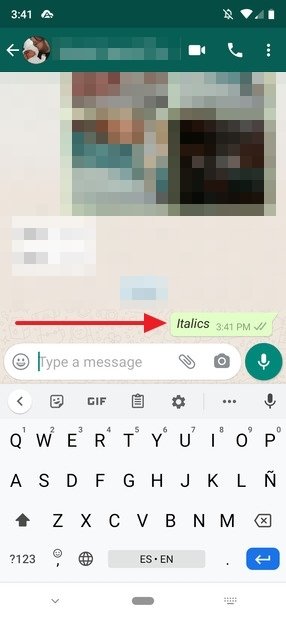
Окончательный результат курсивом
И чтобы зачеркнуть текст, мы должны поместить текст между тильдами (знак
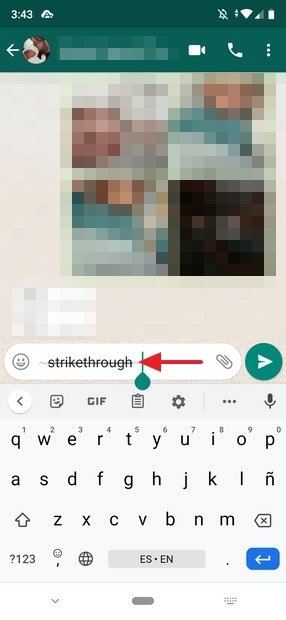
Зачеркнутый текст
Наш контакт получит его в этом виде:
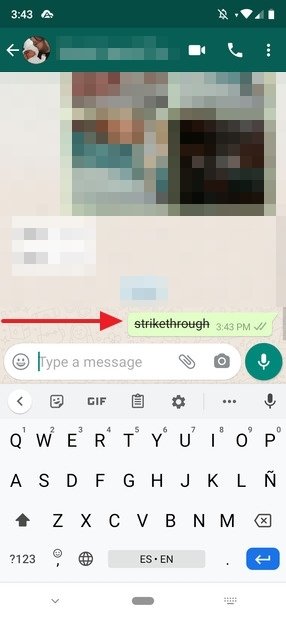
Вид зачеркнутого текста в чате
Эта возможность форматирования текста уже давно работает в WhatsApp, и является еще одним способом добавления выразительности в сообщениях, отправленных нашим получателям. Знаки, используемые для форматирования текста, берутся непосредственно из языка разметки, используемого при онлайн-редактировании контента, известного как Markdown.
Хотя его конечная цель — добиться максимальной разборчивости и простоты публикации, с помощью этого языка в издательском мире писателям не нужно отрывать руки от клавиатуры для форматирования текста, чтобы они могли делать это на ходу. И идея использования этой разметки в WhatsApp точно та же: вам не нужно скрывать клавиатуру, и можете выделять разные части текста по мере его печатания. Очевидно, что им очень легко пользоваться, так как достаточно знать несколько простых правил.
Шрифты в WhatsApp

Ведя переписку в мессенджере, далеко не все пользователи знают, как за счет разных шрифтов сделать сообщение выразительным. Выделение важных слов и фраз привлекает внимание читающего. При помощи форматирования доносится основная мысль сообщения. Какие стили написания поддерживаются в приложении, как изменить стиль написания сообщения, расскажем далее.
Стили написания текста в мессенджере
Разработчики предусмотрели лишь несколько приемов выделения текста или его частей. Для этого поддерживаются следующие шрифты:
| Доступные стили написания слов и фраз | Жирный |
| Наклонный (курсив) | |
| Перечеркнутый | |
| Моноширный (ширина знаков и символов одинакова) |
Как писать жирным шрифтом
Жирный шрифт в Ватсапе — стиль наиболее броский, информативный. Используется для выделения главной мысли месседжа.
Чтобы написать слово или фразу в этом стиле применяется следующий прием:
- Вводите текст сообщения, предназначаемый собеседнику.
- Перед и после фразы, которую нужно жирным текстом, поставьте символ «*».
- В отправленном сообщении помеченные звездочками фрагменты сообщения будут отображаться жирным шрифтом.

Как писать курсивом
Наклонный стиль написания красивый. Чтобы выделить текст курсивными буквами весь текст или определенный фрагмент, следует в его начале и конце ввести знак нижнего подчеркивания «_». В отправленном сообщении отмеченный специальным символом фрагмент отобразится курсивом в Whatsapp.

Как перечеркнуть текст
Зачеркнутый текст в Whatsapp применяют для внесения поправок в написанный месседж. Сделать зачеркнутым текст несложно — достаточно в начале и конце нужного фрагмента вставить символ «
«(Тильда). В отправленном тексте этот кусок будет отображаться зачеркнутым.

Как применить моноширный шрифт
Моноширный стиль написания (FixedSys) применяется редко. Это так называемый шрифт разработчиков, но он доступен для использования в сообщении. Достаточно для изменения шрифта обрамить начало и конец текстового фрагмента специальным символом ««`». Чтобы вставить подряд три апострофа, нужно на клавиатуре мобильника нажать на кнопку, обозначенную «123». В открывшейся панели трижды нажмите на нужный символ.

После отправки сообщения текст выбранного фрагмента будет отражен в отличающемся от стандарта стиле.

Альтернативный способ форматирования сообщения
На Андроиде
Ведите текст сообщения. Нажмите и удерживайте на слово, которое нужно в текстовом поле выделить. Появится контекстное меню с кнопкой в виде вертикальных трех точек. Нажмите на эту кнопку. Откроется еще один перечень пунктов с вариантами: жирный, курсив, зачеркнутый, моноширный. Достаточно выбрать нужные стили, чтобы применить разные шрифты.

На Айфоне
Аналогичным образом нужно нажать на введенный текст и удерживать до появления пунктов меню «Выбрать» или «Выбрать все». Далее перейти «B I U», где следует выбрать требуемый формат.

Читайте также:
Как написать в Ватсап с компьютера на телефон
Полезные советы
Совет №1
Применяя различные стили форматирования, следует учитывать содержание беседы. В деловом формате важно правильно расставлять акценты, и не допускать нарушений этики делового письма.
Совет №2
Допускается обрамление текстового фрагмента сочетанием специальных символов. Можно написать фразы жирным курсивом или перечеркнутым жирным шрифтом и т.д. Но не следует забывать, что между спецсимволами и словом не должно быть пробелов. В противном случае замены шрифта не получится.
Совет №3
Выделенный моноширным шрифтом фрагмент текста преобразовать дополнительно не получится.
Часто задаваемые вопросы
Можно ли в Вацапе поменять размер шрифта ?
Размер шрифта, используемого для отображения переписки можно изменить. Откройте приложение. Перейдите в меню «Настройки». Выберите пункт «Чаты». Здесь найдите подпункт «Размер шрифта» и определитесь с выбором. Доступны три варианта: Маленький, Средний или Большой.