How To Install Lineage Os 19 1 For Redmi 9A 9C 9 Activ Android 12
Xiaomi Redmi 9A, Xiaomi Redmi 9C, and Xiaomi Redmi 9 Activ (garden) launched in June 2020. The handset came with Android 10 Q. In this tutorial, we will guide you to install the latest Lineage OS 19.1 on the Redmi 9A/9C/9 Activ (garden) smartphone. We have given the complete instructions, downloads, and useful updates in the future.
As we all know, Lineage OS 19.1 is based on Android 12 which is the 12th major release by Google and brings many new features and improvements. One of the biggest changes that Android 12 brings to your device is the Material You design language. It is aimed to enhance personalization on the device by allowing users to pick a custom color palette and new widgets.
Android 12 and Its Features#
Android 12 is all about improved personalization and revamped user interface that changes the way to bring more dynamic expression and a whole new design element. It’s a successor of the last-gen Android 11 which was basically focused on the privacy and security of the user data. While the Android 12 not only focused on privacy features but also on visual treatment.
Talking about the features, it has all new and colorful yet minimal widgets that are now more dynamic than ever before. While the dynamic theme with the wallpapers is more expressive as per your mood. The notification shade, lock screen, and its notifications, glance screen, volume controls, quick shortcut tiles, new power menu, transitions or animations, etc everything looks & feels great whatsoever with the ‘Material You’ design.
Meanwhile, the impressive Privacy Dashboard feature, the privacy indicator on the top of the screen is also great. Whereas scrolling screenshot support, improved notifications, quick reply feature, on-device search feature, easy Wi-Fi sharing, one-handed mode, quick back tap feature, haptic-coupled audio effect, Android 12 updates via Google Play, App hibernation, all-new emojis, improved auto-rotate, and a lot more.
How to Install Lineage OS 19.1 on Redmi 9A/9C/9 Activ#
As the title suggests, here we’ve shared the requirements and steps to flash the Lineage OS 19.1 on the Xiaomi Redmi 9A/9C/9 Activ variant.
Before heading over to the guide, make sure to follow all the requirements below.
Pre-Requisites#
Before we begin with this procedure, I would strongly recommend you create a backup of your device storage and all your files stored on your device. Moreover, it is advised to follow the steps mentioned in this post very carefully to avoid permanent damage or to brick your device.
Charge Your Phone#
It’s highly recommended to charge your handset before unlocking the bootloader to avoid your device from shutting down occasionally while going through the process. Make sure to keep at least 50% of charge or higher for a smooth operation.
Download ADB and Fastboot Binaries#
You can skip this adb and fastboot part if you have already installed TWRP Recovery on your Xiaomi Redmi 9A/9C/9 Activ.
Using the ADB and Fastboot command (platform-tools), you’ll be able to boot your Android device into the bootloader mode (download mode) which will be easy for you to proceed with further steps. ADB (Android Debug Bridge) creates a connection or bridge between the device and computer to sideload files.
Whereas Fastboot is a more advanced command utility tool for Android devices that works with computers. You can download ADB and Fastboot Binaries (Platform-Tools).
Download Xiaomi USB Drivers#
A USB Driver is a set of files that basically allows you to create a successful and strong connection between a mobile device with a computer properly using a USB data cable. It’ll be useful to transfer files between the connected devices, flash files on the handset, and more.
It’s also worth mentioning that not only mobile devices but also other external devices can use and run USB Drivers on a Windows computer. Such as a mouse, keyboard, printer, external hard drives, speakers, USB flash drives, etc. You can grab Xiaomi USB Drivers here.
Unlock Bootloader Your Phone:#
To enjoy any custom ROM, you must first unlock the bootloader on your Xiaomi Redmi 9A/9C/9 Activ.
Install TWRP Recovery:#
You have to install TWRP Recovery on your phone to install any custom ROM on your device. After unlocking the bootloader, you can follow our guide to install TWRP Recovery on your Xiaomi Redmi 9A/9C/9 Activ.
Download Lineage OS 19.1 ROM:#
Here, you will find the Lineage OS 19.1 for Redmi 9A/9C/9 Activ.
Download Android 12 Gapps:#
It’s worth mentioning that most of the third-party AOSP (Android Open Source Project) ROMs (also known as aftermarket firmware) come without any preinstalled Google apps package. You can manually install the Android 12 GApps by following our guide.
Instructions to Install:#
- Connect your device to the PC via USB cable. Make sure USB Debugging is enabled.
- Then head over to the platform-tools folder, type in CMD in the address bar, and hit Enter. This will launch the Command Prompt.
- Execute the below command in the CMD window or enter recovery mode by using the Volume and Power button combination. your device to TWRP Recovery:
- adb reboot recovery
- Now head over to the Install section and navigate to the downloaded vendor and firmware. Perform a right swipe to flash it.TWRP Home
- If you want Google Apps as well, then you need to flash it at this instance itself. Go to Install, select the GApps ZIP file, and perform a right swipe to flash this file.
- When that is done, you may reboot your device. Head over to Reboot and select System.
Your device will now boot to the newly installed OS. With this, we conclude the guide on how to install the Lineage OS 19.1 on Redmi 9A/9C/9 Activ. Do keep in mind that the first boot might take up some time and you might have to set up your device from scratch.
GetDroidTips won’t be responsible for any kind of issue that may happen to your device if you flash it on another device and brick it. Do it at your own risk.
Как установить андроид, 12 на Редми 9 с MIUI 12.5.4.0 RJCMIXM на андроид 12
 Максим Александров
06.02.2022
Как установить андроид, 12 на Редми 9 с MIUI 12.5.4.0 RJCMIXM на андроид 12 помогите пожалуйста
Дополнено (1). Дайте полную инструкцию умоляю!
 Макс Человеч
06.02.2022
 Tyler Durden
06.02.2022
4pda тебе в помощь
 Сигизмунд Сигизмундович
06.02.2022
Той же которая стояла изначально.
 dreg_sagin
06.02.2022
Install Android 12 on Redmi 9C NFC (LineageOS 19.1) – How to Guide!
Xiaomi Redmi 9C NFC (garden) launched in August 2020. The handset came with Android 10 Q. In this tutorial, we will guide you to install the latest Lineage OS 19.1 on the Redmi 9C NFC (garden) smartphone. We have given the complete instructions, downloads, and useful updates in the future.  As we all know, Lineage OS 19.1 is based on Android 12 which is the 12th major release by Google and brings many new features and improvements. One of the biggest changes that Android 12 brings to your device is the Material You design language. It is aimed to enhance personalization on the device by allowing users to pick a custom color palette and new widgets.
Talking about the Lineage OS 19.1, it’ll be the upcoming latest version in the Lineage OS family which is a successor of the last-gen Lineage OS 18/18.1 (Android 11). Obviously, the craze of Android 12 visual elements and some of the stunning features are one of the main attraction points to most Android lovers.
Therefore, interested Android fans are eager to use all of those features on Lineage OS 19.1 with the freedom of customizations. As Lineage OS is based on AOSP source code, it’ll have almost every available feature that other Android 12 stock firmware will come with. So, the combo will become deadly for the custom firmware or rooted Android lovers for sure.
Important Notes!
This ROM will only work on this device, Don’t try this on any other device.
Follow the steps correctly otherwise you may brick your device. We are not responsible for any damage to your phone.
It will erase all your data, so we advise you first to take a complete backup of your phone and then proceed.
Ensure that your phone has at least 50-60% charged to prevent the accidental shutdown in-between the process.
Requirements!
You must have TWRP Recovery Installed on your device. (L earn here: How to install )
XDA Development Forum: Here!
(☝Check this XDA Forum for Exact Details on how to Install this ROM also check if there’s a patch need to be flash)
▼DOWNLOAD FILES
Download LineageOS 19 ROM
Download Recovery Image from Google Drive
Check out which G-App is compatible with your device from Here!
Installation instructions:
Download the latest build , GApps
Reboot to recovery
Wipe system , vendor , data , cache, internal storage.
Flash the latest build & GApps
Reboot
Instructions to Install
1. First Download & Install a Custom Recovery on your device ( TWRP is recommended), If you already have installed then skip this step.
2. Download ROM & Gapps .zip file and save it on your device’s internal storage or SD Card.
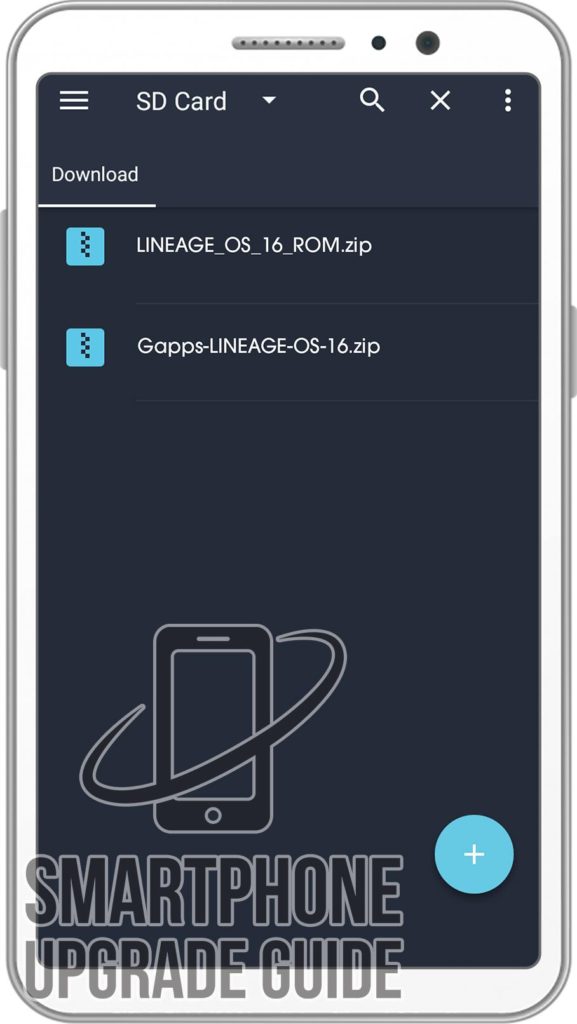
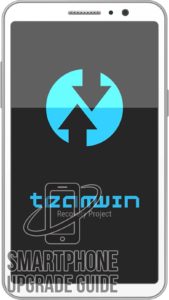
3. Now Boot your device into TWRP Recovery Mode. (if you don’t know how to boot your device into twrp recovery then you can search it on Google)
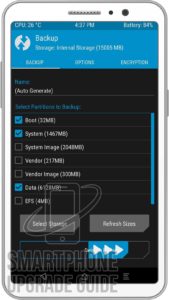
4. Now in TWRP create a Nandroid Backup of your device for safer side. If anything goes wrong, you can restore back to your older ROM. (How to Take Nandroid Backup)
5. Now do a Factory Reset of your device, Goto Wipe > Advanced Wipe > Select Cache, Dalvik Cache, System, and Data. Then Swipe to Wipe.
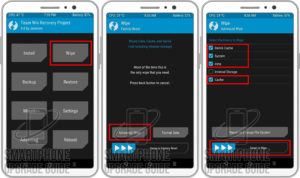
6. Now go back to TWRP Main Menu by pressing the Center navigation button.
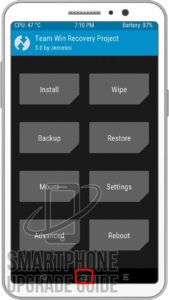
7. Now Select Install, Locate the ROM zip file and Swipe to Confirm Flash.
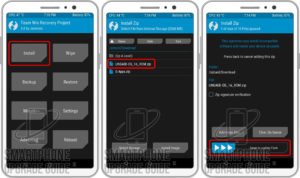
8. After the flashing completes, Flash the Gapps in the manner.
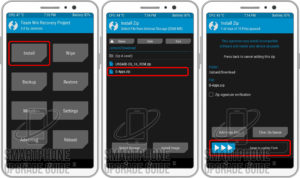
9. After Gapps flashing completes, Select Wipe cache/dalvik from the bottom left side of the screen, & Swipe to Wipe.
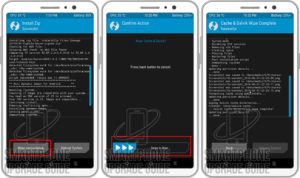
10. After wipe completes, Click on Reboot System.
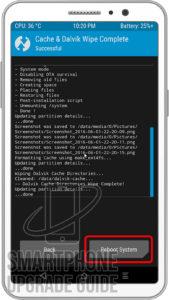
That’s it Now you have successfully installed the latest Android on your device, the first boot will take some time so please don’t panic!
If you have any questions regarding the ROM or the installation process, use the comments section below to reach us or contact to XDA forum members from the link above.
Прошивки Redmi 9

Прошивки Redmi 9 (кодовое имя lancelot ) ниже — это оригинальные стабильные версии MIUI, которые можно скачать в виде Fastboot ROM, Recovery ROM и OTA Update.
Название модели соответствует телефону M2004J19G (Global), M2004J19AG (Global NFC), M2004J19C (China). Стоковые прошивки бесплатно загружаются с официального сайта Xiaomi — bigota.d.miui.com. Мы только собираем и публикуем ссылки на оригинальные обновления.
| Модель | Redmi 9 |
|---|---|
| Дата выхода | июнь 2020 |
| Поддержка | Завершена |
| Последняя ОС | MIUI 13, Android 12 |
Глобальная 13.0.4.0.SJCMIXM
Последняя стабильная глобальная прошивка для Redmi 9 от Xiaomi.
Recovery ROM
- Updated Android Security Patch to January 2023. Increased system security.
Fastboot ROM (Flash File)
- Updated Android Security Patch to January 2023. Increased system security.
Старые официальные глобальные прошивки для Redmi 9:
Китай 13.0.5.0.SJCCNXM
Последняя стабильная китайская прошивка для Redmi 9 от Xiaomi.
Recovery ROM
- Where all things connect
- New: Protective watermarks for images
- New: Introducing comprehensive anti-fraud protection mechanisms
- New: All-new Mi Sans system font with better readability
- New: `Crystallization` live wallpapers
- New: Mi AI can be fully customized now
- Optimization: Improved overall stability
- Optimization: Responsiveness for all system and most popular third party apps
- Optimization: Home screen is now much more fluid and responsive
- Stable MIUI based on Android 12
- Updated Android Security Patch to September 2022. Increased system security.
- New: Protective watermarks can be added as a pattern that is displayed over the whole image protecting it from unauthorized use
- New: Introducing comprehensive anti-fraud protection mechanisms that include warnings, official labels, and transaction shields
- New: Incognito mode restricts camera, microphone, and location permissions
- New: Secure input protects all the text you enter
- To be able to use all MIUI 13 privacy protection features, update Gallery, Security, Contacts, and Messaging to their latest versions
- New: All-new Mi Sans system font with better readability
- Optimization: App vault is now more responsive and has smoother scrolling experience
- App vault widgets can be rearranged now
More features and improvements
- New: Ambient sound recognition in Mi Ditto
- Optimization: Wallet looks much better now
- Optimization: Voice controls are better recognized in Accessibility mode now
- Optimization: Enhanced accessibility support for Phone, Clock, Weather, and Themes
- Optimization: Privacy protection, secure web browsing, and better feed
- Optimization: Mind map nodes are more convenient and intuitive now
Fastboot ROM (Flash File)
- Where all things connect
- New: Protective watermarks for images
- New: Introducing comprehensive anti-fraud protection mechanisms
- New: All-new Mi Sans system font with better readability
- New: `Crystallization` live wallpapers
- New: Mi AI can be fully customized now
- Optimization: Improved overall stability
- Optimization: Responsiveness for all system and most popular third party apps
- Optimization: Home screen is now much more fluid and responsive
- Stable MIUI based on Android 12
- Updated Android Security Patch to September 2022. Increased system security.
- New: Protective watermarks can be added as a pattern that is displayed over the whole image protecting it from unauthorized use
- New: Introducing comprehensive anti-fraud protection mechanisms that include warnings, official labels, and transaction shields
- New: Incognito mode restricts camera, microphone, and location permissions
- New: Secure input protects all the text you enter
- To be able to use all MIUI 13 privacy protection features, update Gallery, Security, Contacts, and Messaging to their latest versions
- New: All-new Mi Sans system font with better readability
- Optimization: App vault is now more responsive and has smoother scrolling experience
- App vault widgets can be rearranged now
More features and improvements
- New: Ambient sound recognition in Mi Ditto
- Optimization: Wallet looks much better now
- Optimization: Voice controls are better recognized in Accessibility mode now
- Optimization: Enhanced accessibility support for Phone, Clock, Weather, and Themes
- Optimization: Privacy protection, secure web browsing, and better feed
- Optimization: Mind map nodes are more convenient and intuitive now
Старые официальные китайские прошивки для Redmi 9:
Европа 13.0.3.0.SJCEUXM
Последняя стабильная европейская прошивка для Redmi 9 от Xiaomi.
Recovery ROM
- Updated Android Security Patch to January 2023. Increased system security.
Fastboot ROM (Flash File)
- Updated Android Security Patch to January 2023. Increased system security.
Старые официальные европейские прошивки для Redmi 9:
Индонезия 13.0.1.0.SJCIDXM
Последняя стабильная индонезийская прошивка для Redmi 9 от Xiaomi.
Recovery ROM
- New: A new widget ecosystem with app support
- Optimization: Improved overall stability
- Stable MIUI based on Android 12
- Updated Android Security Patch to October 2022. Increased system security.
More features and improvements
- Optimization: Mind map nodes are more convenient and intuitive now
- Optimization: Enhanced accessibility support for Phone, Clock, and Weather
Вероятно, этот Recovery ROM является стабильной бета-версией.
Старые официальные индонезийские прошивки для Redmi 9:
Россия 12.5.5.0.RJCRUXM
Последняя стабильная русская прошивка для Redmi 9 от Xiaomi.
Recovery ROM
Fastboot ROM (Flash File)
Обновление OTA
Старые официальные русские прошивки для Redmi 9:
Турция 13.0.3.0.SJCTRXM
Последняя стабильная турецкая прошивка для Redmi 9 от Xiaomi.
Recovery ROM
- New: A new widget ecosystem with app support
- Optimization: Improved overall stability
- Stable MIUI based on Android 12
- Updated Android Security Patch to December 2022. Increased system security.
More features and improvements
- Optimization: Mind map nodes are more convenient and intuitive now
- Optimization: Enhanced accessibility support for Phone, Clock, and Weather
Вероятно, этот Recovery ROM является стабильной бета-версией.
Старые официальные турецкие прошивки для Redmi 9:
Самая свежая версия прошивки не значит лучшая. Перед установкой обновления на Redmi 9 lancelot , ознакомьтесь с отзывами на сайтах 4PDA или XDA Developers. Если вы установили полную прошивку или обновление и столкнулись с проблемами в её работе, пожалуйста, расскажите об этом в комментариях, указав её номер!
Redmi 9 находится в списке Xiaomi EOS (end-of-support). Это аналог EOL (End of Life) и означает, что поддержка смартфона прекращена. Он не получает обновлений программного обеспечения и новые прошивки от Сяоми, а известные уязвимости безопасности не исправляются.
Сяоми выпускает ежемесячные и ежеквартальные обновления патчей безопасности для Xiaomi, Redmi и POCO в течение 2-3 лет после выхода устройства на рынок. Ежемесячные и ежеквартальные обновления безопасности включают исправления безопасности Android от Google, а также исправления специфических проблем от Xiaomi.
Получит ли Redmi 9 MIUI 14?
Нет, Xiaomi завершила выпуск обновлений для него. Последняя версия MIUI для Redmi 9 — MIUI 13.