Обновление Apple CarPlay: когда душе хочется чего-то новенького

Один из главных вопросов, который тревожит пользователей Apple CarPlay — обновление программного обеспечения и добавление новых функций. Многие автовладельцы до сих пор рассчитывают, что в ближайшее время появится поддержка Яндекс карт или других полезных возможностей. Ниже рассмотрим, нужно ли обновление ЭпплКар Плей, чем оно полезно, и какие возможности появились в последней версии.
Нужно ли обновлять Apple CarPlay
Процесс пользования приложением подразумевает подключение Айфона к головному устройству автомобиля. При этом ресурсы и возможности Apple CarPlay зависят от операционной системы телефона и последних изменений. Это не удивительно, ведь Эппл КарПлей является системным приложением. По этой причине обновление автомобильного софта происходит одновременно с системой. Это означает, что предпринимать отдельные шаги, чтобы обновить Apple CarPlay, не нужно.
Возникает другой вопрос — как сделать обновление самого Айфона. Как только появляется сообщение о появлении новой версии, выполните следующее:
- Поставьте девайс на зарядку.
- Подключитесь к Интернету по Вай Фай.

- Войдите в Настройки, а далее Основные.

- Выберите пункт Обновление ПО.

- Жмите на кнопку Загрузить и установить. Если не хватает места, удалите лишние приложения.
- Кликните Установить или жмите Позже.
- Введите пароль, если это необходимо.

На версиях Айфонов выше IOS 12 выставьте автоматическое обновление. Сделайте следующие шаги:
- Войдите в Настройки.
- Жмите Основные.
- Войдите в Обновление ПО.
- Кликните Автообновление.

После этого устройство, а вместе с ним и Apple CarPlay будет обновляться в автоматическом режиме. Если этого не произошло, придется сделать работу в вручную.
Какая версия сейчас актуальна и ее функции
На момент написания статьи в Айфонах работает iOS 13.5.1, получившая ряд дополнений, в том числе в отношении автомобильного приложения.

Выделим основные опции:
- Поддержка сторонних программ навигации в панели ПО.
- Сведения о текущем вызове видны в панели КарПлей.
- Исправлена ошибка софта, из-за которой его подключение могло прерываться на некоторых авто.
Появилось и ряд других исправлений, касающихся остальных элементов программного обеспечения.
Кроме того, в самой 13-й версии ОС произошло большое обновление всех элементов Apple CarPlay. Рассмотрим наиболее важные:
- Дизайн. Оформление софта было существенно проработано и усовершенствовано. Главной задачей стало приведение интерфейса к дизайну Айфон Х. Поменялась также и боковая панель, на которой находится информация о времени, статусе сети и последних подключенных программах.

- Dashboard. Теперь на этой панели отображается только наиболее полезная информация без лишних элементов. Интерфейс делится на две составляющие. Слева показывается маршрут, карта и текущее положение, а справа информация от календаря, маршруты, включенное аудио и иные сведения.
- Новые режимы и программы. В обновлении Apple CarPlay появились настройки и календарь. В последнем показывается текущая дата, а при входе в софт можно делать заметки касательно будущих встреч и событий. Также в КарПлей доступен темный и светлый режимы. Цветовой баланс оптимизирован максимально корректно для комфортных поездок.

- Сири. Головой помощник также получил ряд полезных функций. Теперь Siri показывается в виде звуковой волны внизу, а не на весь экран, как это было до обновления.
- Дополнительные изменения. Ряд нововведений появилось и в Эппл Мьюзик. Главный упор сделан на обложках альбомов из музыкальной библиотеки. Также усовершенствован механизм выбора рекомендации. Оптимизирована навигация, появилась возможность более дательной прокладки маршрутов и т. д.
Как видно, обновление Apple CarPlay имеет большое значение, ведь после него часто появляются новые функции и вносится ряд полезных исправлений.
Что делать, если обновление Эппл КарПлей прошло неуспешно
Бывают ситуации, когда после загрузки нового ПО приложение начинает работать некорректно. К примеру, в последних версиях пользователи жаловались, что Сири переключается на Off, что мешает нормальному взаимодействию с софтом. Для устранения проблемы необходимо убедиться, что голосовой помощник включен, после чего требуется активировать Apple CarPlay. Если проблему не удалось решить, перезапустите телефон. В крайнем случае, может потребоваться сброс настроек.

Как видно из статьи, в отдельном обновлении софта для машины нет необходимости. Apple CarPlay обновляется вместе с операционной системой Айфона и получает дополнительные опции. Если этого не произошло, можно обновить ПО на телефоне вручную с помощью приведенной выше инструкции. При этом не забудьте полностью зарядить телефон и следуйте рекомендациям устройства, чтобы избежать ошибок.
How to Update Apple CarPlay Using iPhone
More than 80% of users worldwide use the Apple CarPlay feature in their cars to make their ride and utilization of the iPhone easier. The Apple Carplay is now even better with its newest update, iOS 16.
Steps to Update Apple CarPlay
If you want to avail the new feature of Apple CarPlay, you don’t want grab your car keys for it. Instead, you can update it just by using your iPhone.
1. In your iPhone, ensure you have connected to a WiFi connection.
2. Next, tap Settings.
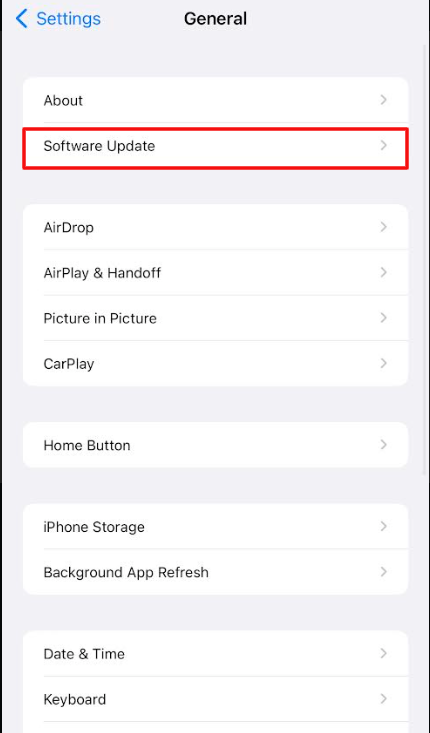
3. Under Settings, select General and tap Software Update.
4. Inside the Software update, turn on the Automatic Update feature. Now, check your iPhone version.
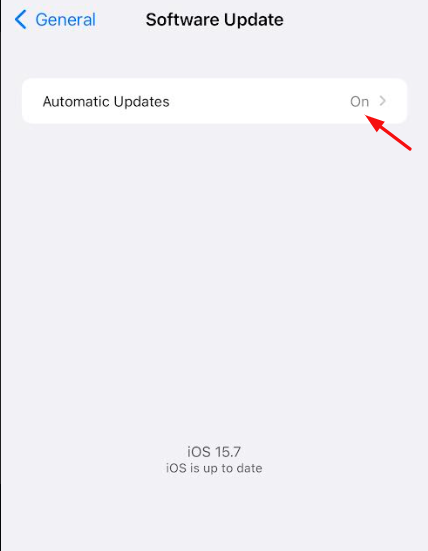
5. If you are using the older version, update your iPhone to the latest iOS version.
6. If an update is available for your iPhone device, you can download it on your device.
After installing your latest iOS version on your mobile, go to your car and connect your iPhone to Apple CarPlay. Next, connect your Apple CarPlay with USB or wirelessly with your updated iPhone, and your CarPlay will automatically get updated. If you are an iPhone user with an iOS 16 version, you can avail some of the new features of Apple Car play.
Apple CarPlay Features
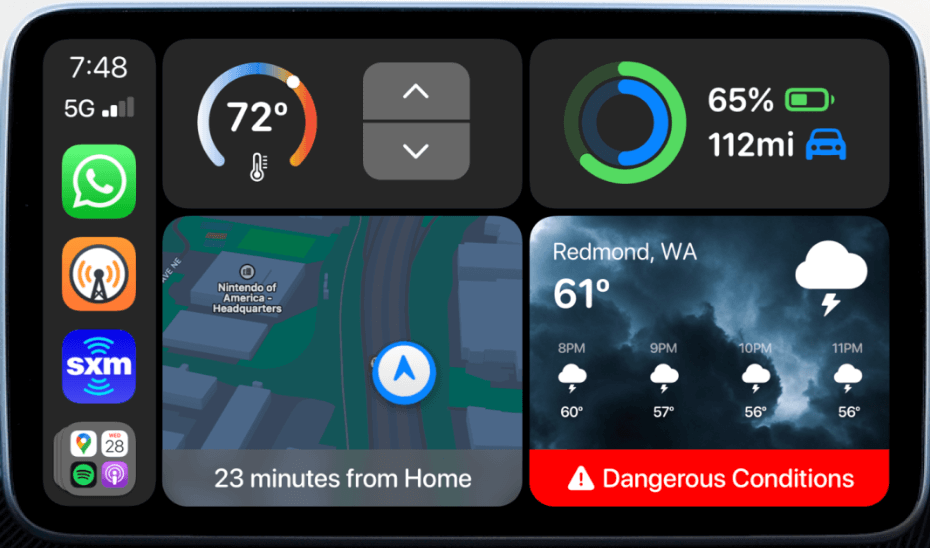
Apple CarPlay comes up with a new update along with iOS 16 with different features that make your ride a bit cooler.
New Widgets & Functions
The new update of CarPlay comes up with new widgets that make your car ride easier. Widgets like trip information, emails, online orders, online payments, etc. With these widgets, you can customize your home screen and make use of the widgets wisely. Moreover, you can control climate and seat ventilation as well.
Themes & Display
With the cluster theme feature, you can change your Rotary dials, digital speedometer, etc. If you like to add a new theme to your CarPlay, you can download it as an add-on and use it on your car.
Frequently Asked Questions
To enable the wireless mode on your CarPlay app, open your iPhone Settings → General → CarPlay → Turn On Bluetooth. The method works only when your car supports wireless connections.
Yes. Some of the 2022 models of Kia cars come along with the CarPlay feature. In older models, you can enable CarPlay by using a USB cable.
Как обновить carplay в машине
Do I Need To Update CarPlay in My Car?
You do not need to update CarPlay in your car. Instead, updates to CarPlay are provided by Apple through software updates on your phone or device, and there is no need to update CarPlay firmware. Apple CarPlay works through your car’s infotainment system, which is compatible with Apple.
Therefore, CarPlay updates come through your Apple devices and not your vehicle, as your vehicle isn’t manufactured by Apple.
Also, you must keep your devices up-to-date to make sure you have the newest features. Besides, these updates usually contain patches to fix bugs Apple has found in the software.
How to Update Apple CarPlay?
You can update Apple CarPlay by installing the most recent iOS update on your Apple device. Although not every software update will have patches specifically for CarPlay, keeping your device up to date is important.
Use your Apple device to open Settings>General>Software Update to check for available updates. There’s no CarPlay App.
After the update, you may need to reconnect your device to your car if you’re having trouble.
To reconnect your device:
- Navigate to Settings>General>CarPlay on your Apple device.
- Select your vehicle.
- Select “Forget This Car.”
- Restart your car.
- Restart your device.
- Connect your device using a USB cord or Bluetooth and follow the setup prompts.
What Is the Current Version of Apple CarPlay?
As of May 2022, the most recent version of the software is iOS 15.4.1, with iOS 15.2.1 being the last update that specifically addressed bugs with Apple CarPlay.
Many new CarPlay features were introduced with iOS 15, including CarKey, Focus, and Announce Messages with Siri. Here’s a quick rundown:
- CarKey: This is a feature that allows you to use your iPhone as a key to start your car. It also offers additional safety features, such as your car only starting if the phone (and, by extension, its owner) is inside the vehicle.
- Driving Focus : An overhaul of the previous ‘Do Not Disturb’ feature, iOS 15 allows you to customize which contacts and apps can send you alerts while you’re driving.
- Wallpapers : iOS 15 adds several new wallpaper options to CarPlay.
- Maps : The updates to Maps are making it more specific and accurate. However, these updates are only for large cities as of this writing. See more about: Apple Maps CarPlay settings.
- Announce Messages with Siri : Carplay Siri can now automatically read your messages aloud and allow you to respond without having to take your eyes off the road.
What Were the Past Versions of Apple CarPlay Software?
CarPlay features began in iOS 8 and have continued to expand with every subsequent update. These updates have included many new capabilities and lots of bug fixes to the software.
Past iOS updates included:
- iOS 8 allowed Apple devices to connect to CarPlay wirelessly. added the ability to play audio messages in your car and expanded the compatibility of Apple Music. provided convenient shortcuts for frequently used apps and Apple Music features. didn’t add any new capabilities to CarPlay but fixed many bugs that were causing problems with audio functionality. allowed CarPlay to support third-party navigation apps in addition to Apple’s Maps software. was a very significant update for CarPlay. It featured a completely new dashboard and added Calendar and Apple News apps. It also updated Maps, Music, and the information for incoming calls. A Do Not Disturb feature was also added (recently replaced with Focus in iOS 15). updated Siri to be able to send messages, warn drivers of accidents and speed traps, and share your ETA with contacts. CarPlay also became compatible with the intercom feature released on HomePods and added Chinese and Japanese keyboards.
- iOS 15Enhanced city maping for Apple maps including displaying turn lanes, bike lanes, and crosswalks (In supported cities: London, Los Angeles, New York City, and San Francisco). Fixed bugs related to third-party apps not responding and HomeKit issues. This update was all about the “next generation of CarPlay” and prepares for upcoming features that are expected in late 2023, which will allow for a more cohesive car and CarPlay experience allowing for more interaction with the cars instrument cluster displays, control of the radio and HVAC, although this will depend on the model vehicle you have. In this update, there are also more apps for driving tasks, such as fueling, road information, towing help, and more. Lastly, there is a new setting that allows you to skip the confirmation step when sending messages. You can enable this in Siri’s settings.
- IOS 17 [NOT RELEASED YET]:
- SharePlay for the Music App: SharePlay now works with the Apple Music app in CarPlay. This feature allows everyone in the car, including passengers, to contribute to an Apple Music playlist. As long as the car owner has an Apple Music subscription and initiates a SharePlay session from CarPlay, other people in the car can choose music to play. Each person can scan a QR code generated by the main user to get access to the playlist to add songs to the in-car Apple Music queue. Importantly, only the person who starts the SharePlay session needs to have an Apple Music subscription, allowing others to contribute without needing to pay .
- EV Charging Station Improvements: For electric vehicle owners, the Apple Maps app can now provide real-time charging availability for compatible charging networks. This update should make it easier for EV owners to locate nearby charging stations during a trip .
- Messages Updates: The Messages app in CarPlay has a revamped interface that aims to make it easier to quickly reply and re-read a message without taking too much attention away from the road .
- Wallpaper: iOS 17 includes new wallpaper options, which can be expanded to the CarPlay interface 1 .
- The All-New CarPlay Experience: Apple previewed the next-generation version of CarPlay at WWDC 2022, which will offer deeper integration with vehicles in the future. CarPlay will support multiple displays, showing up across all of the displays in a vehicle, including the instrument cluster. It will integrate with the speedometer, tachometer, odometer, fuel gauge, and more. The vehicle’s climate controls will also be accessible through CarPlay in upcoming vehicles, allowing users to adjust temperature and activate other in-car climate features through the CarPlay interface. The first cars with this updated technology will be coming in late 2023, and we can expect to see additional CarPlay features coming in future iOS 17 updates. Car brands that will support next-generation CarPlay include Acura, Audi, Ford, Honda, Jaguar, Land Rover, Mercedes-Benz, Nissan, Porsche, and Volvo 1
Conclusion
As promised, updating Apple CarPlay is easier than you think. CarPlay software is updated through iOS updates on your phone, which you can find in the Settings app on your device.
The more recent your iOS version is, the fewer issues you’ll have updating it.
Как обновить carplay в машине
Есть такая штука от Apple — называется CarPlay:
телефон подключается к штатной IVI автомобиля по USB и есть возможность пользоваться со штатного дисплея (картинка+тач+звук) приложениями, помеченными Apple как написанными под CarPlay: звонки, сообщения, сири, нави, музыка, etc..Притом, CarPlay — это не просто зеркалирование картинки с экрана айфона, это другой интерфейс, заточенный под отображение в ландшафтной ориентации на дисплеях размером от 6″ и разрешением от 800х480 (Требования Apple к equipment для CarPlay) + возможно использовать телефоном автомобильный GNSS (c нормальной антенной) c такими плюшками как Dead Reconing.
по современным тенденциям видно, что авто-вендоры достаточно бодро поддержали CarPlay: трудно найти автомобиль 2017м.г., который бы не предлагал поддержку CarPlay в качестве опции
Меня интересует как это реализовано технически, т.е. как поддержать CarPlay в HW, имея LCD c touchpanel, двунаправленный аудиоканал + качественные данные NMEA1083 (немного пошерстил сеть):