Зачем нужны планшеты на Harmony OS?
В 2010 году, когда Стив Джобс показал самый первый iPad, я очень захотел себе этот планшет. Однако тогда возникла определённая проблема: никто не понимал, зачем нужны планшеты. Нам пытались это объяснить со сцены и в течение следующих месяцев, но чёткого ответа так и не последовало.
Даже спустя десятилетие ответа всё ещё нет. На планшетах читают, играют, рисуют, работают — зоны применения можно называть, в принципе, до бесконечности.
Но почему-то именно к конкретным устройствам возникает вопрос: зачем нужны планшеты Huawei? Вопрос довольно странный, поскольку на этих планшетах можно делать практически всё то же самое, что и на планшетах других компаний.
 Иллюстрация: Светлана Чувилёва / Wylsacom Media
Чтобы удостовериться в этом, Huawei выдала мне два планшета. Это MatePad 11 и MatePad Pro 12,6.
MatePad 11
Признаюсь сразу: из обоих планшетов этот мне внешне понравился больше всего. Вероятно, из-за кожаного задника зелёного цвета:
В целом алюминиевая рамка и этот задник выглядят очень хорошо:
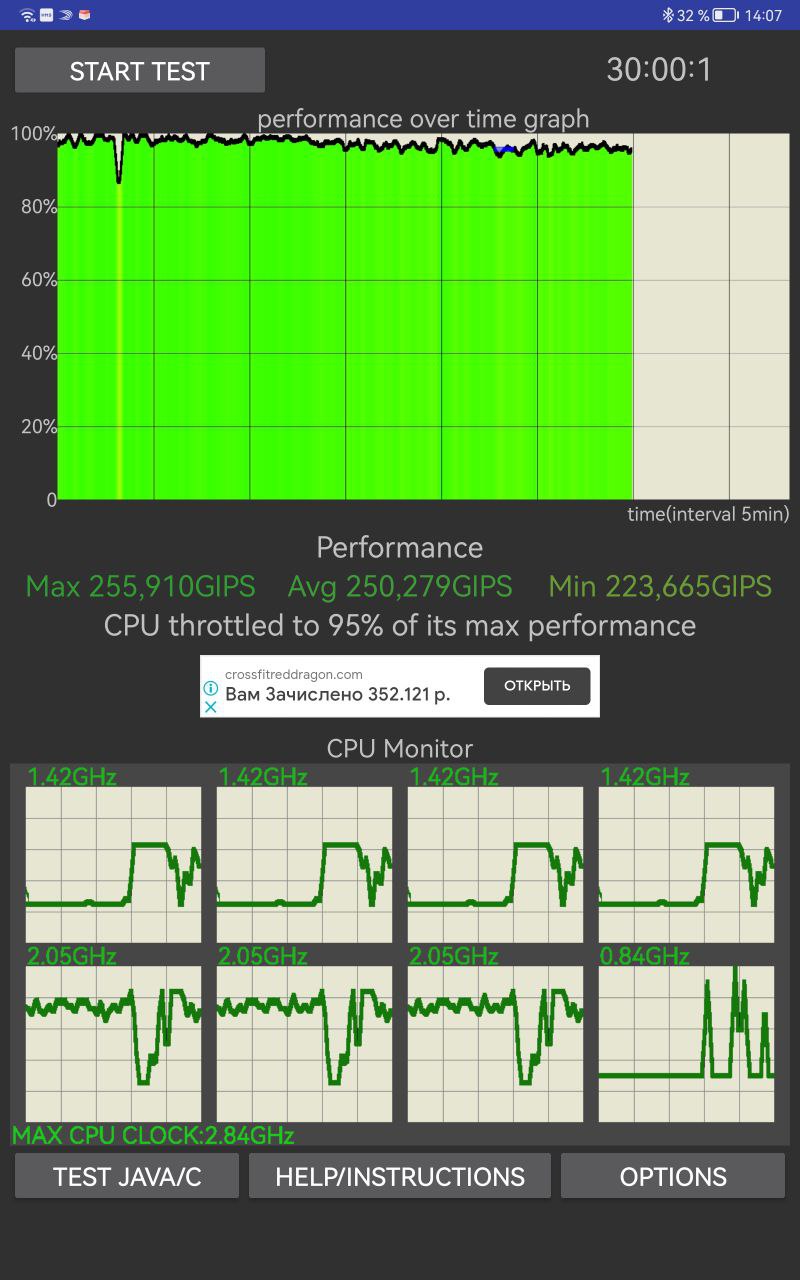
Планшет получил систему-на-чипе Qualcomm Snapdragon 865. Неожиданно её тут видеть из-за того, что это продукт американской компании. Оказывается, американские санкции касаются только компонентов, работающих в сетях пятого поколения, а 865-й их не поддерживает. Да и чего там говорить: все представленные на российском рынке планшеты идут только в Wi-Fi-версиях.
Понравился ещё и тот факт, что в троттлинг-тесте система показала себя лучше современной 888-й:
Планшет получил 10,95-дюймовый IPS-экран разрешением 2560 × 1600 пикселей. У дисплея цветовой охват DCI-P3. Есть сертификаты, подтверждающие, что дисплей не синит. Частота обновления изображения составляет 120 Гц. Изображение плавное, а картинка радует глаз.
У Huawei MatePad 11 аккумулятор условной ёмкости 7250 мАч. По словам производителя, его хватит для просмотра видео в течение 12 часов. Мне эти цифры, к сожалению, проверить не удалось — устройство находилось у меня на руках слишком мало.
MatePad Pro 12.6
Без кожаного задника планшет выглядит не так интересно:
Однако спереди из-за более узких, чем у младшей модели, рамок экран впечатляет:
Сразу видно, что это устройство для потребления контента.
Флагманский планшет получил OLED-дисплей диагональю 12,6 дюйма. У него высокая контрастность 1 000 000 : 1, а также цветовой охват DCI-P3. Помимо этого, дисплей имеет цветопередачу ΔE<0,56. Экран занимает 90 %. Разрешение точно такое же — 2560 × 1600 точек.
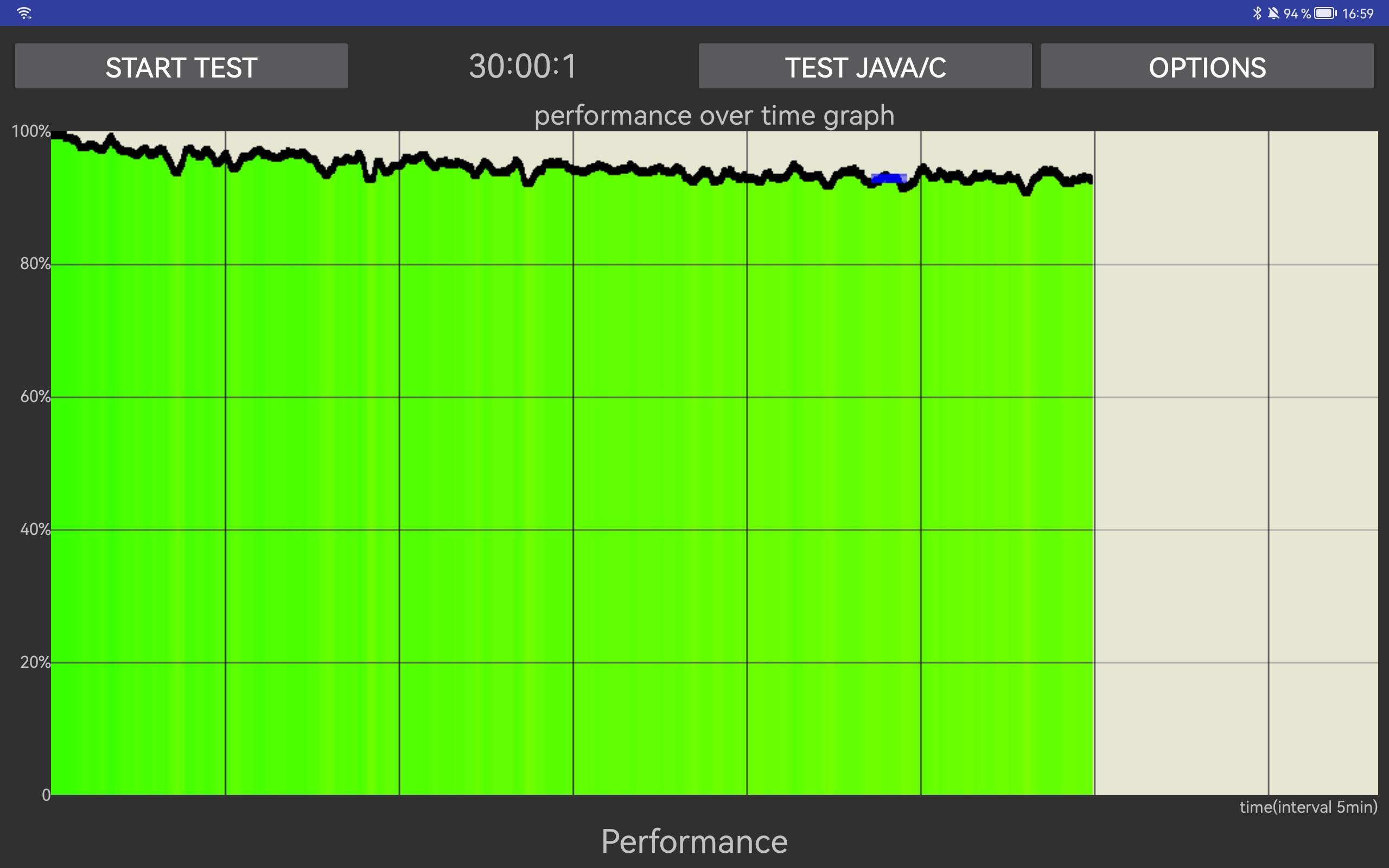
Вместо Qualcomm тут стоит собственная 5-нанометровая система-на-чипе Kirin 9000E. Вот её показатели в троттлинг-тесте, где разработка Huawei неплохо показала себя:
Аккумулятор тут побольше: условная ёмкость составляет 10 050 мАч. В комплекте идёт блок питания на 40 Вт. Но это ещё не всё: тут есть беспроводная зарядка! Её максимальная мощность составляет 27 Вт на получение энергии и 10 Вт на её отдачу. Очень неожиданное решение для планшета.
Общее
В обоих случаях за звук отвечают динамики, настроенные специалистами Harman Kardon. И, если откровенно, похвалить звук я могу только в младшей модели. У неё всего четыре динамика, а у старшей — восемь. Но большее количество излучателей не играет на благо звука. Это особенно обидно, учитывая отличные наушники, выпускаемые самой Huawei.
К планшету можно купить стилус Huawei M-Pencil второго поколения, а также клавиатуру Huawei Smart Magnetic.
Стилус распознаёт до 4096 степеней нажатия, отставания во время использования не заметил. Хорошее перо, которым удобно рисовать. Для зарядки стилус примагничивается к рамке планшета. Тут же на экране появляется сообщение, что идёт зарядка:
Клавиатура Huawei Smart Magnetic Keyboard оставляет приятное впечатление. У неё не очень большой ход клавиш, а также слабозаметный цокот. Единственное — я долго искал переключение языков. Сочетание клавиш «Ctrl + пробел» оказалось слишком неожиданным для этого дела.
У планшетов есть одна крутая функция, попробовать которую, к сожалению, у меня не вышло. Это функция «Мультискрин» в Huawei Share. Раньше вы могли транслировать экран смартфона на ноутбук Huawei. Подробно я описывал эту технологию в одном из обзоров ноутбуков:
Обзор Huawei MateBook 14: Intel i7 11-го поколения и 2K-экран за небольшие деньги
/>Илья Кичаев
Сейчас функциональность расширена до повторения экрана ноутбука на планшете, а также расширения до второго экрана. Теперь на планшете можно с помощью стилуса обрабатывать фотографии прямо в Photoshop, Lightroom или Capture One. А с учётом крутого OLED-экрана у Huawei MatePad Pro эта функция выглядит очень соблазнительной! Хочу скорее попробовать это в деле.
Какие приложения устанавливать?
На планшетах с Harmony OS работают как приложения, написанные специально для этой системы, так и Android-приложения с расширением apk. Huawei App Gallery ищет необходимое вам приложение, используя собственную базу, а также базы сторонних магазинов вроде APKPure, APKCenter и APKMonk.
Нет возможности подключить планшет к ноутбуку? Для рисования есть сразу несколько неплохих приложений. Например, Sketchbook и Zen Brush:
Для работы с документами можно установить приложение «МойОфис Документы» или даже пакет Microsoft Office. А ещё на обоих планшетах есть калькулятор.
Главная проблема, которую я нашёл, — отсутствие приложений для музыкантов, архитекторов и программистов.
А что с YouTube и приложениями Google?
Эти приложения также есть. Но запускаются они через Quick App — центр с приложениями, не требующими установки.
Однако отличия от приложений YouTube тут всё-таки есть, поскольку интерфейс выглядит так, будто вы смотрите ролики в мобильном браузере.
На моём устройстве был странный глюк: при нажатии на пробел в «Google документах» слово повторялось. В итоге набор выглядел так: «Стилусстилус имеетимеет 4096 нажатийнажатий»:
Надеюсь, проблему решат до выхода устройства в продажу.
Так зачем планшеты на Harmony OS?
Собственно, для того же, для чего и любой другой планшет. Разве что можно не устанавливать «Калькулятор» и заряжать любое другое устройство, поддерживающее Qi.
Каких-либо ограничений в использовании планшетов я не заметил: недостающие приложения спокойно устанавливаются из других магазинов приложений, а Quick App отлично запускает приложения, которые можно открыть и в браузере.
 Иллюстрация: Светлана Чувилёва / Wylsacom Media
Признаюсь: я не смогу ответить на вопрос, заданный в заголовке. Но не из-за того, что не понимаю эти планшеты, а из-за того, что каждый использует устройства по-своему.
Предзаказы на оба планшета открыты с 20 июля. Huawei MatePad 11 доступен в трёх версиях:
- 6/64 ГБ, в матово-сером цвете стоит 34 990 рублей;
- 6/128 ГБ в таком же матово-сером цвете обойдётся в 37 990 рублей;
- А вот версия в оливково-зелёном цвете с кожаным задником продаётся лишь в варианте 6/256 ГБ. Её цена составляет 44 990 рублей.
Huawei MatePad Pro 12.6 продаётся лишь в версии 8/256 ГБ и в единственном цвете — матово-сером. Его цена составляет 69 990 рублей.
Отдельно можно купить стилус за 9990 рублей и клавиатуру. Для небольшого планшета её цена составит 10 990 рублей, а для большого — 13 990 рублей.
Также в продажу поступила обновлённая версия Huawei MatePad Pro (10,8 дюйма). Планшет можно будет купить только в «полуночно-сером» цвете в варианте 8/128 ГБ. По габаритам он аналогичен Huawei MatePad 11. MatePad Pro работает на Qualcomm Snapdragon 870 и имеет возможность беспроводной зарядки в обе стороны.
Текст написан при поддержке российского представительства Huawei.
Как легко установить сервисы Google и другие приложения на устройства HUAWEI?
Смартфоны и планшеты HUAWEI поставляются с предустановленным магазином приложений AppGallery. Однако в нём нет сервисов Google и некоторых других популярных программ, вроде WhatsApp или Instagram*. С помощью специального инструмента Gspace эта проблема решается максимально просто. Рассказываем, что для этого нужно делать.
С помощью Gspace можно не только запускать отсутствующие в AppGallery приложения, но и использовать сразу несколько учётных записей одновременно, создавать аккаунты в мессенджерах, популярных социальных сетях и других программах.
Для установки Gspace из AppGallery следуйте инструкции:
- Сначала нужно открыть AppGallery и в строке поиска ввести «Gspace», а затем нажать «Установить».

- После установки Gspace дайте приложению все необходимые разрешения.

- После запуска Gspace загрузится своего рода «рабочий стол», где будут доступны многие популярные приложения. Запускать их можно из меню Gspace или же создать ярлыки для быстрого доступа с основного рабочего стола. Для этого необходимо зажать иконку нужного приложения до появления контекстного меню.

- Наконец, необходимо авторизоваться в аккаунте Google для доступа к личным данным и полноценного использования всех функций приложений.
* Продукт компании Meta, признанной экстремистской организацией в России

Самые комментируемые
 IceStorm37
 Svarga Velesovich
Svarga Velesovich
Svarga Velesovich
Svarga Velesovich
 kalmyk_d1978
DeonisiyRu
Vinokurov_se
«в игрушки играть ?»
А если даже в игрушки рубиться? Зачем писать об этом так уничижительно? Вполне хорошее времяпрепровождение. Если вы в этом ценности не видите, это не значит, что ценность отсутствует.
Лично мне не хватает синхронизации, я не могу в браузере интересующую страницу перебросить в пару кликов/тапов, вместо этого приходится либо через телегу кидать, либо через QR код. Chromecast не работает, сервисы гугл так же распространяются на офисный софт с gDrive, meet (Duo). И многое другое. Вроде как можно без GMS обойтись, но не хочется фигнёю страдать.
Vinokurov_se
knickerbocker
knickerbocker
Svarga Velesovich
Svarga Velesovich
knickerbocker
 akkermanrulit
Sigizmyndld
 Annihilator
DeonisiyRu
demon30483
Megaherz09
Megaherz09
Megaherz09
Megaherz09
Svarga Velesovich
Svarga Velesovich
Svarga Velesovich
olga_kolechko
Megaherz09
Sadko20000
kvadro-kopter
 Promethazine
Promethazine
Как легко установить сервисы Google и другие приложения на устройства HUAWEI?
Ответ: Очень легко! Просто не покупать Huawei. Это же легко?
 tomat.killka
tomat.killka
tomat.killka
Sеmеliranda
Да, только оповещения не работают. Обновления не работаю. Некоторые программы не работают, точнее невозможно указать, что у тебя она куплена.
Авторизация не работает, карты банковские не работают.
Купил флагман от Хонора за тыщу баксов. Думал, что раз проблема давно, то уж есть вменяемое решение и все работает как часы.
А оказалось нет.
И мелочи эти бесят. Бесит, что приложения запускаются медленно. Бесит, что при смахивании выкидывает не на ярлык приложегие, а на приложение гспайса этого. Бесит, что карты работают плохо.
Бесит, что некоторым приложениям нужны сервисы гугл и они без них не работают, а скачал ты их с 4пда. То есть тебе их нужно купить, а с оплатой из России проблемы. И не все доступны для россиян.
Удивлен, что столько заливают на маркетинг, а нормального решения не выкатили.
Разблокируйте лучше загрузчик, перешью смартфон.
Sеmеliranda
пьяный_бот
Will Android Apps Work on Harmonyos (Real Research)
This article has been fact checked by a third party fact-checking organization.


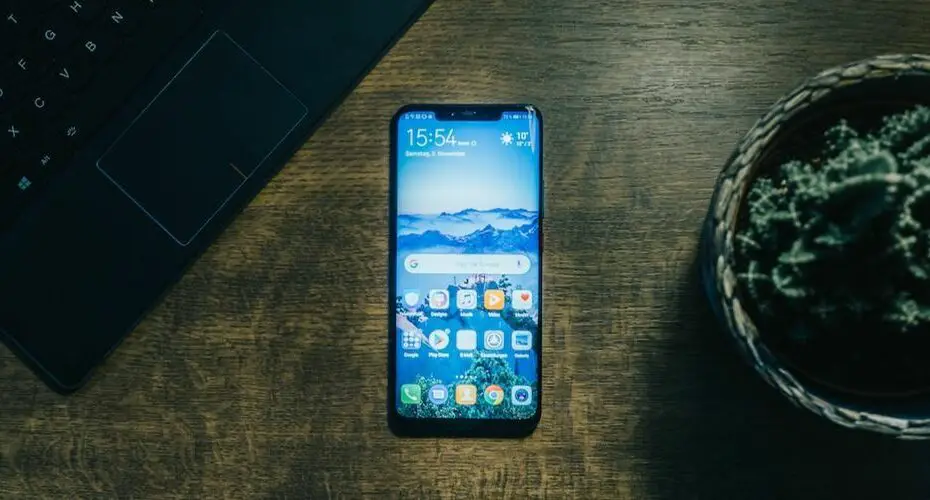
Android apps generally work on HarmonyOS devices, but there are a few that may not work properly. If an app doesn’t work properly, you can usually fix it by disabling compatibility mode or by installing an updated version of the app.
Read this first
Android apps generally work on most devices running Android 4.1 or later. There are a few exceptions, such as some older Kindle Fire tablets and some older Motorola Droid phones. You can find a list of all compatible Android devices on Google’s website.
Some apps, like the Facebook app, require a login. Other apps, like the Pokemon Go app, use location services to find other people playing the game nearby.
Android apps can also access your Google account, so you can send emails, access your Google Drive files, and more.
Can Harmonyos Run Android Apps
Huawei has built HarmonyOS with Android branches (libraries, supported frameworks) hat help the HarmonyOS users to run Android applications. The HM OS app ecosystem is still growing and native apps are low in numbers. As a result, HarmonyOS users have to rely on third-party applications and Android apps ported to HarmonyOS. Android app ports are not always reliable and can be unstable. Additionally, HarmonyOS does not have the same app store as Android, so users have to search for and download apps from the internet.
Android app ports are not always reliable and can be unstable. Additionally, HarmonyOS does not have the same app store as Android, so users have to search for and download apps from the internet. However, there are some apps that are not available on HarmonyOS. For example, the Netflix app is not available on HarmonyOS because Netflix does not release apps for HarmonyOS. Additionally, some apps are not available on other platforms, but are available on HarmonyOS. For example, the WhatsApp app is not available on other platforms, but is available on HarmonyOS.
Despite these limitations, Android app ports to HarmonyOS are still useful. For example, HarmonyOS is a low-cost alternative to Android devices for users who do not want to use Android apps or want to use Android apps that are not available on other platforms. Additionally, HarmonyOS is useful for users who want to use Android apps that are not available on other platforms. For example, the WhatsApp app is not available on other platforms, but is available on HarmonyOS.
Can Huawei Run Android Apps
Huawei phones can run Android apps.
Some apps use Google Play Services, which isn’t included on new Huawei phones.
You can sideload Android apps onto Huawei phones.
Some apps work correctly and others don’t.
New Huawei phones don’t have Google Play Services.
If you want an app that uses Google Play Services, you’ll have to find an older Huawei phone or use a different phone.
Sideloading won’t work with all Android apps, but it’s a way to get some of them onto your Huawei phone.

Do Android Apps Work on Huawei
Huawei phones run the open-source version of Android, which means that consumers can get these apps by installing their APK (Android Package). But this is not without security risks. For example, some apps may have malicious code that could infect your phone, or could steal your data. So it’s important to be aware of the risks before you install any apps, and to use a security app like antivirus to keep your phone safe.
Will Harmonyos Succeed
Huawei’s HarmonyOS for smartphones and tablets is unlikely to succeed against Android and iOS without easy access to popular apps or a global sales channel.
HarmonyOS is an operating system developed by Huawei that is designed to offer a more intuitive and user-friendly interface than Android or iOS. However, analysts say it is unlikely to succeed without easy access to popular apps or a global sales channel.
Android and iOS are both popular mobile operating systems with millions of users worldwide. They are widely used because they are available on a wide range of devices, from smartphones to tablets. Users can access a large number of popular apps on Android and iOS, and they can also buy devices running these operating systems from a number of online and offline retailers.
Huawei’s HarmonyOS is not available on a wide range of devices, and it is not as popular as Android or iOS. Therefore, it is unlikely to succeed in the market place without easy access to popular apps or a global sales channel.
Can You Install Harmonyos on Samsung
Harmony OS is a Linux-based operating system that runs on Android devices. It is produced by Huawei, the largest telecommunications equipment manufacturer in the world. It is based on Android, but has been modified to provide a more customized experience. For example, the operating system includes its own system settings menus and app store, separate from Google’s Play Store. This makes it easier for users to customize their devices to their own preferences.
Huawei has stated that they designed Harmony OS with the goal of making it easier for people to transition to Android devices. They believe that Android is a great operating system, but that it can be improved by adding features that are specific to Huawei devices. For example, Harmony OS includes its own system settings menus and app store, separate from Google’s Play Store. This makes it easier for users to customize their devices to their own preferences.
Another reason that Huawei designed Harmony OS was to provide a more secure experience for users. Android is a popular operating system, and there is a risk that users will install apps from unofficial sources. Harmony OS includes its own system settings menus and app store, separate from Google’s Play Store. This makes it easier for users to customize their devices to their own preferences, and it also makes it more difficult for apps to access sensitive information.
Overall, Huawei designed Harmony OS with the goal of making it easier for people to transition to Android devices. They believe that Android is a great operating system, but that it can be improved by adding features that are specific to Huawei devices. They also designed Harmony OS with the goal of providing a more secure experience for users.
Will Harmonyos Remove Google Services
There is no guarantee that all the Google services will work on HarmonyOS.
Push, Maps, and IAP may not work properly on HarmonyOS.
If you want to use Google services on HarmonyOS, you will need to be aware of any potential issues.
It is up to you whether or not you want to use Google services on HarmonyOS.
If you decide to use Google services on HarmonyOS, be aware of any potential problems.
Google services can be used on HarmonyOS, but there may be some issues.
If you choose to use Google services on HarmonyOS, be prepared for possible problems.
Is Harmonyos a Fork of Android
HarmonyOS is a fork of Android that was created by a company called Huawei. While the company’s marketing and development paperwork appear to be intentionally written to obfuscate the fact this it is essentially a forked version of Android, it does appear to be based on Google’s mobile OS. So to say that it is replacing Android on the company’s smartphones isn’t exactly correct.
The wrap up
Do you have an Android phone or tablet? If you do, you’re likely using apps to do things like read books, watch videos, play games, and more. But what if you want to use an app that isn’t available on HarmonyOS? That’s where compatibility mode comes in.
When you’re using compatibility mode, your phone or tablet behaves a little bit like a different device. For example, if you want to use an Android app on your HarmonyOS device, you can do that by turning on compatibility mode. But if you want to use an app that isn’t available on HarmonyOS, you’ll have to find a different way to do that.
Some apps might not work properly when you’re using compatibility mode. But you can usually fix them by disabling compatibility mode or by installing an updated version of the app. So, if you’re looking for a way to use an app that isn’t available on HarmonyOS, Compatibility mode might be a good option for you.
How to Install Google Play Store on Any Huawei HarmonyOS 2.0 device
It’s difficult and painful to use a phone that doesn’t have access to Google services, but Huawei has no control over this. The US Department of Commerce has blacklisted the company as a result of the conflict between China and the United States. It has lost access to not only Google’s services, but also to much-needed American technology in the last year and a half, forcing it to stop producing its Kirin chipsets last September.
While HMS’s AppGallery and Petal Search are a step in the right direction, users often prefer to search for alternatives on their mobile devices, which they can also use to pay for goods and services in-store.
So, if you’re looking for a step-by-step guide on how to install Google Play Store on your Huawei Harmony (2.0), then you’ve come to the right place.
Steps to Install Google Play Store on Any Huawei HarmonyOS 2.0 device
Even if you don’t have Google’s core services installed on your Huawei or Honor device, it appears that you can still use a third-party app to install the Google Play Store and Google Play Games app.
PLEASE NOTE:
To install and use the Google Play Store app on your Huawei or Honor device running HarmonyOS 2.0 or later, we highly recommend that you use or create a second Google account. To ensure your safety and the privacy of your personal information, avoid using your primary Google account.
DISCLAIMER:
In the event that something goes wrong on your Huawei or Honor device while/after installing the Google Play Store, TheWorldsBestAndWorst will not be held responsible. Do this at your own risk, as we have no idea if the third-party app has any security flaws.
DOWNLOAD:
Download OurPlay (Google Play App) APK file on your Huawei or Honor device.
You can use OurPlay to download and install the Google Play Store on your device, but only if you have this OurPlay app installed on your device. It doesn’t matter if you download apps or games from the Play Store directly; they’ll all be stored in OurPlay.
- Once the OurPlay APK file has been downloaded to your phone, tap on it.
- Click ‘Don’t ask me again’ and then tap on Allow.
- To begin installing it on your device, tap INSTALL ANYWAY.
- Now Open the OurPlay App which you have just installed.
- The Application Language is in Chinese. So Just tap on the green button and allow all the permissions until you reach the OurPlay main menu.
- The Google Play Store app will begin downloading as soon as you land on the OurPlay page.
- The OurPlay app will ask you if you want to install apps after the download is complete.
- Click on ‘Don’t ask me again’ and tap on Allow.
- You will be alerted that ‘No risks detected,’ following a scan by Huawei Mobile Services.
- As a result, you can now press the INSTALL button to begin the process of installing Google Play Store on your phone.
- In order for the app to function properly on HarmonyOS 2.0 or later, tap on Open > There will be a progress bar that will indicate that something is installing in the background.
- If the OurPlay app’s on-screen popups appear at any point during this procedure, make sure to tap the green button.
- Finally, the Google Play Store and Google Play Games apps will be installed on your device. You’ll be able to see both of the shortcuts in the OurPlay app.
- Tap on the Google Play Store app shortcut (icon) > Tap on the green button again to accept.
- Please be patient while the Google account login/registration page loads. Please be patient.
- Login with Second Google Account Which you have already made before in past. [ You Can also create new account ]
- Now, tap on Yes, I’m in > You’ll need to give some permissions to the Google account to run properly by selecting I agree > More > Accept.
- After this you will be redirected to OurPlay App Page. Here Click on the Google Play Store app icon to open it.
- Voila! You’re now on the Google Play Store app on your Huawei or Honor device running HarmonyOS 2.0 or later.
Final Words
Congrats! This was done by you. Your Huawei Harmony has now been successfully installed with the Google Play Store (OS 2.0). Relish any Google app to its fullest and highest extent and indulge yourself once more.
I’m Jaskaran Singh, a passionate tech enthusiast from Delhi, now based in Ahmedabad. My five-year journey as a tech writer has culminated in my role as the Editor in Chief at TheWorldsBestAndWorst, where I continue to explore and share the myriad facets of technology with my audience. Beyond writing, I also run a YouTube channel, with a community of 50,000 subscribers.