Google Chrome Vs Microsoft Edge Best Browser To Choose
But with the release of Windows 10, Microsoft launched its new web browser revamping the browser with number enhancements and improvements to release a completely new browser package. However, early released Microsoft Edge was also not able to compete with the giant Google Chrome, chrome caught its claws in the market very tightly, a year ago 67% of market share was of Google Chrome. Microsoft Edge was far better than the old gun Internet Explorer and that what the only reason some customers were jumping of the Chrome to ship onto Edge, liking its smooth functioning and better power management features, but still, after a few years of struggle and continuous changes, Microsoft Edge wasn’t standing up to the company’s hope. Major reasons could be that Microsoft Edge was not as rich in extension as Google Chrome was. Other reason would be its lack of compatibility across various platforms, poor loading speeds and fewer features compared to Chrome. Microsoft Edge wasn’t compatible with many websites, as Google has a monopoly over how sites should be to rank in the google search engine, and these lead to less popularity and fewer customers. Finally, Microsoft made a huge change and announced it will run on Chromium and a New Edge Browser was born. Google Chrome also uses the same open-source Chromium Project. And with this enhancement and change, Microsoft Edge is trying hard to gain its prominence in the browser market. In this article, we will discuss each and every aspect of Microsoft Edge and Google Chrome, we will compare both web browsers on the basis of various characteristics, and at last, we will try to find which browser is best on the basis of each individual factor.
Introduction#
Microsoft Edge#
Microsoft Edge was originally developed and published by Microsoft, Inc. for Windows 10 operating system and Xbox One. It was launched in the year 2015 with the release of Windows 10 and later the browser was launched for Android and iOS in 2017 and for macOS in 2019. Microsoft Edge originally built with Microsoft’s browser engine EdgeHTML and their Chakra JavaScript Engine, later in 2019 Edge was rebuilt on Blink and v8 engine and Chromium-based browser, and the latest upgraded version of Microsoft Edge was released on Jan 15, 2020
Google Chrome#
Google Chrome is a cross-platform (that is implemented and used on multiple computing platforms) web browser developed by the tech giant Google. It was first launched in the year 2008 for Microsoft Windows XP and later it was released for Linux, macOS, Android, and iOS too. Originally, most of the codes are taken from Google’s open-source Chromium project and designed with a WebKit rendering engine, but ultimately Google forked it and created the Blink engine, now every Chrome variant uses Blink engine except the one on iOS.
Real Usage Comparision#
Both the Softwares are tested on Macbook with the latest version at the time of writing. (Results may vary on different systems) The Browsers were opened after the system restart to check there start time.
Strat-Up Time#
Chrome Start-Up Time – 1.12 Sec Edge Start-Up Time – 1.15 Sec
Web Rendering Time#
We loaded AndroidAuthority on both the sites without any use of Extensions and noted; Chrome – 4.2 Sec Edge – 4.1 Sec Conclusion: As both, the browsers are using the same browser engine Blink. The speeds are very much congruent.
Default Settings#
Microsoft Edge#
Microsoft Edge’s default settings include Bing as a default search engine, also Microsoft News powered by Bing will appear at the homepage. For casting Microsoft Edge uses Miracast or DLNA protocol. DLNA protocol is compatible with more number of devices for screencasting.
Google Chrome#
Google Chrome’s default settings include Google as a search engine, and on the home page, you will have quick access to Gmail and other Google’s products. Google Chrome uses Chromecast for screencasting purposes. Conclusion: All other default settings are fine and identical. But when it comes to casting, Chrome lacks behind Microsoft Edge, because Chrome only supports Chromecast while Microsoft Edge supports Miracast, and hence Microsoft Edge will be much more compatible for screencasting with other devices, including smartphones, etc.
Features#
Microsoft Edge#
After updating to Chromium source code Microsoft Edge started supporting all the extensions supported by Google Chrome. Also, it has some other smart features, like reading mode and comes up with excellent voice support, if you are reading or viewing any document over Microsoft Edge, you can use “Read Aloud” feature to listen what has been written, this feature works excellently with the English language but might show some terrible results with other languages. Also, you can choose “Text Preference”, with this feature you can change text size and even it offers several themes for the page. You can use Grammar Tools for checking the grammar. Microsoft Edge also offers a number of customization options, you can enable “Dark Mode” in the Web browser settings. With all these features Microsoft Edge is surely taking a spotlight in the browser industry.
Google Chrome#
When it comes to the features of Google Chrome, it is among the fastest web browser, it offers a lot of customization options. You can go to Chrome web store for trying different themes and using extensions available for chrome to enhance the web browser. It also offers Chrome Flags which are experimental settings to add some extra features to your Browser. Also, with Chrome, you can use all other Google products. You can view and check notifications from the other Google apps thanks to cross-platform support. Conclusion: If it’s about features, both browsers are best at their own pace, I simply can’t refer to any one of them on my preferences, you can choose your browser according to the features you need the most.
User Interface#
Microsoft Edge #
Microsoft Edge now comes with a completely different look, it has bing as a default search engine and its background is updated with bing daily wallpaper, you will see the most visited websites in a series, and it is integrated with Microsoft news. It has a completely new designed User Interface which is clean and neat which you can even customize.
Google Chrome#
Google has its old and quite a simple homepage, which has Google as a default search engine with all the most visited websites at the bottom in the form of featured buttons. Moreover, you can customize it too and access all other Google products from the homepage. Conclusion: In the case of UI, Microsoft edge offers a very much interactive and beautifully laid out homepage as compared to Google Chrome, I will prefer using Microsoft edge if it is about user interface because Microsoft edge offers a user-friendly and well-designed UI. If we are talking about scrolling smoothness I will prefer Microsoft Edge over Google Chrome.
Performance#
Microsoft Edge#
Microsoft Edge has to face a lot of struggle and customer resist before being launched with Chromium version. Now with the newest version, Microsoft edge comes with numerous features and functionalities. With the new version and certain enhancements, Microsoft Edge offers world-class performance and compatibility with all the websites, also you will experience a huge difference in the speed of the browser, earlier Microsoft edge was a little slow compared to Google Chrome, but thanks to Blink Engine now it has good loading speed.
Google Chrome#
Google Chrome is already optimised with Blink Engine and was launched with Chromium and all of us familiar with its features and working. Whenever it comes to the performance of Google Chrome it is always considered as one of the best browsers. It offers various extensions to make your browsing easy and more productive. Conclusion: Since, both Chrome and Edge working up on same source codes, so there is not much difference between the performance of both the browser, but if we have to choose one among both, I will prefer Microsoft edge as it uses less of computer’s resources, which Chrome is very notorious for hogging. Response and load time of both the browser shows identical results.
Synchronization#
Microsoft Edge#
In synchronization, Microsoft Edge may be lacking because you can’t sync all of your data including bookmarks, history in the Microsoft Edge from google account, but yes you can sync all your data using Microsoft account.
Google Chrome#
Google Chrome is best in case if you wish to synchronize all your browser data, you can sync all of your history, bookmarks, extensions, open tabs, and many more things at one place. Conclusion: There is not much to conclude over this point, because it is clearly mentioned that Microsoft Edge is lagging behind Chrome in case of synchronization, as everyone uses Google account for most of their work, so if you need to sync all of your data across browser devices than you should prefer Google Chrome. But, if you prefer a Microsoft’s account then you can sync all the data without any hassle with Microsoft edge.
Disk Space Usage#
Microsoft Edge #
In terms of Disk Usage, on I Windows system, after I have cleared all the cache, Microsoft Edge took 319 MB.
Google Chrome#
At the same time, I checked chrome for occupying the disk space it was talking about 440 MB, which is much more than other browsers. Conclusion: Many testes showed that it is good to prefer Microsoft Edge for saving your disk space because Chrome eats too much RAM and due to this a sudden drop can be seen in the overall system performance. Chrome is considered a bulky web browser.
Extensions#
Microsoft Edge#
Microsoft Edge also supports all of Chrome’s extensions available at Chrome web store. So that means you can use extensions from both Microsoft Edge store and Chrome web store.
Google Chrome#
Google Chrome offers various extensions to add more features into your browser, you can easily find them from Chrome Web Store and add them to chrome. You get all genres of extensions ranging from video assistant tools to productivity, from writing tools to professional support plugins on Chrome Store. Conclusion: Now, here with the new Microsoft Edge it offers a lot more than other browsers do, you can have extensions from both Microsoft Store and also from Chrome Web Store. Microsoft Edge holds a little upper hand over Chrome.
Security#
Microsoft Edge#
Microsoft Edge is working way ahead in terms of Security, the browser is based on open-source Chromium code and Chromium get updates in every 6-8 months but still, Microsoft added a tracking prevention option this will keep you, safe from trackers, you can enable it in simple steps,
Go to Settings of your browser.Go to Privacy and ServicesSwitch the option ON and set it to balanced mode.
By doing this, the trackers will be blocked from the sites you visit. Also, Microsoft edge consists of a SmartScreen system, which displays when you enter any website using HTTP service rather than secure HTTPS. With InPrivate mode in the new Microsoft Edge, your browsing history and searches are not attributed, giving you greater control over your data. Microsoft has replaced and improved more than fifty of Google’s services from the Chromium code, they enhanced security measures and included some more features into it, they include ad blocking, Google Now, Google Cloud Messaging, Services related to Chrome operating system. Microsoft is providing its complete set and trying to replace Google’s services.
Google Chrome#
As mentioned earlier, Google Chrome is completely based on Chromium browser code, and the Chromium browser gets an update every 6-8 months. Google updates all the new features quickly, and hence Chrome doesn’t offer any other security service. Chrome also provides a warning when we enter into the website using HTTP rather than HTTPS. However, it is not as effective as Microsoft’s SmartScreen system. Conclusion: If you are a programmer or someone whose most of the time passes out in surfing through the internet, visiting on different websites, so prefer Microsoft edge to prevent yourself from anonymous websites and trackers. It’s certainly worth trying the new Edge if you are more concerned for your Privacy and Security.
Password management#
Microsoft Edge#
Microsoft Edge provides an excellent password management system inside the browser. Anyone can access the password by going to the Settings → Profile → Password Menu. Microsoft also provides a dedicated password manager with the Office 365 subscription.
Google Chrome#
Google Chrome offers a very amazing password management service within the browser. The feature is known as Chrome password Manager, which offers auto-fill password to the corresponding email. If you have a Google account on your Android smartphone, so it will sync all the data including history, bookmarks, and passwords too, it provides strong password suggestions wherever needed. Conclusion: For Password management, Google Chrome will be considered over any other web browser including Microsoft Edge. Google Chrome provides a much better password management facility to its users. As it syncs across various platforms.
Compatibility#
Microsoft Edge#
Microsoft Edge is compatible with Windows, macOS, iOS, and Android. Maybe it will be available for the Linux operating system in late 2020.
Google Chrome#
Google Chrome is compatible with most of the operating systems including Windows, macOS, Linux, iOS and Android.
Some Benchmarking Test Result#
After comparing both browsers based on some individual property, we have some benchmark results to have an overall comparison between both browsers and know which browser is best. Jetstream
Futuremark Peacekeeper#
Octane#
SunSpider#
Final Verdict#
We compared Microsoft Edge and Google Chrome comprising across all major point. But it’s tough to prefer one over another, both the web browsers are best at their own place, Google Chrome is the fast, accessible and mostly used web browser. While Edge also is fast but is more secure and ensure more of your privacy. Microsoft Edge was struggling to be among the top browsers and now with its update to Chromium, results are surprisingly different. Microsoft Edge showing interestingly very high performance and offering all the available extensions and many more features. So the choice is completely yours, you can choose any one of them, both are best with their own advantages and disadvantages. But if you are privacy concerned than Edge has an edge over Chrome. And if cross-platform accessibility is your need than Chrome is the best choice. If you’ve any thoughts on Microsoft Edge Vs Google Chrome | Comaparing the Best Browser, then feel free to drop in below comment box. Also, please subscribe to our DigitBin YouTube channel for videos tutorials. Cheers!
Сравнение Microsoft Edge и Google Chrome: какой браузер станет лучшим в 2023 году?
С момента выпуска Google Chrome В 2008 году он быстро стал стандартом просмотра и отраслевым стандартом в Интернете. Когда Microsoft Edge был выпущен вместе с Windows 10 в 2015 году, Microsoft надеялась, что пользователь, наконец, будет полагаться на свой встроенный браузер. К счастью для Google, Microsoft Edge не смог впечатлить рейтингом Chrome как лучшего веб-браузера для Windows 10. Оцените Лучшие специализированные веб-браузеры, которые вы никогда раньше не использовали Если вы ищете совершенно другое решение.
Несколько лет назад популярные и устойчивые споры о сравнении Edge и Chrome были нелепыми. Но теперь, когда Microsoft сделала ставку на движок Chromium для Edge, битва за лучший веб-браузер для Windows 10 стала более открытой, чем когда-либо.
Этот обзор и сравнение основаны на каждой из следующих версий: Версия Google Chrome 89 и версия Microsoft Edge 89.
Дизайн и исходный код
Браузеры Edge и Chrome очень похожи по дизайну. Edge теперь имеет более чистый вид и использует аккуратные закругленные кнопки. Строка поиска / адресная строка почти идентичны Google Chrome, как и макет панели закладок, расширений и настроек. Знакомый дизайн привлечет больше пользователей к Edge, и Microsoft рассчитывает на это.
Google Chrome недавно интегрировал новую функцию, которая позволяет группировать вкладки. Группируя вкладки вместе, вы можете освободить рабочее пространство и повысить производительность. Но имейте в виду, что это произойдет за счет увеличения использования памяти.
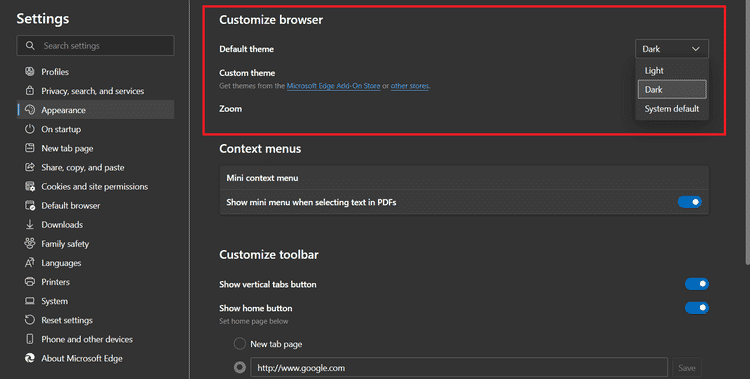
Microsoft, возможно, преуспела в одной функции со встроенным темным режимом по сравнению с Microsoft Edge. Однако в Google Chrome вам необходимо настроить параметры настройки Windows, чтобы включить темный режим. Если вы не хотите изменять настройки Windows 10, некоторые сторонние надстройки также могут Включить темный режим в Google Chrome.
Однако вы можете использовать собственные темы в Google Chrome. В Интернет-магазине Chrome доступен широкий спектр тем, которые можно найти с пользой.
Новый и улучшенный Microsoft Edge построен на базе браузера Chromium с открытым исходным кодом, как и Google Chrome. Chromium известен своим упрощенным пользовательским интерфейсом, который делает просмотр веб-страниц быстрым и легким.
производительность
Чтобы точно сравнить производительность обоих браузеров, мы решили протестировать Edge и Chrome с одними из лучших инструменты измерения производительности в поле. Мы провели три разных теста, чтобы получить более надежное и беспристрастное сравнение.
Сначала мы проверили совместимость с HTML5. Этот тест показывает, насколько хорошо ваш браузер поддерживает стандарты HTML5. Неудивительно, поскольку и Chrome, и Edge используют по существу один и тот же исходный код, результат теста HTML5 был нейтральным при значении 577.
Перед запуском следующих тестов мы сбрасываем настройки веб-браузеров до их значений по умолчанию, и все расширения / надстройки отключены.
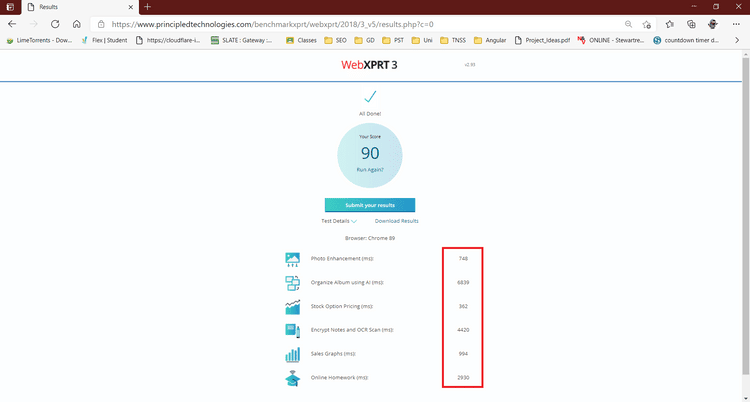
Это инструмент измерения производительности Веб XPRT 3 Отраслевой стандарт, который измеряет производительность веб-браузеров при размещении в различных сценариях, повторяющих среднесуточное использование. После тщательного тестирования Google Chrome получил хороший результат 81/100, а Microsoft Edge получил исключительный результат 90/100.
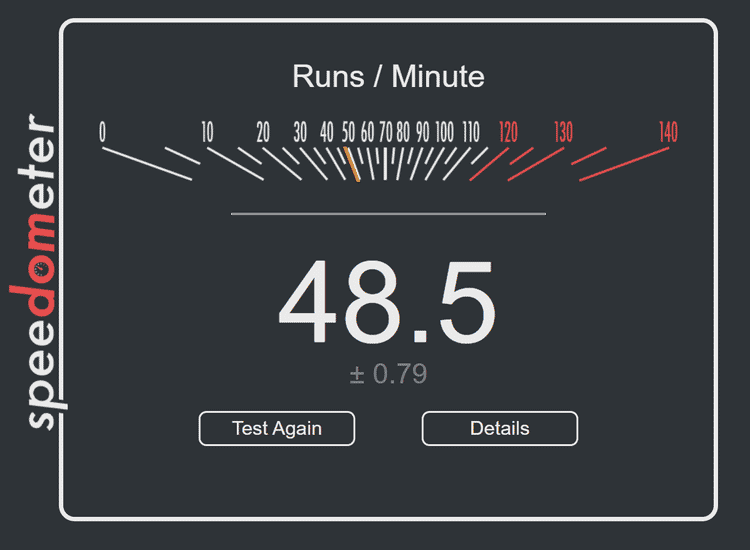
Аналогично в тесте Спидометр2.0 Edge явно превзошел Chrome, набрав 48.5 балла по сравнению с 37.1 баллом Chrome. Эти результаты свидетельствуют о том, что Microsoft Edge намного лучше с точки зрения производительности в Windows 10.
Использование RAM
Ни для кого не секрет, что Google Chrome потребляет большую часть оперативной памяти (RAM). По иронии судьбы, Chrome когда-то славился минимальным использованием системных ресурсов. Напротив, Microsoft Edge использует меньше ресурсов памяти, что делает его идеальным для систем с ограниченным объемом памяти. Также проверьте Chrome не отвечает, часто дает сбой или зависает во время использования?.
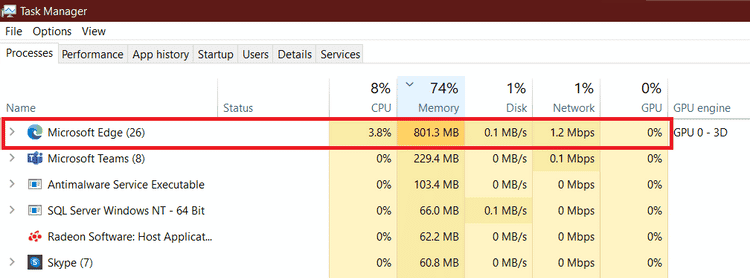
Вы можете открыть диспетчер задач, щелкнув правой кнопкой мыши на панели задач, чтобы просмотреть, сколько памяти потребляет каждое приложение. Наши результаты показали, что десять вкладок Google Chrome потребляют около 1100 МБ ОЗУ, а десять вкладок Microsoft Edge — только 800 МБ.
На компьютере с ограниченными ресурсами вы ощутите значительное увеличение производительности при использовании Microsoft Edge. Что касается использования памяти, Microsoft Edge намного легче, чем его аналог Google Chrome, поэтому на этот раз Edge выходит на первое место.
Предыдущий
В современном цифровом мире конфиденциальность данных играет жизненно важную роль. Такие организации, как Facebook и Google, постоянно пытаются найти баланс между потребностями в пользовательских данных и их конфиденциальностью.
В 2020 году был выпущен Chrome 83 с множеством новых функций безопасности и конфиденциальности пользователей. Несмотря на дополнительные функции безопасности и расширенный список параметров конфиденциальности, конфиденциальность данных остается непонятной для обычного пользователя. Плохо спроектированный пользовательский интерфейс очень усложняет навигацию по настройкам конфиденциальности и безопасности.
Еще одна ключевая функция безопасности в этом обновлении — безопасный просмотр. Это обеспечит вам различные уровни электронной защиты в зависимости от ваших требований. Google рекомендует выбрать Enhanced Protection, чтобы обеспечить более быструю и более проактивную защиту. Неудивительно, что для этого необходимо дать согласие на отправку данных о просмотре в Google в обмен на комплексную защиту.
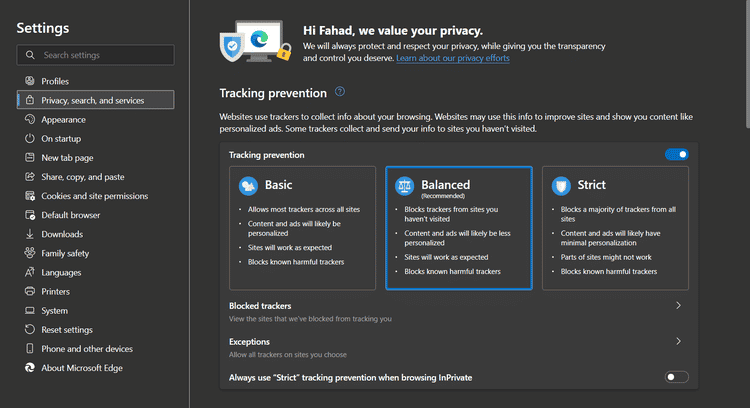
С другой стороны, Microsoft Edge принял упреждающие меры, которые упростили работу с конфиденциальностью и безопасностью для пользователей. Во время установки пользователям предоставляется простой набор параметров конфиденциальности. Edge предлагает базовое, сбалансированное или строгое предотвращение отслеживания, и потенциальные последствия каждого из них хорошо объяснены.
Когда мы сравниваем функции конфиденциальности и безопасности Edge и Chrome, довольно удивительно видеть, что Microsoft Edge — лучший вариант. Microsoft сосредоточилась на том, чтобы сделать настройки конфиденциальности и безопасности всеобъемлющими и легкодоступными для пользователей, и это окупилось. Хотя оба браузера позволяют настраивать идентичные параметры безопасности, в Edge это можно сделать гораздо быстрее.
совместимость
Google Chrome существует уже более десяти лет, поэтому неудивительно, что Chrome поддерживает гораздо более широкий спектр платформ.
Chrome — это веб-браузер и поисковая система по умолчанию практически для всех устройств Android и Chromebook. Помимо Windows и macOS, Google Chrome совместим с iOS, а также обеспечивает поддержку Linux для Debian, Fedora и Ubuntu.
С другой стороны, Microsoft Edge совместим с Windows 7 и новее, Android, iOS и macOS. Edge теперь также совместим с Linux, но маловероятно, что Microsoft будет поддерживать Chrome OS.
Microsoft Edge — лучший браузер для Windows 10
Проведя всестороннее сравнение между Google Chrome и Microsoft Edge, мы можем с уверенностью сказать, что Microsoft Edge с большим отрывом является лучшим браузером для Windows 10 2021 года.
Edge неизменно превосходит Chrome с точки зрения производительности, обеспечения конфиденциальности и безопасности, а также использования системной памяти. Однако, учитывая поддержку совместимости для обоих браузеров, Chrome выходит на первое место, но в ближайшем будущем это может измениться в пользу Microsoft Edge.
2021 год может стать годом, когда вы поймете, что Microsoft Edge имеет преимущество перед Google Chrome. Теперь вы можете проверить Сравнение Microsoft Edge и Firefox в 2021 году: какой браузер победит?.
Microsoft Edge vs Google Chrome for PC. Which is better?

It has been a few years since Microsoft released its chromium-based browser. Also the recent Windows updates also force its users to use the Edge browser. As both browsers have been available for the public for quite a few years; it’s time to compare them head to head.
Here we will compare the different aspects of browsers.
Every browser is unique in it. Because of this uniqueness, different people use different browsers. Still, there are a few key elements that elevate the browsing experience. Here in this article, we will discuss those key elements that matter to users.
Though both of these browsers are chromium-based, there are many areas in which they are different from each other.
1. User Interface
The only way a user interacts with a browser is through UI. The Chrome browser does not offer much more home page customization. But, Edge shows a ton of information on its home page which may distract a user. However, it is always possible to make the homepage much simpler. Moreover, the feeds in Edge are customizable according to the user interface. The functionality, tooltip, and language support are almost identical in both browsers.
Chrome: Simple and minimalist
Edge: Versatile
2. Features and options
Since the release of Microsoft Edge in 2015, it has continued adding many features in its update. Though the features they offer are similar, they are different in how they are accessed.
3. Sync
One of the essential features of a browser is sync. It helps a browser sync bookmarks, passwords, themes, and history across devices, across all different platforms and in different OS. A browser that provides a deep extension for sophisticated API is better. Regarding sync, Chrome is way ahead of Edge as it syncs instantly after the user logs in to a new device with email. Edge is not so sophisticated and sometimes delays syncing.
4. Speed and performance:
Probably the essential aspect of a browser is its speed. As both the browsers are chromium-based, there is not much speed difference between the two. A general user may not notice the difference in speed between the browsers. However, there is a difference in their RAM management. Chrome uses a lot of memory for its process, while Edge uses less RAM. While I opened ten tabs in both browsers, including Facebook and YouTube, Edge used almost half of the RAM used by Chrome. Thus multitasking while browsing in Chrome feels much smoother in Edge.
5. Privacy
When it comes to privacy, neither of the browsers is perfect. Edge provides a 3-level tracking option, while Chrome provides a do not track option in its browser. The privacy features are easy to understand in Edge than in Chrome. Both the browser allows a user to manage cookies inside the sites. To prevent malware and phishing, Edge comes with Microsoft’s Windows defender SmartScreen while Chrome has a built-in anti-malware feature.
Chrome pushes updates quickly without any risk but collects tons of data. For this reason, Google is currently facing lawsuits for tracking users in incognito mode.
6. Extensions
Another popular feature that comes in handy while browsing is “Add-ons” or “Extensions.” Both browsers support the extension and have their library. Chrome has tons of extensions which is lacking in Edge. But as both browsers are Chromium-based, chrome extensions are usable in Edge and can be easily added from the chrome web store.
Its up to a user which browser will he used based on the personal requirements. To conclude what is discussed in this article please refer the following graph.
Thank you for your patience and time if you have followed the article till now. I hope you learned something new today. Have a good day ahead.
Microsoft стала предупреждать пользователей Windows 10 и 11, что Edge лучше Google Chrome

По данным портала Neowin, Microsoft начала настойчиво с помощью уведомления предупреждать пользователей WIndows 10 и 11, что Edge лучше Google Chrome. Компания делает это в том случае, когда пользователь пытается скачать Chrome из Edge.
В Edge при таких действиях теперь появляются следующие системные уведомления (они чередуются):
- этот браузер (Chrome) как из 2008 года. А знаете, какой новый? Microsoft Edge;
- Microsoft Edge работает по тем же технологиям, что и Chrome, но Microsoft больше доверяет Edge.
Вдобавок, если пользователь сделает в поисковике Bing запрос «браузер» или «скачать браузер», то появится рекомендация для установки Edge или уведомление, что Edge установлен в системе и он лучший браузер, а устанавливать еще другой нет смысла и необходимости.
15 января 2020 года Microsoft выпустила релизную версию браузера Edge на движке Chromium. Microsoft заявила, что новый Edge «является единственным браузером, оптимизированным для Windows 10». Компания опубликовала исходный код некоторых компонентов браузера (в фильтре набрать: microsoft edge).
В начале февраля 2020 года Microsoft стала агрессивно рекламировать свой новый браузер Edge в разделе с рекомендациями в меню «Пуск» Windows 10. Это происходило, например, если у пользователя установлен браузер Firefox по умолчанию. В этом случае рекламный баннер компании гласит: «Ещё пользуетесь Firefox? Microsoft Edge здесь». Кликая по нему, пользователь начинает загрузку нового браузера Microsoft Edge на движке Chromium.