Как установить приложения на iOS в обход AppStore
Такой вариант установки подойдет любым устройствам под управлением iOS 13 и новее. Скорее всего, вы используете iOS 16, так что дополнительно вам нужно будет получить права разработчика, иначе все описанные ниже действия не помогут.
Подготовка
На устройствах под управлением iOS 16 появился дополнительный защитный механизм, блокирующий установку приложений из неизвестных источников. Чтобы отключить его, переходим по пути Настройки – Конфиденциальность и безопасность — Режим разработчика. После активации опции устройство нужно перезагрузить, а потом его можно использовать как обычно.
Установка Scarlet
Для установки приложений с использованием .ipa нам поможет программа Scarlet. Для начала со своего iPhone или iPad переходим на сайт сервиса в браузере Safari. Прокручиваем страницу вниз и находим кнопку Install. Установка приложения может занять время, запаситесь терпением. На этом этапе сервис будет показывать вам рекламу и перекидывать на сторонние ресурсы. Не скачивайте сомнительные приложения и не вводите данные на подозрительных ресурсах, просто вернитесь обратно на страницу сервиса и нажмите ту же кнопку вновь. Подождите оговоренные сервисом 10 секунд и подтвердите установку.
Теперь нужно добавить Scarlet в доверенные источники. Для этого открываем Настройки — Основные — VPN и управление устройством. На этой странице выбираем China Mobile Group… и указываем, что этому источнику можно доверять.
Теперь переходим к собственно приложению Scarlet. Здесь есть небольшой каталог встроенных приложений и возможность устанавливать ipa файлы из сторонних источников. Для этого скачиваем заранее интересующий пусковой файл, потом возвращаемся к приложению Scarlet, здесь переходим во вторую вкладку, нажимаем на кнопку в правом верхнем углу и в открывшемся проводнике выбираем нужное приложение. Когда установка программы закончится, ею можно будет пользоваться как обычно.
Что делать, если приложения не запускаются
Убедитесь, что .ipa файл не поврежден, а устанавливаемое приложение совместимо с вашим устройством.
Что делать если все работало, а потом перестало
Без паники, такое бывает. Если Apple отозвала у Scarlet сертификат разработчика, приложения перестанут работать у всех пользователей.
В части случаев вам может помочь очистка данных в браузере Safari (включаем режим полета, переходим в Настройки — Safari — Очистить историю и данные, после этого заново запускаем приложение, а потом отключаем режим полета).
Вы также можете использовать DNSCloak для создания черного списка DNS. Для начала, в Заметках создаем документ со следующими строками:
Сохраняем заметку в любом удобном месте и запускаем DNSCloak. Вызываем Меню (три полоски в левом верхнем углу) — Blacklists & Whitelists — Enable Blacklists и выбираем только что созданную текстовую заметку. Теперь возвращаемся на главную страницу приложения и выбираем пункт adguard-dns — Use this server. Если все сделано правильно, вы увидите значок VPN в строке состояния.
К сожалению, ни один из этих способов не дает стопроцентной гарантии решения проблем со Scalret. Иногда надо просто подождать, пока разработчик обновит сертификат, после чего вы сможете переустановить сам каталог с новым сертификатом, а потом установить заново все интересующие программы.
Используйте сертификат разработчика
Если вечные проблемы и сбои Скарлет вас не устраивают, можно приобрести сертификат разработчика, с ним приложение будет работать стабильнее.
Вы можете получить собственный сертификат, зарегистрировавшись как разработчик в Apple Developer Program, это будет стоить $99. Другой вариант — использовать чужую учетную запись. Подобных предложений немало на торговых площадках, торгующих цифровыми активами, а цены могут сильно отличаться. Внимательно относитесь к выбору продавца, чтобы не наткнуться на мошенника.
Использование собственного сертификата также позволит вам использовать сервисы ESign и GBox для установки приложений.
Installing Ipa Files On Iphone Without Jailbreaking In 2022
Apple has been known for their innovative products and technology, and they continue to lead the industry in terms of mobile devices. One of their newer products is the iPhone, which has become one of the most popular devices on the market. One of the challenges that many people face when using an iPhone is that they need to jailbreak it in order to use some of its features. However, there are ways to install IPA files without jailbreaking in 2022. One way to do this is by using a third-party app called Cydia. Cydia is a software application that allows users to install various applications and extensions without having to go through Apple’s official website or app store. Once you have installed Cydia, you can open it and search for “ipa files”. Once you find the file, you can click on it and it will take you to a page where you can download it. Once downloaded, you will need to extract it into your phone’s internal storage. Once extracted, you will need to open up IPA File Manager and navigate to where your phone’s internal storage is located. Once located, drag and drop the IPA file into the folder where your phone’s internal storage is located.
First, you need to download the IPA installer app to your PC. Next, you need to find the IPA file you’d like to install. Then, tap on it. Once you’ve done this, you’ll see a successful installation message on your screen. This method works with any iOS version. After you’ve completed this step, you can then install any IPA file on your iPhone without jailbreaking.
You can also use the free online tool called Supersend. It is an excellent solution for anyone trying to install an IPA file on their iPhone without jailbreak. It offers many facilities for iOS and Android developers. If you’re not a Mac user, you can also download Cydia Impactor and use it to install IPA files on your iPhone without jailbreaking. Once you’re done, you can send IPA files to team members and test them without the need to jailbreak your device.
Can I Install IPA On iPhone Without Jailbreak?#
First, you need an Apple ID registered in Apple’s Developer Program. The developer certificate lasts for one year, or 7 days if your Apple ID is not registered in the program. Install the IPA file using Cydia Impactor. After the installation is complete, you will see a notification that your device has successfully installed the IPA file. If you have a trust in the developer, you can continue sideloading applications by dragging and dropping them onto the Cydia Impactor window.
Can I Install IPA On iPhone Without Jailbreak?How Do I Install An IPA File To My iPhone?Can You Download IPA On iPhone?Can You Convert APK To IPA?How Do I Install 3Rd Party Apps On iPhone?How Do I Open IPA Files On iPhone Simulator?How Do I Install Ad Hoc IPA On iPhone?
Another way to install IPA on iPhone without jailbreak is to use Apple iTunes to copy and install the iCloud backup. Once you have the iCloud backup, you can use AnyTrans to install the IPA file on iPhone without jailbreaking. This method is more convenient because it does not require rooting your iPhone, and you can easily transfer the files from your PC to your iPhone or iPad. Make sure you use a Mac or PC to do this, as the process is a little more complicated if you’re using an iPhone.
How Do I Install An IPA File To My iPhone?#
If you haven’t yet jailbroken your iPhone, you’ve probably wondered how to install an IPA file onto your iPhone without a jailbreak. The answer is simple – you simply install the IPA file through iTunes. If you’re looking for a quick and easy way to install an IPA file onto your iPhone without a jailbreak, consider using AnyTrans, an app that allows you to install and manage IPA files. All you have to do is download the application, install it on your computer, and then choose the IPA file you want to install to your iPhone.
To sideload an IPA, you’ll need to register with Apple’s Developer Program and have an Apple ID that is registered in the program. Once you have an ID registered in the program, you’ll receive a developer certificate valid for a year. Alternatively, you can sign and install an IPA file with Cydia Impactor. Once the installation process is complete, you can trust the developer and launch the sideloaded app from your home screen.
Can You Download IPA On iPhone?#
Although iOS has an app store to download apps from, some iOS users may want to install older versions of apps or simply have access to different versions not available in the App Store. These cases may call for a way to install.iPa files onto their iPhone or iPad. In this article, we’ll show you how to load.ipa onto an iPhone without jailbreaking it. Before you start, it’s best to install the app on a PC or Mac before trying any of these methods.
Before you can install the IPA on your iPhone, you’ll need a Cydia Impactor application, which is available for Windows, Mac, and Linux users. Download the installer and save it in a folder where you can access it easily. Once installed, it will detect your iPhone and install IPA files and packages. After installing, you’ll be prompted to enter your Apple ID credentials.
Can You Convert APK To IPA?#
With today’s modern technologies, it’s no longer necessary to jailbreak your iPhone to use applications developed for other operating systems. With the help of a software tool called APK to IPA converter, you can download third-party apps and install them on your iPhone without any trouble. It’s simple and requires no programming skills. You can get the software from various third-party websites, but you should only use the links that are secure.
If you’re wondering how to do this without jailbreaking your device, IPA is the file format you’re after. These files store the contents of apps you download to your iPhone. Unlike APK, you cannot open IPA files using iTunes, as it uses them for backup purposes. But, a free program called iFunbox, available for Mac and Windows, can open IPA files. After installing the program, you can import and export ringtones and save them onto your iPhone.
If you’re wondering how to open APK files on iOS, you’ve come to the right place. The IPA file equivalent of an APK file can be installed on your iPhone using the Cydia Impactor software. It requires no tweaks or jailbreak, and will also allow you to install Android applications. If you’re unsure about the procedure, you can read on for a step-by-step guide.
How Do I Install 3Rd Party Apps On iPhone?#
If you want to install third-party apps on your iPhone, you can download them using the sideloading method. This method is not very common, because most of the apps on your phone are only available in the App Store. However, it’s possible to get around this restriction with the help of Cydia Impactor, a tool that can allow you to install third-party apps on your iPhone.
Basically, you can sideload apps from third-party stores, but you need to trust certificates to do so. This is done by using Xcode and the AltStore. You can also download apps from unofficial sources like Google Play or Microsoft Store. You must remember a password for each app. If you can’t remember it, you can simply delete the profile. If you have an older version of iOS, you can try to install third-party apps using a Cydia impactor.
If you’re looking for ways to install third-party apps on iPhone without jailbreak, you’ve come to the right place. Cydia Impactor is one of the best tools for this task, and it can be used with Windows, Linux, and Mac computers. However, it’s essential that you have a reliable anti-virus installed before you try this method. This will protect you against malware and other issues that unreliable apps may cause.
How Do I Open IPA Files On iPhone Simulator?#
IPA files are designed to run on Apple devices only. They cannot be opened on PCs using iTunes or any other free program. iTunes uses IPA files for backup purposes and for the devices to understand downloaded and purchased apps. In order to open an IPA file, you can download a free program known as iFunbox for Windows or Mac. This software will open the IPA file and allow you to transfer it to your compatible iOS device. iFunbox will also allow you to export and import ringtones, which are unique to Apple devices.
The IPA file extension is not unique to iOS devices, but the iOS device can automatically detect it with the Xcode SDK. This means you don’t need a jailbreak to run IPA files on your iPhone simulator. Typically, IPAs have ARM slices rather than double ones, but if you’re unsure, you can run them using the Simulator app.
How Do I Install Ad Hoc IPA On iPhone?#
If you’re wondering how to install Ad Hoc IPA on iPhone with no jailbreak, you’ve come to the right place. While the process of installing an IPA file on an iOS device isn’t as simple as some other methods, it is remarkably easy to complete. The first step is downloading the file from your computer. Next, open the file with a file manager like AnyTrans. From there, you can select the file and open it on your iPhone.
If you want to distribute the app to multiple registered devices, you can use an ad hoc certificate. To use an ad hoc certificate, you must first identify every device you’d like to distribute it to. Then, you’ll need to install the provisioning profile that allows you to distribute the ad hoc IPA file. This means that only devices that have registered ad hoc certificates can install an ad hoc IPA.
How to install .ipa file directly to iPhones/tabs without using laptop/Desktop?
There are many instances when tough times comes out to be a great teacher that provides you with many unexplored opportunities, this article is about one such times when I have to deal with testing an iOS app with only iOS device in hand and limited stable internet connection.
In an ideal scenario one can easily install .ipa file to iDevices from a mac/computer with the following two ways:
- iTunes: This method doesn’t require any other software apart it to install iOS app(.ipa) to mobile device, just follow below steps and your good to use the app from your device:
iTunes > App Library > drag and drop .ipa file > Install > Sync
Note: On a windows system you need to download iTunes first to install an .ipa further on mobile device.
- Xcode : Using xcode is the simplest way to install .ipa file is what I feel, if you have xcode installed on your Mac by just following below easy steps the app will be ready to explore:
Xcode > cmd+shift+2 > devices > drag and drop .ipa file
Now let’s understand the situation when you don’t have mac/laptop/Desktop but have only a mobile device and .ipa file to test.
Below are the ways I tried to install an iOS app into iphone (SE — iOS 13.3) which I find somehow achievable to get the work rolling :
OTA Deployment
OTA(Over the Air) Deployment enables you to install your built apps(.ipa/apk) via HTTPS.
The steps to install apps via this method are as follows:
- Download the .ipa file to your device or icloud.
- Upload the .ipa to any such site which create a shareable installation link using the uploaded .ipa file
- For the above step there are several sites (i.e., DeployNinja, AppHost, diawi, installonair, etc.) paid/free from where you can get the installation link by uploading the .ipa file. I found the below one to be free, easy and reliable: https://www.installonair.com
- Open the above link and upload the downloaded .ipa file
- Once the files get uploaded click on submit button and wait for the shareable link to get generated
- Share the link via mail or other mediums to open it on the targeted mobile device
- Lastly install the app on the mobile device by opening the shared link through installonair and you are are ready to test once the app gets installed on your device.
Third Party Apps
These can be downloaded from various external play-stores, I tried appcake for this purpose by following below steps:
- Open https://www.iphonecake.com
- Click on 3 horizontal lines on top right of site home screen for more options and select App Cake iOS app.
- Click on install package and install the required certificates for the same
- After installation of the the appCake it asks for the certificate verification which can be from phone settings as: Settings > General > Profiles and device management > verify CRCC** profile.
- Reopen Appcake and verify its profile from settings and check if it’s installed successfully
- Open the downloaded .ipa file on phone and click on share option to select the copy to appcake option.
- Once the app gets on to the Appcake download section it will ask for the app to install on the phone directly.
- Click on install so that the app installation starts which can be monitored on device app library.
Note: The app may behave differently if it requires any certificate profile to get verified from its end as appcake install it by verifying it through appcake’s own profile which can result into conflicts.
Thats all folks! Comment down your thoughts, queries and suggestions on this article. Thanks!
Инструкция: как установить программу на iPhone через *.ipa файл

Многие владельцы яблочных мобильных устройств, которые делают джейлбрейк iPhone, взламывают систему для расширения функциональных возможностей гаджета и установки твиков из Cydia. Но джейлбрейк также позволяет устанавливать взломанные приложения. В этом материале мы подробно разберем, как установить ipa файлы на iPhone.
В первую очередь для установки ipa файлов нужно сделать джейлбрейк.
Как скачать AppSync
Еще одним обязательным элементом является приложение AppSync, которое позволяет устанавливать и использовать взломанные игры и программы. Скачать и установить его можно в магазине Cydia.
- Запустить Cydia.
- Открыть вкладку Репозитории.
- Нажать Правка – Добавить.
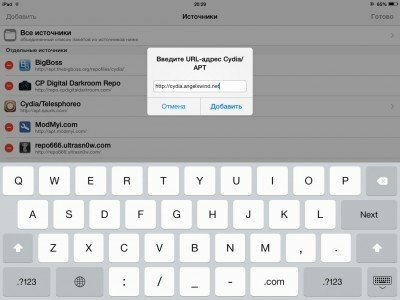
- Добавить следующие репозитории: http://cydia.angelxwind.net/ и http://repo.hackyouriphone.org .
- Подтвердить добавление.
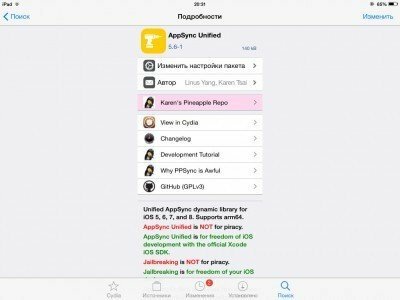
- С помощью поиска найти расширение AppSync для нужной версии iOS.
- Установить твик.
Вам потребуется перезагрузить iPhone после установки AppSync.
Установка ipa приложений с помощью iTunes
Самый простой и наиболее приемлемый для большинства пользователей iPhone метод установки ipa без джейлбрейка – это использование iTunes.
Для этого вам понадобится:
- Скачать и установить последнюю версию iTunes.
- Скачать нужное приложение или игру в виде ipa-файла.
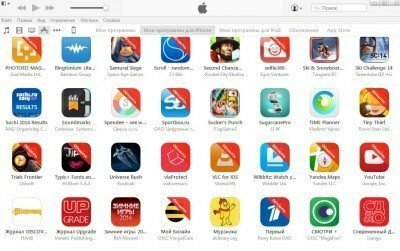
- Открыть файл в iTunes (дважды кликнуть по файлу). Программа будет добавлена в iTunes — iTunes Программы.
- Подключить iPhone к компьютеру.
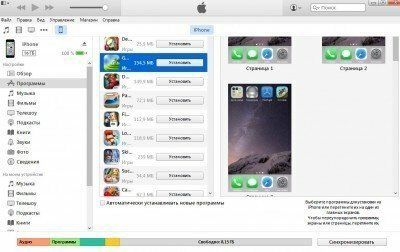
- В iTunes зайти в iTunes – iPhone – Программы.
- Отменить приложения, которые нужно перенести на iPhone.
- Нажать Синхронизировать.
Установка ipa с помощью сторонних утилит
На сегодняшний день есть несколько программ, которые заменяют собой iTunes. Почти все из них позволяют устанавливать приложения на iPhone. Самыми популярными утилитами являются – iFunBox и iTools.
iFunBox
Отличительной возможностью iFunBox является высокая скорость работы. Однако приложение не обладает красивым интерфейсом — разработчики сосредоточили свое внимание на функциональных возможностях.
Для установки программы с помощью iFunBox нужно:
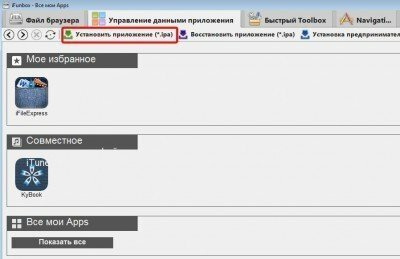
- Скачать и установить менеджер iFunBox.
- Скачать нужную программу.
- Подключить смартфон или планшет к ПК.
- Открыть iFunBox и нажать Управление данными приложения — Установить приложение (*.ipa).
- Указать путь к ipa-файлу программы.
- Установить программу.
В работе iFunBox есть один нюанс.
Разработчики не рекомендуют устанавливать приложения, размер которых превышает 1 Гб. После установки игры она может вылетать после начальной заставки.
iTools
Приложение iTools в отличие от iFunBox обладает современным интерфейсом. Но во всем остальном утилиты похожи.
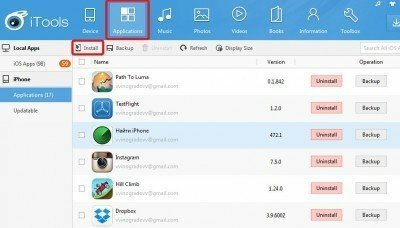
-
и установить iTools.
- Скачать ipa файл.
- Подключить iPhone к ПК.
- Открыть iTools.
- Перейти во вкладку Applications.
- Переключиться на пункт iPhone.
- Нажать кнопку Install.
- Указать путь к ipa файлу.
- Дождаться завершения установки.
Установка игр и приложений из ipa файлов с помощью vShare
Приложение vShare также является очень популярным, но принцип его работы несколько отличается от остальных. Все дело в том, что доступные приложения и игры хранятся на сервере vShare, что намного упрощает процесс установки.
Для установки приложений с помощью vShare нужно:
- Открыть Cydia.
- Подключить репозиторий http://repo.appvv.com/ .
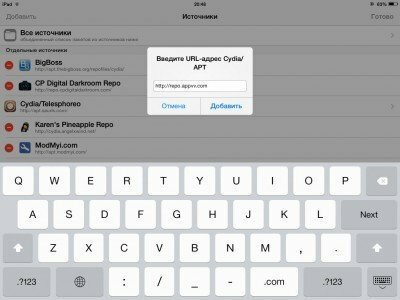
- Найти и установить программу vShare.
- Запустить установленное приложение.
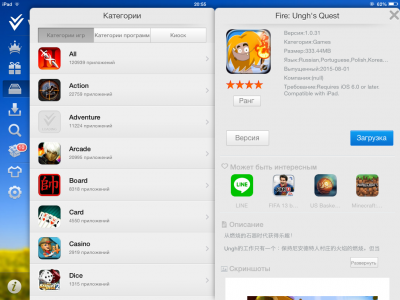
- В vShare выбрать нужное приложение и скачать его.
vShare позволяет скачивать и устанавливать одновременно сразу несколько программ.