Removing all unnecessary bloatware from Xiaomi MIUI 11/12 (Android 9/10) without root
UPDATE 2020-05-09: Added SIM Toolkit description.
UPDATE 2020-07-04 Added some apps, thanks to @thecrazyblack.
UPDATE 2020-11-23 Updated list of apps, thanks to new comments by @toast254, @swiesmann, @MarcelloDM, @satnited.
Xiaomi phones have impressive parameters for given price, but they come with a lot of unnecessary software. It eats battery and memory, sometimes shows annoying advertisement, and may have security issues. You can not uninstall this pre-installed apps like usual ones, and you can not even disable them from settings like in earlier Android versions.
Here is how to remove or disable unnecessary software without rooting phone. Works for MIUI 11 and 12 (based on Android 9 and 10), should work for other phones for recent Android versions. Thanks to this very useful but severely under-voted stackoverflow answer.
NOTE: I do not guarantee that this instructions won’t break your phone, blow it to flaming pieces or cause a sentient machines rebellion against humanity. You were warned.
To manage phone from command-line via USB you need adb — Android Debug Bridge, part of Android platform-tools. You can download the recent one for your OS here.
If you are on Windows, you also need USB drivers for your device. You may also try Universal Adb Driver. If you are using chocolatey package manager, you can get both like that:
choco install -y adb universal-adb-drivers
- ⚙️ Settings — About phone(or My Device). Tap “MIUI version” multiple times. Now Developer Options are unlocked.
- ⚙️ Settings — Additional settings — Developer Options — [✔️] USB debugging.
- Connect the phone to your computer via USB. Choose “File Transfer” mode instead of default “No data transfer”.
- Open console in a directory where you unpacked platform tools.
- ./adb devices
- Phone will prompt to add your computer’s key to allowed, agree to it.
- ./adb shell you have a shell on your device.
Now you need app package names, like com.miui.yellowpage for Mi Yellow Pages.
- ⚙️ Settings — Apps — Manage Apps. Tap on application, then tap info(ℹ️) button in the right corner. There you can see “APK name”, that’s what we need.
There are 2 options: disable app and uninstall app. I prefer disabling them, it’s easier to enable them back if you’ve broken something.
To be able to install apps back, you need to enable
- ⚙️ Settings — Additional settings — Developer Options — [✔️] Install via USB
On Xiaomi phone to enable this setting you need to sign in into Mi Account. You may just use your Google account to sign into it and then sign-out when you don’t need it anymore:
- ⚙️ Settings — Mi Account — sign-out.
Here is a list of Xiaomi and Google apps that I find unnecessary:
UNSAFE TO DISABLE/UNINSTALL
| com.xiaomi.finddevice | Result: endless boot loop, some time after it will ask to erase the phone and start over. Guess how I learned that? |
| com.miui.securitycenter | Result: phone reboots only in recovery mode |
| com.android.contacts | Result: you lose the phone icon |
| com.mi.android.globalminusscreen | Xiaomi App Vault. Result: if you are logged in with Mi account, device becomes locked, to unlock you should bring it to Xiaomi Services Center. Settings -> Home Screen crashes Settings app. See comment by @satnited. |
Xiaomi:
| com.miui.analytics | Mi Analytics (Spyware?) |
| com.xiaomi.mipicks | GetApps — app store like Google Play from Xiaomi. The most annoying one, periodically shows advertisement. |
| com.miui.msa.global | MIUI Ad Services — also responsible for showing ads. |
| com.miui.cloudservice com.miui.cloudservice.sysbase com.miui.newmidrive | Mi Cloud |
| com.miui.cloudbackup | Mi Cloud Backup |
| com.miui.backup | MIUI Backup |
| com.xiaomi.glgm | Games |
| com.xiaomi.payment com.mipay.wallet.in | Mi Credit |
| com.tencent.soter.soterserver | Authorize payments in WeChat and other Chinese services, useless if you don’t live in China. |
| cn.wps.xiaomi.abroad.lite | Mi DocViewer(Powered by WPS Office) |
| com.miui.videoplayer | Mi Video |
| com.miui.player | Mi Music |
| com.mi.globalbrowser | Mi Browser |
| com.xiaomi.midrop | Mi ShareMe |
| com.miui.yellowpage | Mi YellowPages. Some kind of caller id app. |
| com.miui.gallery | MIUI Gallery — if you use another gallery app WARNING: @nihalanand697 reports disabling it isn’t safe. But I had no problems after uninstalling it. |
| com.miui.android.fashiongallery | Wallpaper Carousel |
| com.miui.bugreport com.miui.miservice | Mi Bug Report — if you not using this feature |
| com.miui.weather2 | MIUI Weather. I prefer another weather app. |
| com.miui.hybrid com.miui.hybrid.accessory | Quick apps. |
| com.miui.global.packageinstaller | MIUI package installer. Without it Play Store app will be used. It shows ads, but I like that you can manage app permissions before starting it. |
| com.xiaomi.joyose | ?? Some junk |
Google:
| com.google.android.gms.location.history | Location History |
| com.google.android.videos | Google Movies |
| com.google.android.music | Google Music |
| com.google.android.apps.photos | Google Photos |
| com.google.android.youtube | Youtube — I prefer to use a browser |
| com.google.android.apps.tachyon | Google Duo — video calling app |
| com.google.ar.lens | Google Lens — identify things on camera |
| com.google.android.googlequicksearchbox | Google search box — I prever to use a browser or widget |
| com.google.android.apps.wellbeing | Digital wellbeing |
| com.google.android.apps.googleassistant | Google Assistant |
Facebook:
What the @#$%? I just got a fresh phone, didn’t install any Facebook apps and I still have a bunch of Facebook services eating my battery and memory.
| com.facebook.katana | Facebook mobile app |
| com.facebook.services | Facebook Services |
| com.facebook.system | Facebook App Installer |
| com.facebook.appmanager | Facebook app manager |
Default Android Apps
| com.android.browser | Default Browser — not necessary if you use Firefox or Chrome |
| com.android.wallpaper.livepicker | Wallpaper live picker |
| com.android.dreams.basic | Screen saver |
| com.android.dreams.phototable | Screen saver |
| com.android.providers.downloads.ui | Downloads UI. Periodically show notifications about files you downloaded. I find no use for it. |
Miscelanneous Promoted Apps
| com.netflix.partner.activation | Some Netflix stuff |
| com.zhiliaoapp.musically | TikTok |
| ru.yandex.searchplugin | Yandex Search |
| com.yandex.zen | Yandex Zen |
| com.ebay.mobile com.ebay.carrier | Ebay Store |
| ru.ozon.app.android | Ozon Store |
| com.alibaba.aliexpresshd | Aliexpress Store |
| sg.bigo.live | Some social media |
| ru.auto.ara | auto.ru app |
And some additional steps to disable Xiaomi ads and collecting data:
- ⚙️ Settings — Passwords & Security — Authorization & revocation. Revoke authorization from msa(MIUI System Ads) application. Not necessary if you already disabled com.miui.msa.global .
- ⚙️ Settings — Passwords & Security — Privacy. Disable “User Experience Program” and “Send diagnostic data automatically”.
- ⚙️ Settings — Passwords & Security — Privacy — Ad services. Disable “Personalized ad recommendations”.
SIM Toolkit
Some Russian mobile operators use SIM card built-in application to promote paid services. They show pop-up windows with OK/Cancel buttons. Hit the wrong button — and you are suddenly subscribed to some freaking SMS horoscope with daily fee.
| com.android.stk | SIM Toolkit |
| com.android.stk2 | SIM Toolkit for the second SIM card |
Note, that some mobile operators may use SIM toolkit for useful things, and you will lose that functions. In my experience I have never seen anything useful there.
What is com.mi.globalminusscreen on Android phones? 2023
Are you wondering what com.mi.globalminusscreen is on your Android device?
Then you have landed on the right website because we will share the best possible information about this file in this article.
This com.mi.globalminusscreen is a package file of the “App Vault” app on Xiaomi phones. But few people get afraid when they see these kinds of files on their smartphones. They remain careful when they find something suspicious on their devices.
Since there are certain cases where a package file is used to distribute malware, for example, the “Adobe Flash Player.exe” package file, malware gets installed on their device whenever the user opens it.
To ignore these malicious attacks, people started to check every single file on their devices. This is because these files often seem like legitimate software, but they are not.
Let’s talk about this file in detail and discuss some of its features. Plus you can also check out What is com.miui.securityadd on Android phones.
Table of Contents
What is com.mi.globalminusscreen?
This com.mi.globalminusscreen is a package of an app called “App Vault”. This application provides all the most commonly used apps and services in one place and also provides shortcuts to their features without searching for them in individual apps.
Apart from this, it also provides all the trending stories from the internet. Just open your home screen, swipe right, and explore anything you want.
Hence, this is an incredible app for multitaskers and can help them do their work more efficiently.
Moreover, all the most frequently used features of all social media apps can be shown in one place. This would be an amazing feature for all social media enthusiasts who love scrolling through them and exploring fresh information.
If this feature is not showing up on your home screen, then try to find it in the widgets section. This feature competes with so many small widgets and comes with a whole package of features.
All the phones with MIUI have this feature, especially midrange smartphones. Some low-end devices may not have this feature, but other useful widgets can be used on those smartphones.
Is com.mi.globalminusscreen safe?
Yes, it is a safe and secure app. We all know that this app was developed by Xiaomi, and we all know that Xiaomi is a well-known tech company. So there is no doubt about their security and safety.
Big tech giants like Xiaomi have their own security measures to protect their products, which include encryption, firewalls, and intrusion detection systems. These are all industry-standard security measures that help protect user data from unauthorized access or disclosure.
Overall, Xiaomi has a good track record of security. Because their products constantly get tested for security vulnerabilities before they are launched in public.
But we are not claiming that the company’s security is unbeatable.
While no security system is 100% secure, there can be some loopholes. So make sure that you always keep the device up to date, protect your data with strong passwords, and are not fully dependent on the company’s security system.
Can I uninstall com.mi.globalminusscreen from my phone?
No, you cannot uninstall this com.mi.globalminusscreen file from your device because this is a package of a system app and cannot be permanently uninstalled from the device.
People often try to delete these kinds of system apps by rooting their devices, which is completely unsafe.
Please keep in mind that if you uninstall important apps like the default launcher, gallery, camera, file manager, and so on, you must first install a third-party replacement.
Because removing these features from the device would cause a severe system crash. The outcome of this could affect the normal functioning of your device,
Also, if you are unsure about the consequences of removing any system apps, try disabling them first. If there are no problems, you can uninstall it later.
Conclusion
So that was all about this article; we hope it helped you clear your doubts. At last, we want to say that com.mi.globalminusscreen is a package file associated with Xiaomi phones’ “App Vault” app.
While some Android users may be concerned about the presence of such files on their devices, it is essential to note that com.mi.globalminusscreen is a safe file developed by Xiaomi, a reputable brand known for producing secure products.
If you have any other doubts regarding this vault app, comment on this post, and we will be happy to assist you.
Related FAQs
How can I keep my Xiaomi phone safe?
To keep your Xiaomi phone secure, keep it up to date with the latest firmware and security patches.
Com mi android globalminusscreen что это
Лента виджетов (App vault) — всё самое нужное в одном месте.
Версия: 13.14.3 / 12.34.0
Последнее обновление программы в шапке: 17.09.2023


Краткое описание:
Лента виджетов — всё самое нужное в одном месте.
- Ярлыки
Перенесите часто используемые функции из любимых приложений в одно место. Всё, что вам нужно из Facebook, Instagram, приложения «Очистка», ShareMe, Сканера, Калькулятора, Заметок и других приложений в одном месте. - Инструменты
Благодаря набору мощных инструментов ваше устройство всегда будет защищено. Удаляйте ненужные файлы для освобождения памяти, ищите и исправляйте ошибки в работе системы, удаляйте вредоносное ПО. - Рекомендации приложений
Одним касанием устанавливайте популярные приложения. - Быстрые заметки
Просто нажмите на карточку и начните работу в заметках. Просто и быстро. - События календаря
Просматривайте и создавайте события календаря. Вы больше никогда не пропустите день погашения кредита, день рождения друга или другое важное событие. - Новости и видео
Смотрите актуальные видео и читайте самые свежие и обсуждаемые публикации.
Требуется Android: 11+ / 7.0+ (MIUI)
Русский интерфейс: Да
Сообщение отредактировал iMiKED — 25.09.23, 09:34
Тип: Новая версия
Версия: 12.11.3
Краткое описание: Обновление (GP)
Что нового:
We keep improving and optimizing our app to make it better and more convenient.
com.mi.android.globalminusscreen — что это?
 com.mi.android.globalminusscreen — процесс приложения Лента виджетов (Mi App Vault).
Ранее процесс назывался иначе — com.mi.android.personalassistant.
Данное приложение является вшитым в прошивку MIUI. Удалить невозможно.
Проанализировав интернет, можно прийти к выводу — Лента виджетов это приложение, представляющее из себя папку необходимых виджетов. Нет необходимости искать нужную программу в списке меню. Папка может содержать такие программы как календарь, заметки, быстрый поиск, вызов такси, контакты, почта, диктофон (количество зависит от версии ленты).
Другое название программы — личный помощник.
App Vault может содержать любое приложение — достаточно перенести необходимые. В некотором роде это — еще один рабочий стол, где присутствуют необходимые программы (например часто используемые).
Можно попробовать отключить данную программу (не на всех смартфонах возможно). Откройте настройки телефона, выберите пункт Рабочий стол и Недавние:
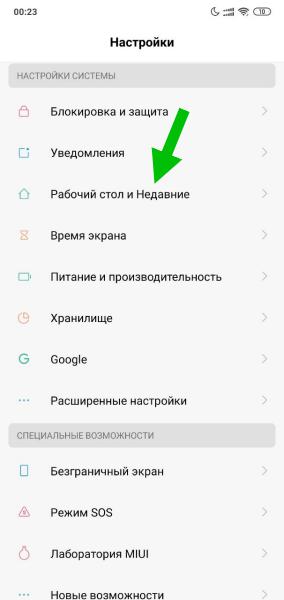
Находим пункт Ассистент и отключаем передвинув ползунок:
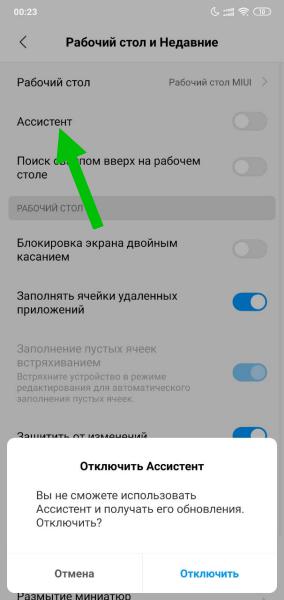
Второй вариант отключения: настройки/рабочий стол/лента виджетов/отключить.