AltStore
Since a lot of people have been asking how to use AltStore, sideload, or IPA files for apps such as YouTube; This guide will tell you how to use AltStore, sideloading, issues, and how to solve them.
Apples restrictions
The difference between AltServer and AltStore is that AltServer is what you use to install AltStore and refresh your apps so they don’t expire. You have to refresh apps every 7 days or else they expire. You can also have a max of 10 app IDs. 1 app (including AltStore) takes up 1 to 2 or sometimes 3 app IDs.
Using AltServer on Mac
So first off, you will want to get AltServer from AltStore.io.
So after you’ve clicked MacOS, a file called AltServer.dmg should’ve been downloaded. Once you open it, you will see AltServer downloaded to downloads or where ever you downloaded it. When you open it, an icon should appear in the corner. ( note that if you have Bartender or a menu bar client it may be hidden) when you click it, it should show a lot of options. Click the one that says “Install Mail Plug-in…” and click “Install Plug-in” once clicked, type your password to install it. This is safe, none of your mail data is sent or recorded by AltStore. The mail plug-in is just to refresh apps so they do not expire. ( note that you must have an account in mail) Once installed, if mail is closed and reopen it, if not then open it. Once opened, click Mail at the top, then Preferences, and Manage Plug-ins in the corner. Then check AltPlugin.mail bundle, Allow Access, then Apply and Restart Mail. Then, go back to AltServer, and click Install Altstore. Your phone should show up Not showing up? Connect your phone to your computer, trust, then go to finder, “ your phone’s name” and at the bottom, “ Show this iPhone when on Wi-Fi.” Make sure to hit apply in the right corner of the finder. Then, if you haven’t already, hit Install Altstore, and your device. Then, type in your Apple ID. If you don’t feel comfortable, you can use a dummy Apple ID, but this doesn’t get sent to Altstore or Riley. Just apply for authentication. They are not saved as well. Once you hit install, it should work. If it doesn’t, make sure the mail is open. Once installed, You now have AltStore! Read the next part that says how to sideload apps to learn how! You might also want to turn notifications on for AltServer.
Using AltServer on Windows
Using AltServer on windows is relatively the same process as on Mac. Go to AltStore.io and download it for windows. You should get a file called altinstaller.zip Run setup.exe Not AltInstaller, Altinstaller is to remove or repair AltServer. ( would be better if Riley named it something else!) then click next, install, and say yes. You getting closer! Next get iTunes ( 32-bit devices 64-bit devices ) and iCloud, 64 and 32-bit. Please do not get it from the Microsoft store or it will not work. You also don’t have to sign into iTunes or iCloud with your Apple ID. Ok, got iCloud and iTunes installed? Click the AltServer icon in the tray, install Altstore, on your phone, and type in your Apple ID. If you don’t feel comfortable, you can use a dummy Apple ID, but this doesn’t get sent to Altstore or Riley. Just apply for authentication. They are not saved as well. Once you hit install, it should work. If you have any issues, scroll down to issues under how to use AltServer on Linux. See if your issue is there before commenting, please! You might also want to turn notifications on for AltServer.
Using AltServer on Linux
AltLinux is a GUI for AltServer Linux, both being made unofficially. To install it, follow the instructions at the link bellow.
Do Not Use 3uTools
Whatever you do, don’t use 3Utools. It has been proven to be modifying jailbreak developers’ jailbreaks without permission which is piracy, sending data to china about your phone, Using a pirated and modified version on Appsync Unified. Do not use it.
Issues & Fixes
How do I turn on developer mode?
How do I trust AltStore?
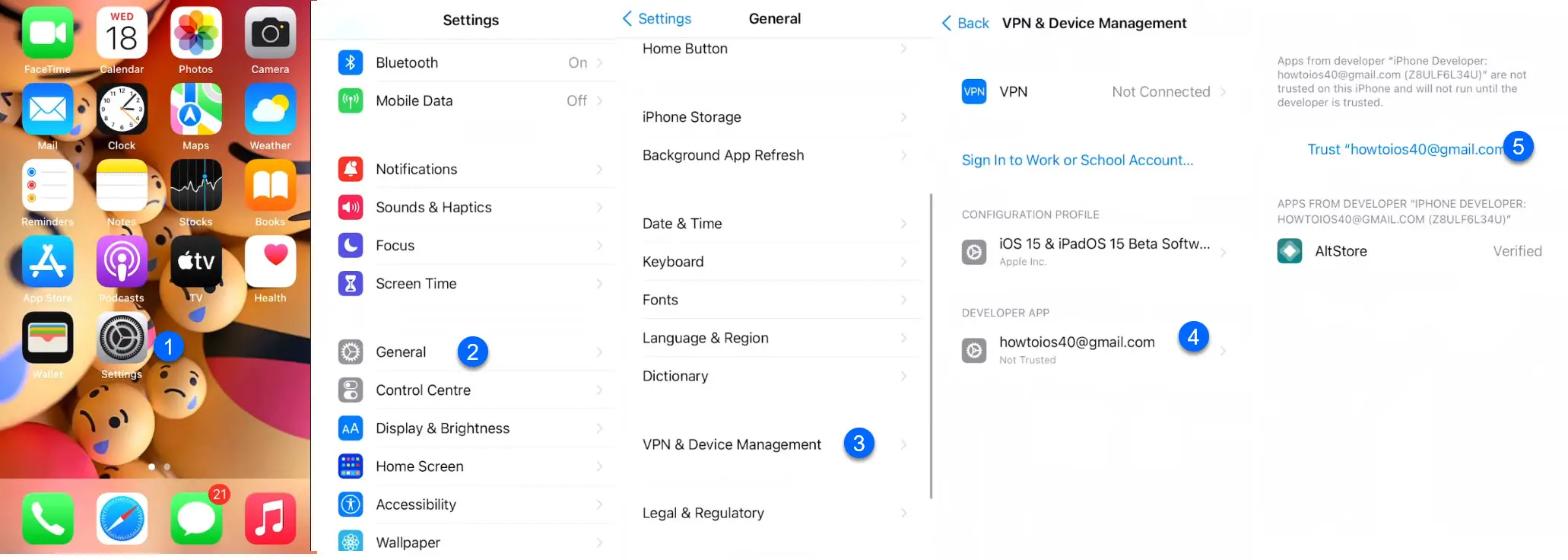
To trust AltStore, go to Settings < General < VPN & Device Management < ( your email that you used to install altstore ) < trust
My device isn’t showing up.
Thanks to u/BWC_4_Wife for this info
On Windows C:\ProgramData\Apple\Lockdown (start, type in %ProgramData%\Apple\Lockdown ) or
on a Mac: Go to /var/db/lockdown in Terminal You can remove everything in this folder, which will remove trust from every device. Refresh your apps faster
My apps arent refreshing wirelessly
!WINDOWS ONLY! u/wolo_prime had a lot of trouble getting Altstore apps (uYou+) to refresh my apps wirelessly. He installed every version of Itunes, reinstalled services, windows updates, wifi, and firewall settings.
What finally worked is restarting the Apple Mobile Device Service. In order to do it on windows, you open the command in admin mode. Wnd key, type “cmd”, right-click “run as administrator”.
When it’s opened you type:
net stop “Apple Mobile Device Service”
wait a couple of seconds
net start “Apple Mobile Device Service”
Your device should appear on Itunes a few seconds afterward. You also find the process running in task manager and right-click “restart” which would do the same.
Credit to u/cancerism for this idea!
Another way to automate your refreshes if Background refresh doesn’t work
Background refresh is supposed to automate refreshing but it never worked for u/cancerism.
I’ll assume that you’ve already set up wifi sync and auto start altserver with your computer
Just use shortcut automation and pick a time that you’re most likely to be at home. Turn off Ask Before Running which will be on by default
YouTube++/uYou+ isn’t working, what can I do?
First off, don’t use a random YouTube++, use uYou+ it’s much better than a random file you found off of a shady site.
If I use the same apple ID on both my iPad and iPhone, will it affect the number of sideloading apps?
It shouldn’t, in my testing, you can use the same apple ID
How vulnerable is my iPhone if I enable developer mode?
Not that vulnerable. Still safe even after it’s turned on. Apple might just be trying to scare you
I’m getting error 1100
Make sure you are signed into iTunes
Be sure to authorize iTunes → Accounts → Authorizations → Authorize This Computer
Enable iTunes Wi-Fi sync for your phone
Minimize iTunes when done. Make sure it is still open in the background
Run altserver as admin
Hope this helps!
Written by u/chux-e.
I’m stuck on the login screen, what do I do?
Written by u/archiep0gi
Ensure the following:
I’m not receiving notifications from apps I sideloaded
You can only get notifications from apps you sideload by paying $99 a year to apple for a developer account. Idk how altstore can send notifications though.
Is there any way to bypass/extend the expiration from 7 days?
With an apple developer account for $99 a year, you get, 365 until it expires, then you refresh, unlimited app id’s, your P12 signing certificate, notifications, access to the developer betas, and the rest is here You can get IPA files from here. now stop asking plz
The icon isn’t showing up in the tray, what do I do?
Credit to RyzenGaming#5928 for figuring this out. u/wukkyy got the idea but RyzenGaming made a guide that went into more detail and said more steps you needed to do.
Step 1- Download the vivetool from here ����(https://github.com/thebookisclosed/ViVe/releases)
Step 2- Create a folder name vivetool without any spaces in the name, in C Drive.
Step 3- Now Extract all the files from the zip to That vivetool folder you had created in Step 2.
Step 4- Open Up the CMD (Run as Administrator).
Step 5- Copy Paste & Run this Command in CMD ���� c:\vivetool\vivetool.exe /disable /id:26008830
Step 6- After Running the Command it will Show you a Message saying ����Successfully Set Feature Configuration ) which means the command is successfully implemented.
Step 7- Now the only thing you need to do afterwards is that restart your PC.
Step 8- After Restarting your PC, Launch the** AltServer as Administrator**, Guess what, . Boom. �� u can see the AltServer Icon in your taskbar tray bar.
There is no provisioning profile with the requested identifetr on this team.(3017)
!YOU MUST USE ALTSERVER FOR THIS UPDATE!
Reinstall AltStore from AltServer, then you should be on the newest version. Please note that you do not need to delete AltStore.
Установить приложение на iPhone через AltStore
С помощью AltStore вы можете установить на iPhone или iPad приложения, которые отсутствуют в магазине AppStore. Для установки потребуется компьютер на Windows или iOS, а также кабель для подключения смартфона к ПК.
Inspector Cloud не несет ответственности за работоспособность ваших iOS-устройств. Все описанные действия вы делаете на свой страх и риск.
- Windows
- macOS
- Скачайте и установите iTunes и iCloud с сайта Apple.
- Скачайте AltServer для Windows, распакуйте архив и установите приложение.
- Запустите AltServer — иконка приложения появится в статус-баре.

- Подключите iPhone к компьютеру через кабель, разблокируйте его и выдайте доверительное разрешение, если это требуется.
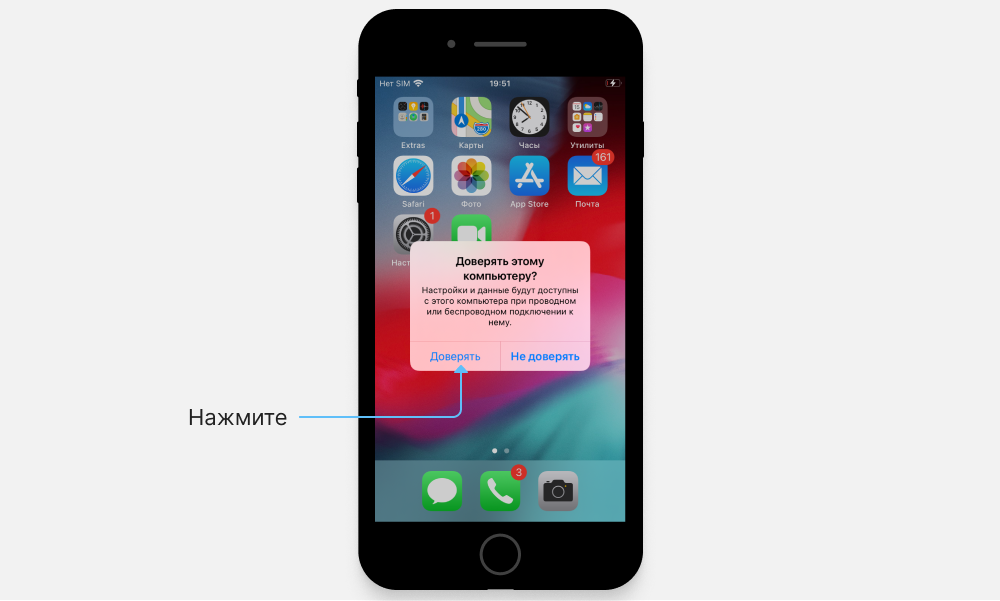
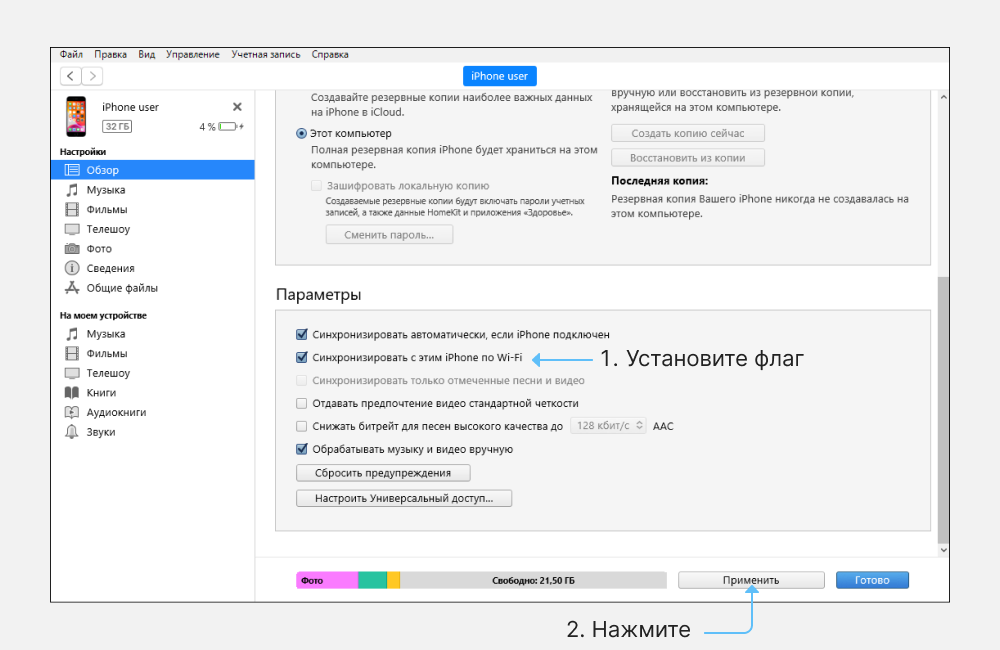
- В iTunes разрешите подключение к iPhone по Wi-Fi.
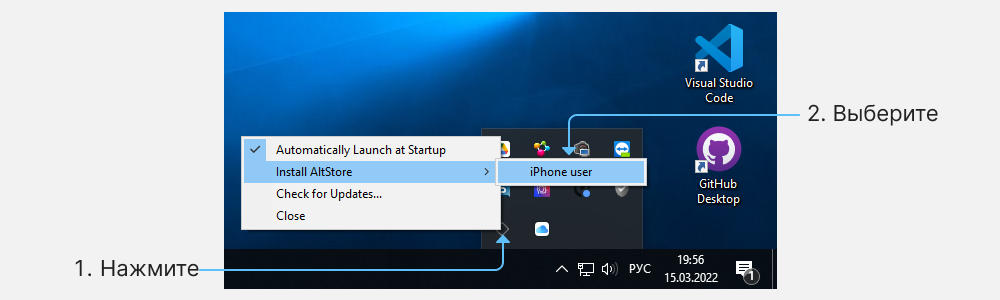
- В меню AltServer выберите раздел «Install AltStore» и кликните на подключенный смартфон.
- Введите Apple ID и пароль учетной записи Apple, чтобы подписать устанавливаемое приложение.
Через пару минут приложение появится на рабочем столе смартфона.
- Скачайте AltServer для macOS, распакуйте архив и переместите его в папку «Программы».
- Запустите приложение — иконка приложения появится в статус-баре.
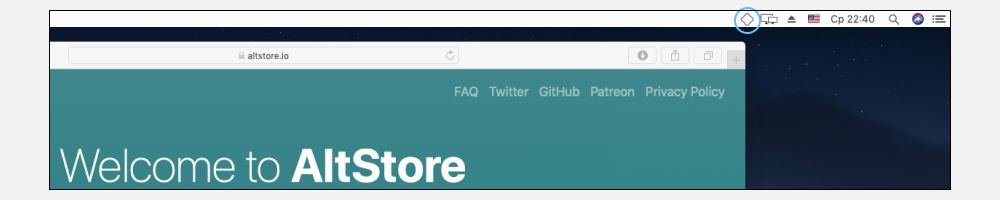
- В меню приложения нажмите «Install Mail Plug-in» и введите пароль.
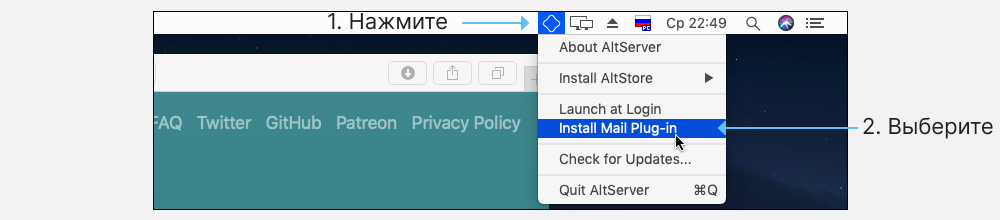
- Откройте настройки почты в macOS и нажмите «Управлять плагинами».
- Включите «AltPlugin.mailbundle» и нажмите «Применить и перезагрузить», чтобы завершить установку.
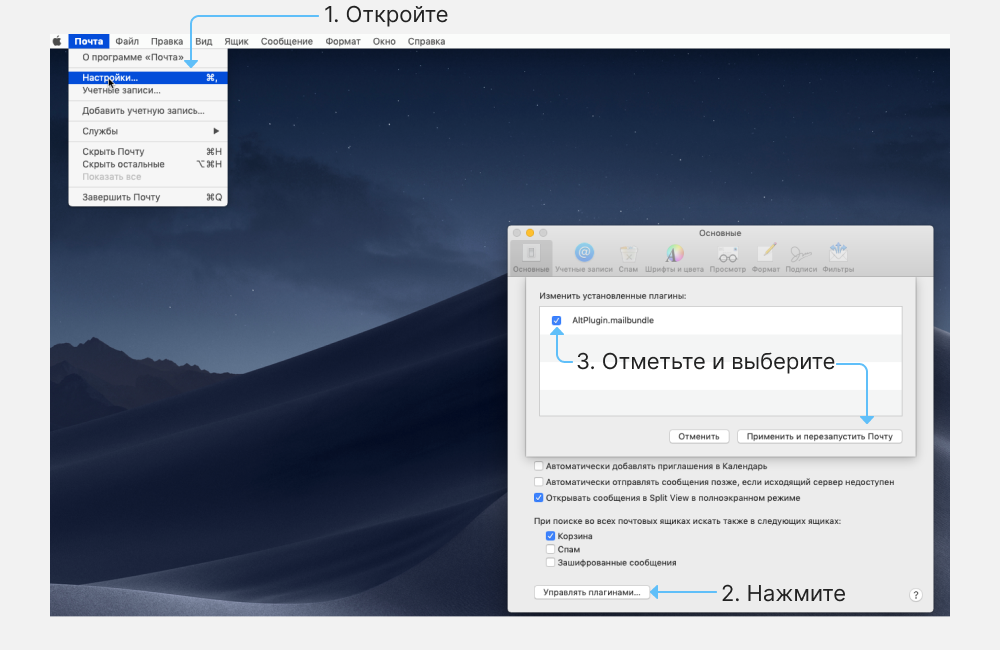
- Подключите iPhone к компьютеру через кабель, разблокируйте его и выдайте доверительное разрешение, если это требуется.
- В iTunes или Finder (в macOS Catalina и новее) разрешите подключение к iPhone по Wi-Fi.
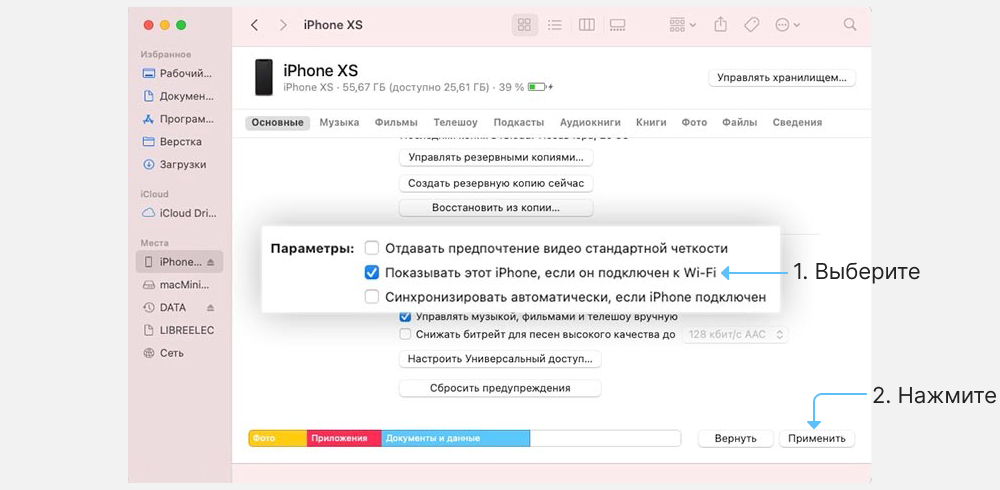
- В меню AltServer выберите раздел «Install AltStore» и кликните на подключенный смартфон.

- Введите Apple ID и пароль учетной записи Apple, чтобы подписать устанавливаемое приложение. Через пару минут приложение появится на рабочем столе смартфона.
- На iPhone перейдите в «Настройки/Основные/Управление устройством».
- В окне будет отображаться сертификат учетной записи Apple ID. Выдайте ему доверительные разрешения. Это нужно чтобы запустить приложение на устройстве.
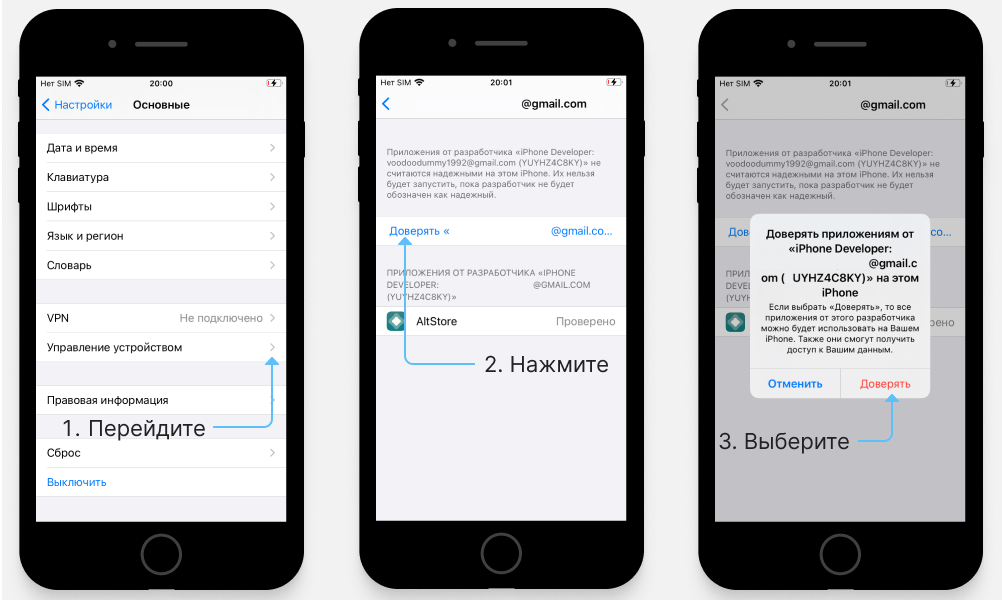
- Откройте приложение и дождитесь окончания загрузки.
Теперь установите приложение на смартфон.
Установить проложения на iPhone
Для установки приложений iPhone должен находиться в одной сети с компьютером, на котором запущен AltServer.
- Скачайте приложение Inspector Cloud в формате *.ipa на iPhone. Файл можно скачать через Safari или передать на устройство по AirDrop.
- В меню «Поделиться» выберите AltStore.
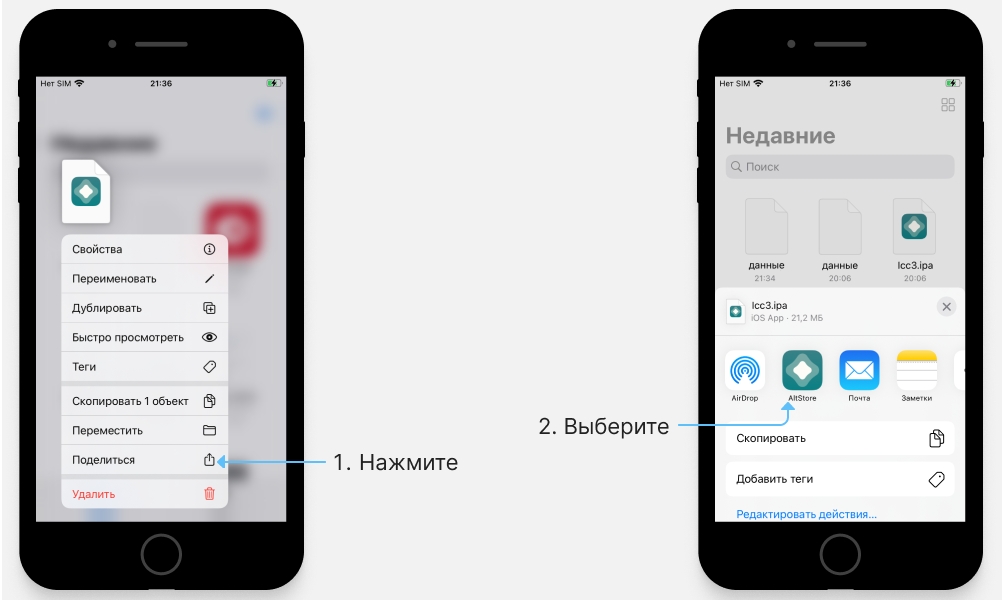
- Подтвердите установку и дождитесь ее окончания.
Приложения удаляются стандартным способом. Для окончательного удаления почистите сертификат в разделе «Настройки/Основные/Управление устройством».
Как установить AltStore на свой iPhone, чтобы загружать приложения без взлома
Разработчик приложения для iOS по имени Райли Тестут разработал альтернативу Apple App Store, которая запустила Он называется AltStore.. Разработчик описывает приложение как «дом для приложений, которые расширяют границы iOS».
Самая крутая часть этого альтернативного магазина — это то, что он поставляется с Эмулятор Nintendo Он был разработан самим Testut под названием Delta. Это позволит пользователям iPhone и iPad Играйте в классические игры прямо на своих устройствах Apple. Сказочно, не правда ли?
К счастью, вам не нужно делать джейлбрейк устройства iOS, чтобы использовать этот магазин. Магазин доступен для загрузки в ранней предварительной версии. К тому времени, когда эта статья дойдет до вас, будет доступна полная версия AltStore, если Apple не примет меры по блокировке App Store, как всегда.
Очень взволнован официально анонсированный AltStore: альтернативный магазин приложений для iOS — джейлбрейк не требуется. Запуск в эту субботу, 28 сентября, но вы можете скачать предварительный просмотр СЕГОДНЯ https://t.co/M7nULBV28p
— Райлз ��♂️ (@rileytestut) 25 сентября, 2019
Если вам интересно узнать Как Testut создал альтернативный магазин приложений AltStore использует ваш Apple ID, чтобы вернуть приложения, чтобы их можно было установить на ваше устройство. Затем, чтобы фактически установить приложения, AltStore отправляет приложения через Wi-Fi в настольное приложение AltServer, которое использует синхронизацию iTunes WiFi, чтобы установить их обратно на ваше устройство. ‘, — сказал Тестут в твиттере в Твиттере.
Срок действия приложений, установленных с помощью этого метода, истекает через неделю, и именно здесь на сцену выходит приложение AltServer. AltStore будет автоматически обновляться в фоновом режиме, когда телефон подключен к той же сети Wi-Fi, что и компьютер, на котором установлен AltServer.
AltServer Preview доступен для загрузки в Windows 10 и macOS. Я попытался запустить AltServer на компьютере с Windows, несмотря на то, что у меня был Macbook Air, и убедился, что приложение работает без сбоев на платформе Windows.
Установите AltStore на iPhone и ПК
AltStore — это не отдельное приложение для вашего iPhone, оно запускает сервер на вашем ПК и обновляет приложения на вашем iPhone, как мы указывали. Приложения, установленные с помощью AltStore, работают только семь дней, и их необходимо обновить, или они будут автоматически удалены из-за строгих политик Apple. Сервер гарантирует, что ваши приложения будут работать вечно, пока вы подключаете свой iPhone к серверу AltStore один раз в неделю. Шаги по установке AltStore на Mac и Windows очень похожи, за исключением одного небольшого различия в шаге 2. Вы не должны столкнуться с какими-либо проблемами во время установки.
Шаг 1: Перейти к Сайт AltStore Загрузите приложение на свой компьютер. Он доступен как для macOS (10.14.4 и выше), так и для Windows (только 10).
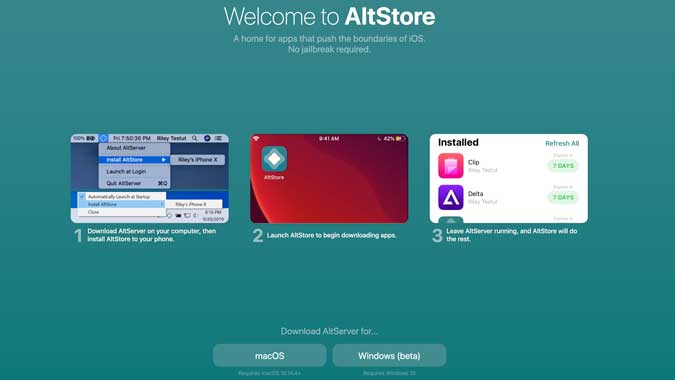
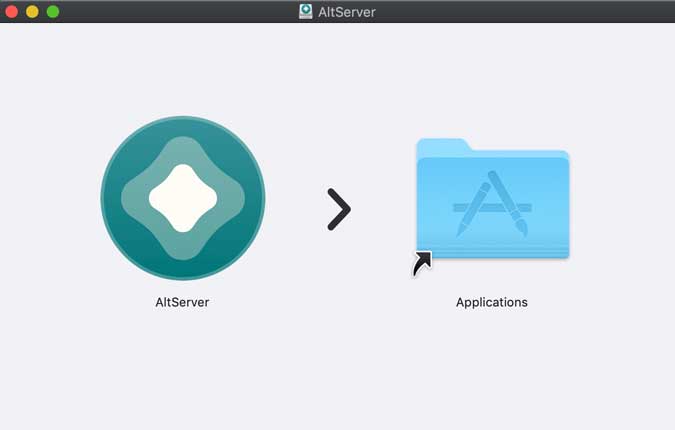
Шаг 2: Разархивируйте файл и установите сервер, запустив файл. У вас не должно возникнуть никаких проблем с macOS во время установки, однако пользователи Windows могут получить сообщение об ошибке, если на вашем ПК с Windows установлен iTunes.
если ты Установите iTunes из Microsoft Store , полностью удалите его из системы, прежде чем продолжить. Перейдите в Панель управления> Удалить программу> Щелкните правой кнопкой мыши iTunes> Удалить.
Теперь удалите файлы библиотеки iTunes со своего компьютера, что помешает плавной установке программы установки iTunes. Перейти к Этот компьютер> C: диск> Пользователи> ИМЯ ПК> Музыка> Папка iTunes . Удалите эту папку и все файлы внутри нее (если это важно, просто переместите ее в другое место).
Загрузите и установите установочный файл iTunes из Сайт Apple или щелкните Щелкните эту ссылку. Установите iTunes на свой компьютер с Windows.
Шаг 3. С этого момента процесс для macOS и Windows будет одинаковым. Запустите сервер AltStore на своем компьютере, и он начнет отображаться на панели меню Apple и на панели задач Windows. Подключите iPhone к компьютеру через USB-кабель, нажмите «Установить AltStore» и выберите свой iPhone.
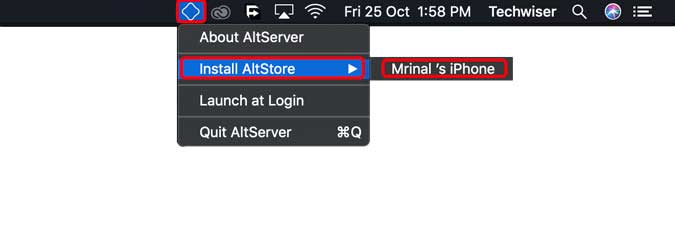
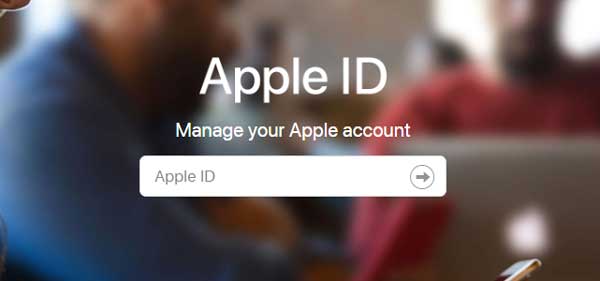
Шаг 4: Сервер попросит вас ввести учетные данные Apple ID, ввести данные и нажать OK. Если двухфакторная аутентификация включена, вам нужно будет создать пароль приложения для сервера AltStore. Перейти к Ваша учетная запись Apple Щелкнув эту ссылку в своем веб-браузере и войдя в систему, используя свои учетные данные Apple ID.
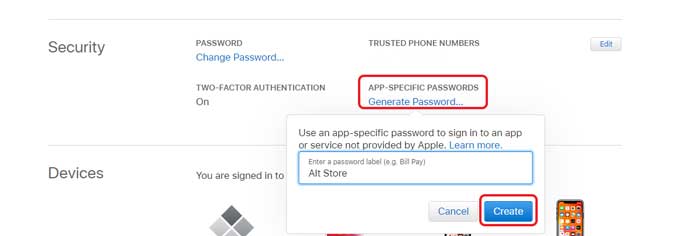
Шаг 5: Прокрутите вниз до «Настройки безопасности» и нажмите «Создать пароль», назовите его и нажмите «Создать». Этот пароль будет использоваться много раз, поэтому запишите его где-нибудь.
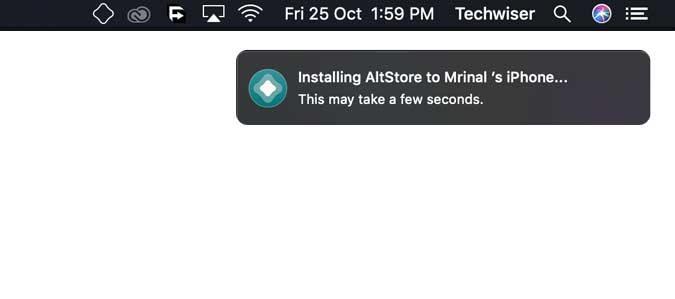
Шаг 6: Теперь вернитесь к серверу AltStore, работающему на компьютере, и установите приложение AltStore, введя свой Apple ID и пароль для приложения. Установка приложения займет несколько минут, и когда это произойдет, оно появится на главном экране вашего iPhone. Затем вы можете отсоединить USB-кабель.
Шаг 7: Приложение пока не открывается, и нам придется проверить приложение в настройках. На вашем iPhone перейдите в «Настройки»> «Основные»> «Управление устройством»> «Ваш Apple ID»> нажмите «Доверие».
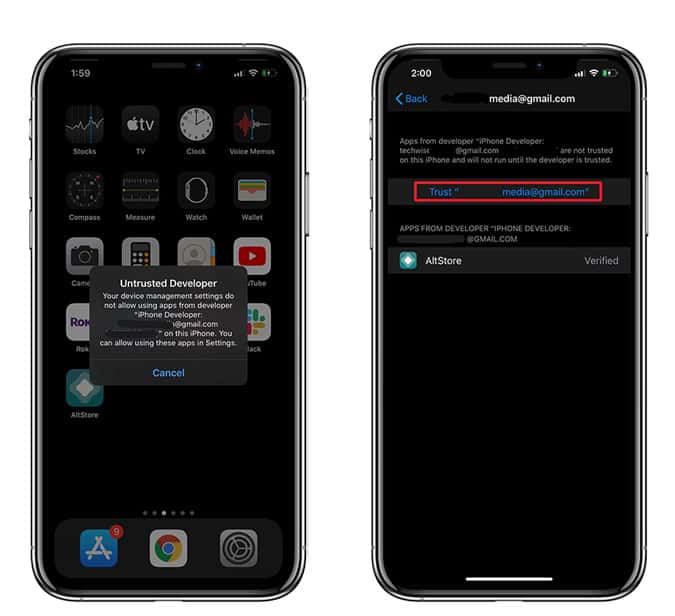
Шаг 8: Теперь вам нужно ввести свой Apple ID и пароль для приложения в приложении. Откройте приложение AltStore на своем iPhone, перейдите на вкладку «Настройки» и нажмите «Войти с Apple ID». Введите учетные данные, и все, AltStore настроен и готов к работе. Установите избранные приложения!
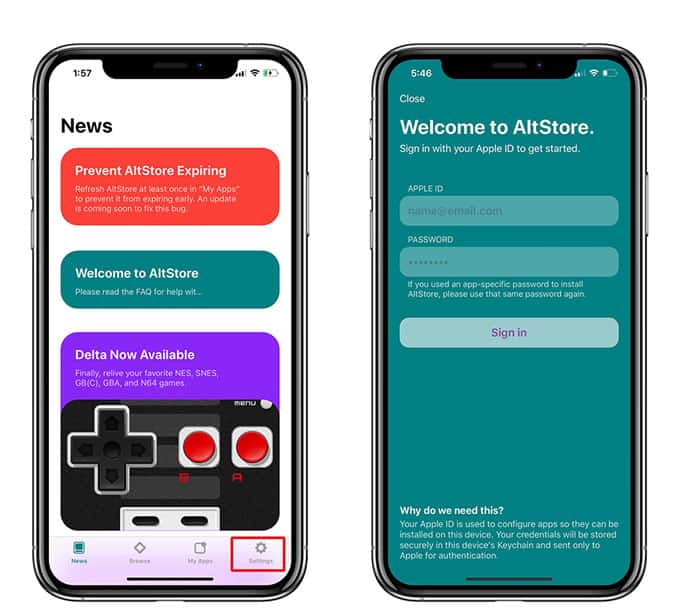
Шаг 9: Осталось только включить синхронизацию по Wi-Fi. Как я уже упоминал ранее, приложения, загруженные с помощью AltStore, работают только семь дней и требуют обновления. Это то, что делает AltStore Server, и он автоматически обновляет приложения, загруженные на ваш iPhone через Wi-Fi. Единственное требование — подключать компьютер и iPhone к одному Wi-Fi не реже одного раза в неделю. Для большинства людей это не будет проблемой, так как ваш iPhone, скорее всего, все равно будет подключен к вашей домашней сети.
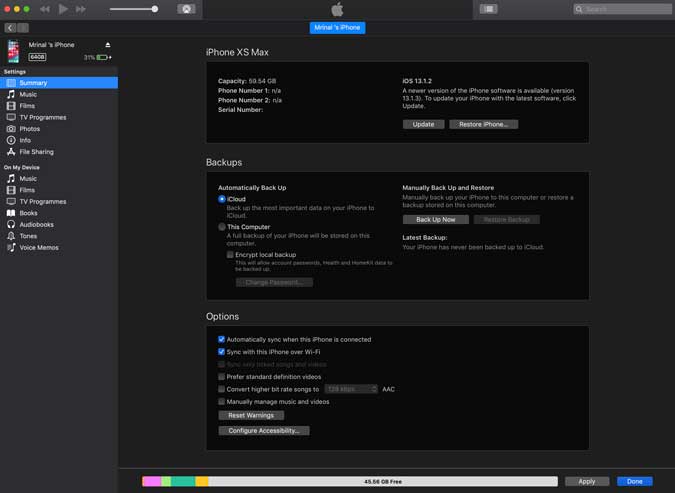
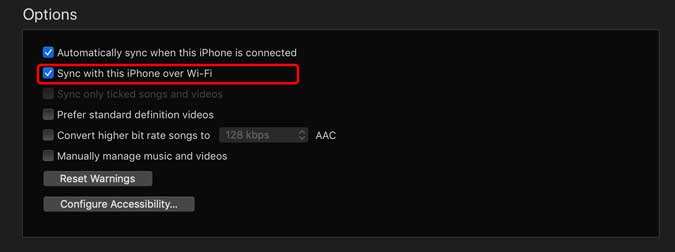
Чтобы включить синхронизацию Wi-Fi, подключите iPhone к ПК с помощью USB-кабеля и откройте iTunes, перейдите на свой iPhone, затем выберите вкладку «Параметры» в поле «Синхронизировать iPhone через Wi-F» и нажмите «Готово». Теперь AltStore Server будет автоматически обновлять загруженные неопубликованные приложения каждые семь дней.
Как установить AltStore
Это был быстрый способ установить AltStore на ваш компьютер. Это достойное приложение с простым процессом установки. Я согласен, приложение для Windows не работает плавно по сравнению с его аналогом для iOS, но вы можете легко исправить это за считанные минуты. Что вы думаете об этом методе, дайте мне знать в комментариях ниже.
How To Install AltStore on iPhone iOS 17 on Mac OS

In this AltStore Mac download tutorial, I am showing you how to download and install AltStore on iPhone running on iOS 17 devices. Well, it does work for upper and lower iOS versions as well.
Along with installing AltStore Mac with the mail plugin, I have shown the app signing and re-signing on AltStore.
What is Altstore?
Altstore is a third-party app store for iOS that pushes the boundaries of iOS with NO jailbreak. You can use this Altstore to sideload/install IPA files on your Apple devices.
It’s the complete alt store iOS 17 macOS with a mail plugin tutorial, so follow it till the end. If any error occurs, the solutions are given at the end of this article; you can refer to those.
As you can see below, I am on iOS 17. Now below, I have started the process. First, I have shown how to get the alt server on macOS, which we’ll use to install AltStore on iPhone.
Trending
Apple released iOS 17.0.3 that comes with a fix for iPhone 15 Pro overheating issue
iOS 17.1 beta is introducing a host of new features for iPhone users
iOS 16.0 – 17.0 A12+ JAILBREAK NEWS: TrollStore 2 POSSIBLE! New Kernel Bugs + Permanent Signing
Apple rolled out iOS 17.1 public beta 1 with these 5 new features
Does AltStore work on iOS 17?
For those who don’t know, iOS 17 is outstanding. You will have to turn on the developer mode because it will not allow you to run iOS unless you turn on the developer mode in case you have installed AltStore and upgraded to iOS 17.
Here is how to install and download filza without jailbreak on your device; it’s a great way to have Filza file manager to see and edit system files on iOS devices.
Please enable JavaScript
It is free, and you can perform it after restarting your device. Everything, including AltStore and delta, is going to start working subsequently. Though iOS 17 is incredible, specific notch iPhone will not be able to have a percentage for the battery for several reasons.
If you got a windows computer, not a mac computer, you can follow the Altstore windows download tutorial step by step.
How to install AltServer to install Altstore on iPhone on macOS with Mail Plugin
Step 1. Download Altserver for macOS
Open Safari or any other browser, and go to the AltStore.io website.
You will need to download the Mac OS version of the Altserver; click on the Mac button, and it’ll start downloading.
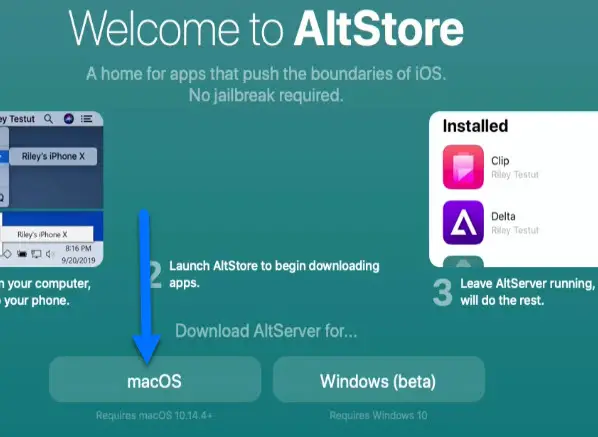
Step 2. Install Altserver on macOS
Once the Altserver download is completed, click on the downloads arrow at the top right corner of the browse.
Double-click on the downloaded file; we will use this alt server for AltStore mac download on iPhone.
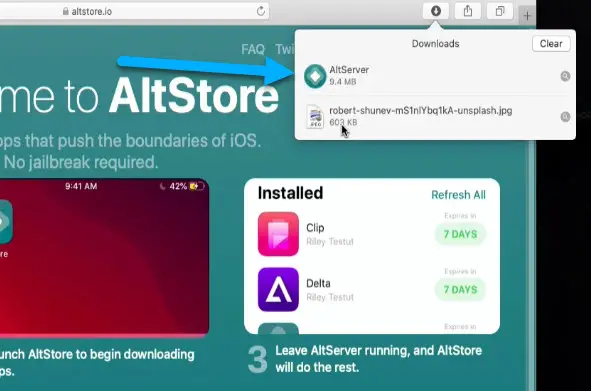
Once you click the AltServer file, your computer will verify the AltServer first.
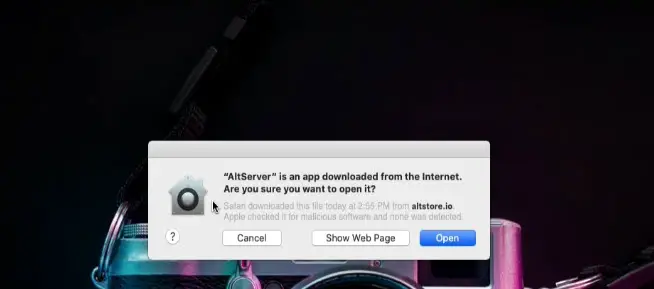
After the verification, a dialogue box will open stating, ‘AltServer is an app download from the internet. Are you sure you want to open it? Click on the open.
Check here how to download and install the iNDS emulator on iPhone.
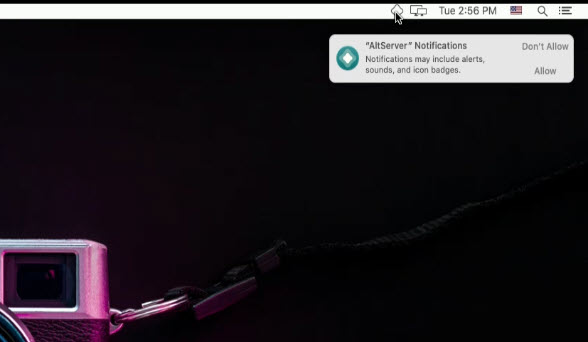
After a few seconds, you will see the AltServer icon at the top right corner of your Mac screen.
Step 3. Install the Mail plugin on macOS
We can’t directly install altstore iOS 17 on iPhones from here. We first need to install the altstore Mail Plugin.
Click on the AltServer icon, select the install Mail plugin, and then again click on the install mail plugin in the popup.
Want to download trollstore on iPhone? Here is the step-by-step tutorial attached.
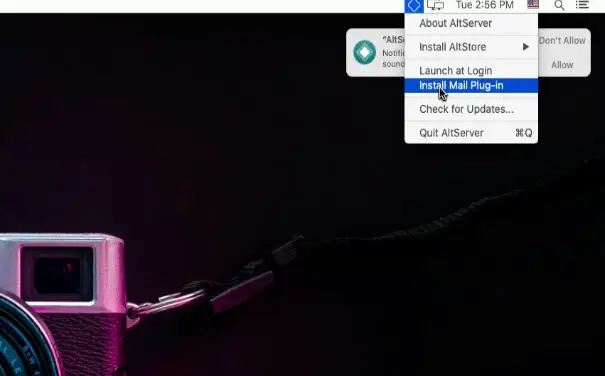
It will ask you to enter the password for your computer, so enter your computer’s password and click OK.
A popup will appear stating the alt store Mail Plugin installed. Installing the Mail plugin on mac for AltStore is necessary for AltStore iOS 17 mac download, so do not miss this step! Most of the time, it’s the reason why the altstore installation failed. If you face any issues regarding mail plugin errors, you can look for a solution in this article to how to fix the mail plugin not working.
Step 4. Enable Altplugin.mail bundle in the mail app
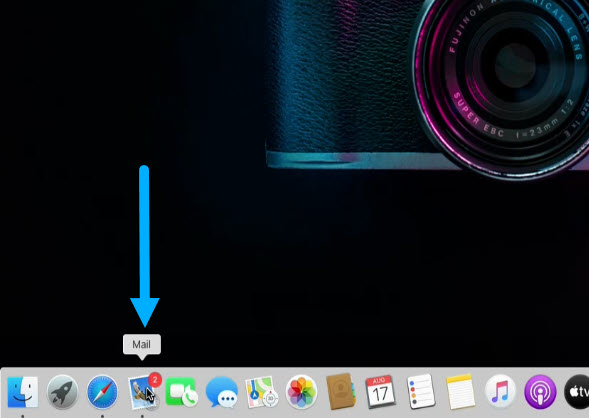
After the mail plugin installation, open the ‘mail app‘ from the dock.
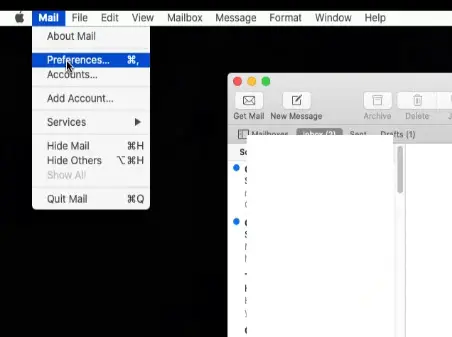
Go to its preferences from the top.
Click on the ‘manage plugins’ button.
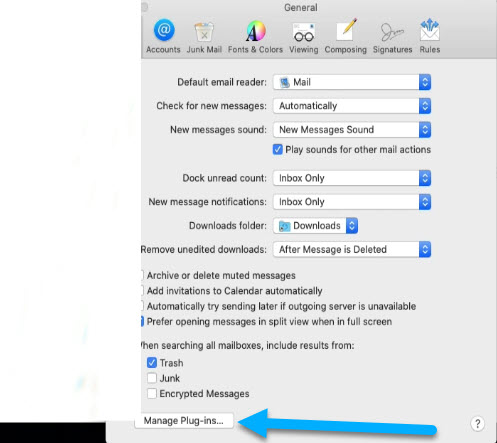
On the new dialogue box, click on AltPlugin.mail Bundle box If it is not already checked, click on the ‘apply and restart mail.’ If you don’t see it, you haven’t installed or installed the mail plugin after you attempted it.
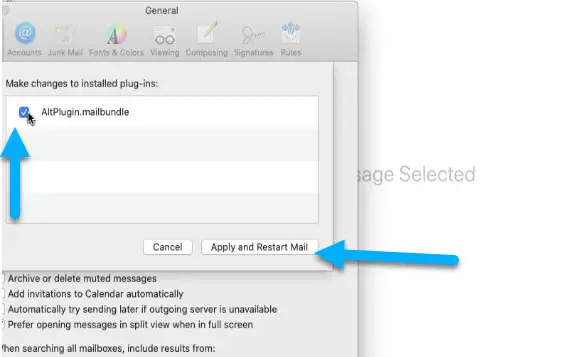
Once it’s opened, minimize it, and do not close the mail app, it’s necessary to be open in the background to download AltStore on iPhone.
Below, I’ll show you how to install altstore on iPhone iOS 17.
Here is how to download palera1n GUI jailbreak on macOS and jailbreak iOS 15 – 16 on checkm8-supported devices.
How To Install AltStore on iPhone iOS 17 from MacOS
Step 1. Connect iPhone with macOS PC
Connect your device to the computer, and make sure your iPhone is connected to the same WiFi network as of computer for the AltStore to download on iPhone.
Step 2. Trust the device
Hit the trust button on the popup on your iPhone or iPad.
Step 3. Install Altstore on iPhone
To get AltStore on iPhone, click on the alt server icon at the top.
There is the option to install Alt Store iOS; it shows your device name. Please hover your mouse pointer on it and click on the install button.
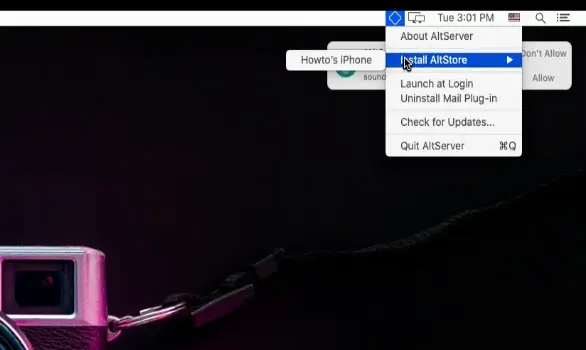
Step 4. Sign in with Apple Id
It’ll ask you for Apple ID credentials; sign in with your Apple ID and password, and click on the install button.
Alt Store will use this to sign or resign your applications.
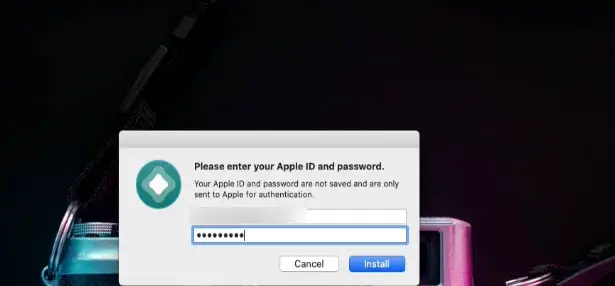
If you have two-factor authentication enabled for your Apple ID, you must enter the code for verification while logging in from your computer.
Check how to jailbreak iOS 15-16 with palera1n windows jailbreak for free on checkm8 supported devices.
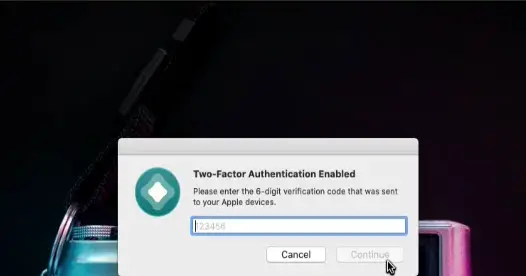
A popup with the code will appear on your screen when you turn on the screen. Take that code from your device’s screen and put it on the computer screen.
Step 5. If the verification Code popup for AltStore is not showing
- Let me show you how you can get the verification code if the popup doesn’t appear on your device.
- This is the problem people sometimes face, and they can’t log in with an Apple id on the computer to install altstore on macOS.
- Go to settings, tap on your apple id, here tap on password & security. It’ll ask you for authentication, do it on the next screen.
- Tap on this, and get the verification code button. It’ll show you a popup with the code.

Step 6. Enter the Apple Id verification code
Put this code on your computer screen and click on the install button.
The AltStore macOS will start installing on your iPhone. This may take a few seconds to install alt store iOS 17 on iPhone. If you face any errors, I have mentioned fixes articles links below at the end of this article, and you’ll find the fix to your problem there; refer to those below.
If you see any error during AltStore iOS 17 installation on iPhone, you must repeat the installation process step by step.
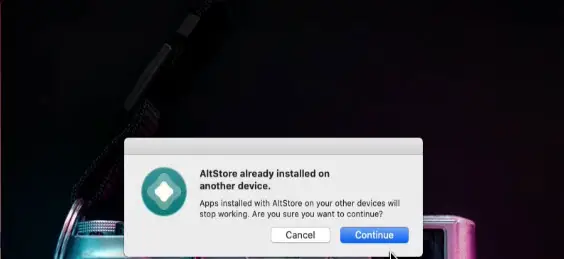
And if you see a popup stating AltStore is already installed on another device, click on continue.
Step 7. Trust the app
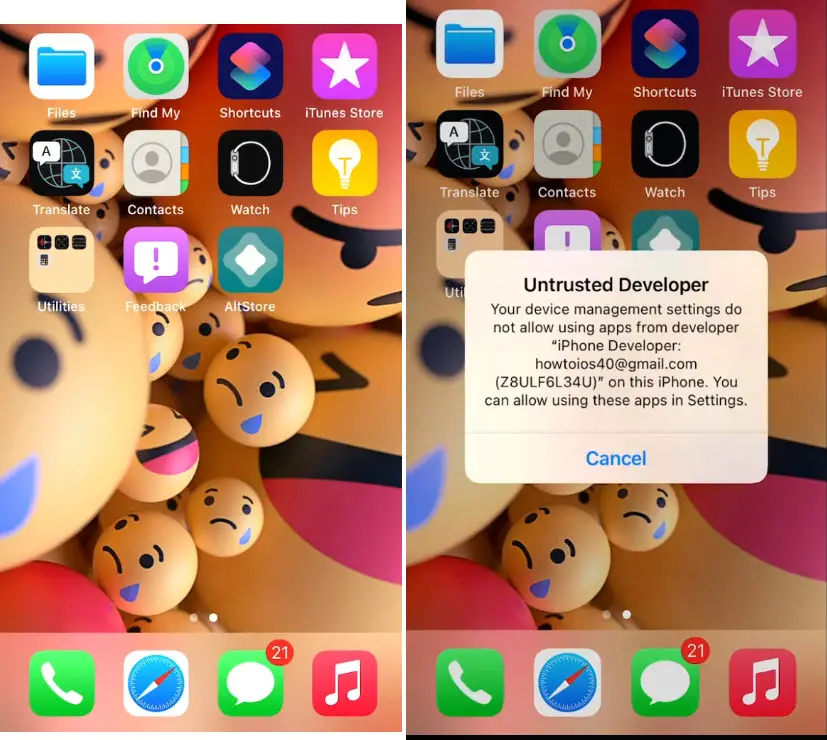
Once AltStore iOS 17 macOS is successfully installed on iPhone.
Tap on it to open it, but when you tap on the AltStore icon on your device’s home screen, it will bring up the Untrusted Developer popup.
This means we need to trust the AltStore before we can use it.
Go to Settings, go to General, tap on the VPN & device management, tap on your Apple ID, and trust the application.
After that, you can open the AltStore ; go through the initial setup.
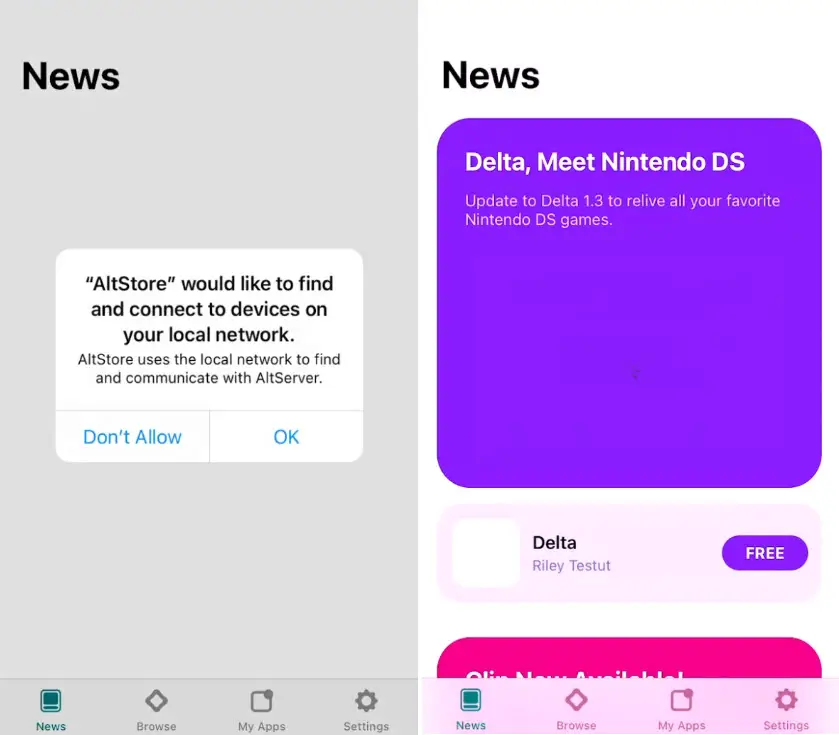
Now I’ll show you how to install apps with AltStore iOS 17 on iPhone. You need to have an IPA file on your device to install that.
How To Download Built-in Apps with AltStore iOS 17 on iPhone
Before I go ahead and show you how to install IPAs with AltStore on iPhone, let me first show you how you can install built-in apps with AltStore iOS 17.
Step 1. Download Altstore Apps
In the AltStore, you can directly download the Delta application, which is built into this AltStore iOS 17.
If you tap the FREE button in front of it, it will ask you to put in your Apple ID and password.
Step 2. Sign in with Apple Id
Put the same Apple ID and password you put in your Mac computer while installing the AltStore on your iPhone.
After that, it will start installing on your device, and you’ll have it on your device’s home screen. But if you failed to install that, you must have missed something. Follow the above steps again, or refer to this guide on fixing the altstore installation failure.
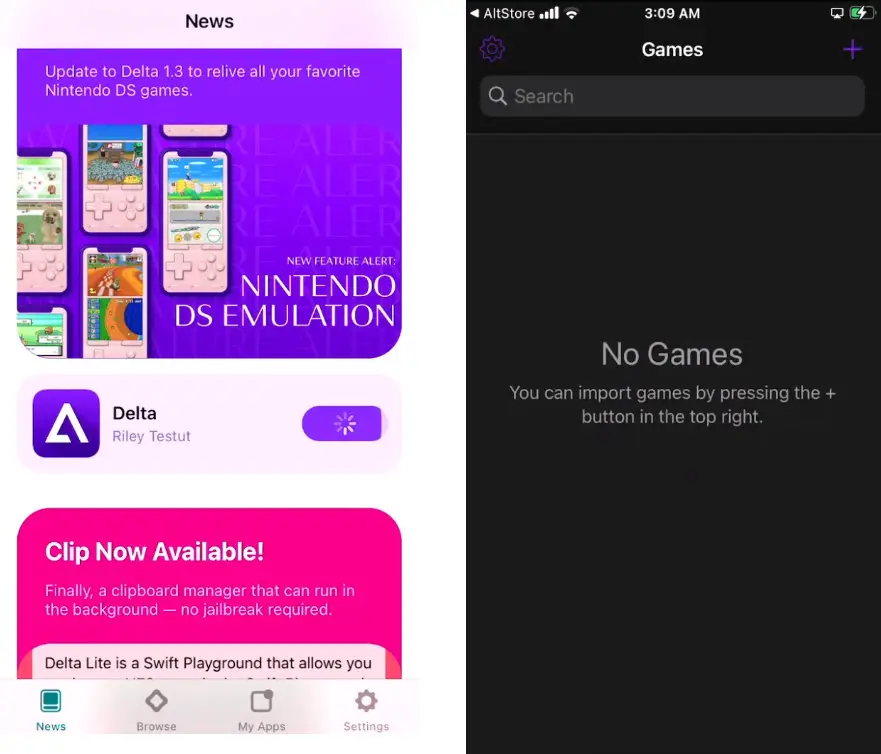
By far, we have seen how to get AltStore mac on iPhone.
Now I’ll show you how to install apps with AltStore iOS 17 on your iPhone or iPad.
How To Install/Sideload IPAs with AltStore on iPhone iOS 17
Step 1. Download IPA file
We need an IPA file to install it with AltStore iOS 17 on the device.
I have downloaded the unc0ver jailbreak IPA file already. Let’s install unc0ver jailbreak with AltStore on my device.
Step 2. Keep the device connected to the same WiFi
Before installing any app, ensure your device is connected to the computer and your device and computer are on the same WiFi network.
Make sure these things are first and then proceed further.
Step 3. Install/Sideload IPA on iPhone with Altstore
Tap on the ‘My Apps‘ section at the bottom, then tap on the + icon at the top of your device.
This page will show you all the downloaded apps you can install with AltStore iOS 17.
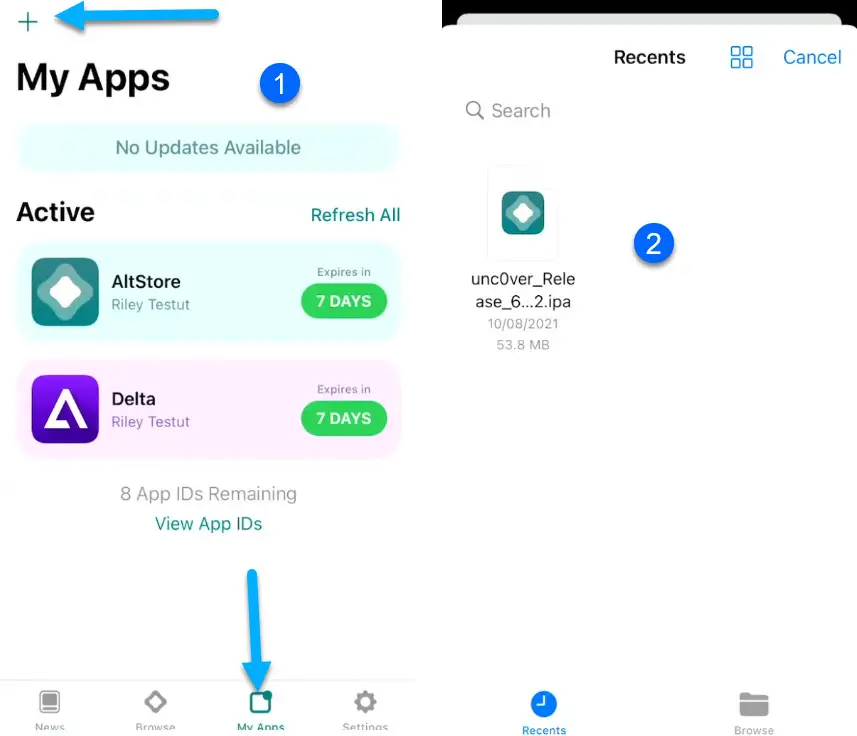
Just tap on the IPA file, and it’ll start sideloading on your device.
If you see any errors like altstore could not find altserver, or altstore mail plugin not working, the fixes are already posted and mentioned here; you can refer to those to fix these issues to install apps.
Suppose you’re installing the app for the first time with AltStore iOS 17. It’ll ask you to put in an Apple id and password, and the same Apple ID has already logged in on your device.
AltStore uses your apple id to sign the certificates for apps. Put in the credentials and proceed; it’ll install the app on your device.
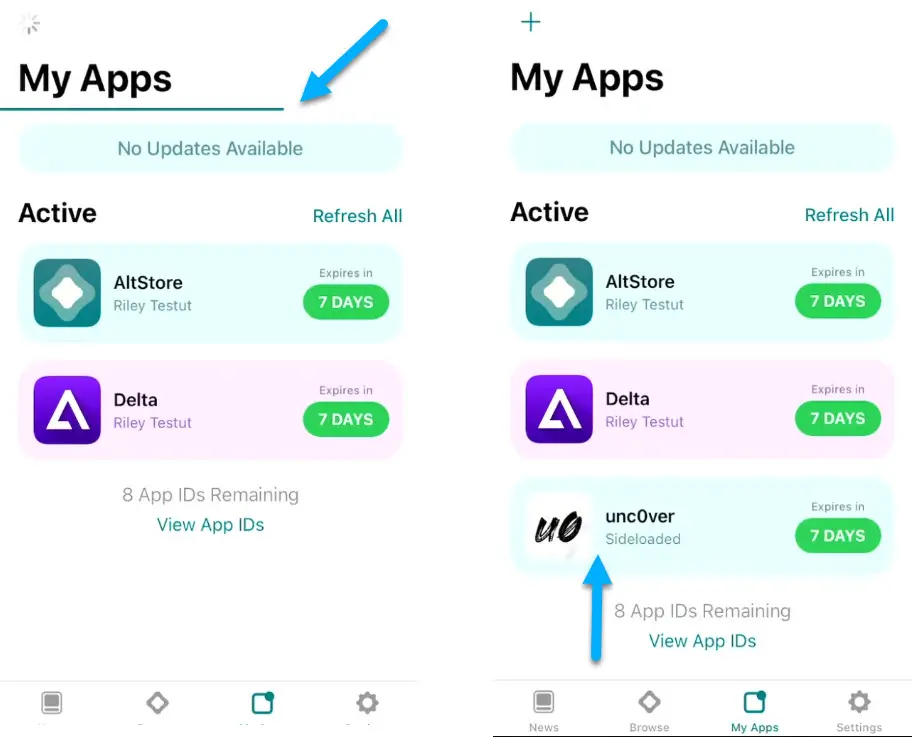
As you can see, the unc0ver jailbreak is installed on my device, although I can’t use it to jailbreak because iOS 17 isn’t supported for unc0ver jailbreak.
If you’re on iOS 17, you’ll see an error after opening the sideloaded app that the developer mode is required. For that, here is how to fix the developer mode required on iOS 17 to open altstore apps.
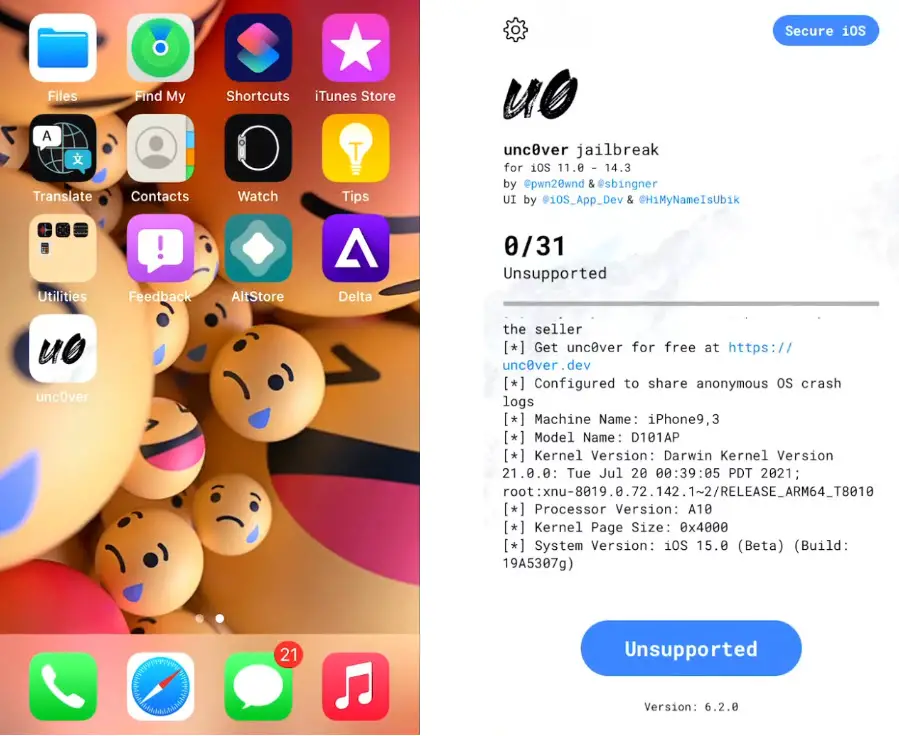
This is how to install apps with AltStore on your iPhone or iPad.
Now I’ll show you how to resign apps with AltStore iOS 17 to reset the expiry date.
How To ReSign Altstore Apps on iPhone – Reset AltStore Apps Expiry Date
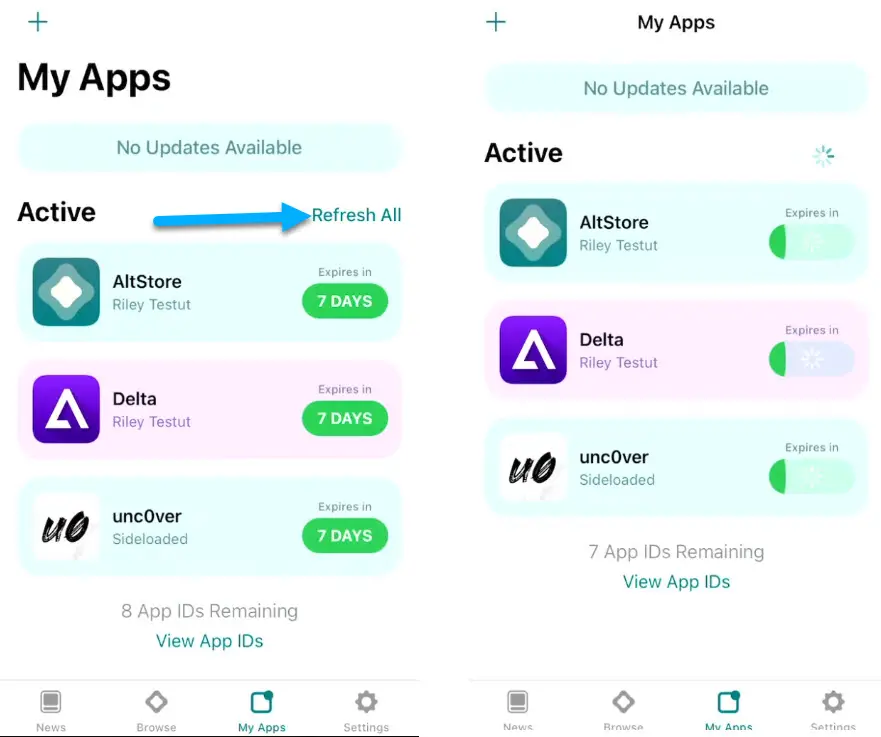
- As you can see on the My Apps section (image below at the end), it states seven days expiry. Installed apps expire after seven days on a free developer’s account.
- However, you get one year of signed apps on AltStore iOS 17 if you have a paid developer account.
- Suppose there is only one day left for the apps to expire. You must resign apps with AltStore to keep them working on your device.
- First, you need to attach your device to a computer, ensure your device and computer are on the same WiFi network, and ensure the alt server is running on your computer.
- Now tap on this refresh all button on your device; the expiry date will reset to seven days.
Conclusion – Install AltStore on iPhone on iOS 17
This is how to install AltStore iOS 17 on iPhone on macOS with the mail plugin; if you face any issues downloading Altstore on the iPhone process, comment below so I can help you out.